> ## Documentation Index
> Fetch the complete documentation index at: https://usefulai.com/llms.txt
> Use this file to discover all available pages before exploring further.
# 7 Best ChatGPT Cheat Sheets in 2025 (Free Downloads)
Whether you're completely new to ChatGPT or an experienced user, understanding its full capabilities can feel overwhelming, but no worries!
This guide will equip you with the best ChatGPT cheat sheets, helping you unlock the full potential of this powerful tool.
## Best ChatGPT Cheat Sheets
1. [ChatGPT Prompting Cheat Sheet (by Zain Kahn)](https://www.linkedin.com/posts/zainkahn_chatgpt-is-a-free-personal-assistant-that-activity-7079799388528607233-Nvfu/)
2. [ChatGPT Cheat Sheet v3 (by Max Rascher)](https://www.linkedin.com/posts/maxrascher-ai_the-long-awaited-chatgpt-cheatsheet-v3-activity-7102235951954841600-kkvq/)
3. [ChatGPT: Zero to Power User Cheat Sheet (by Pete Huang)](https://www.theneuron.ai/tutorial/chatgpt-cheat-sheet)
4. [ChatGPT: From Zero to Hero Cheat Sheet (by AI Fire)](https://www.aifire.co/c/ai-learning-resources)
5. [ChatGPT Mastery Cheat Sheet (by Zain Kahn)](https://www.linkedin.com/posts/zainkahn_the-only-chatgpt-guide-youll-ever-need-activity-7075084649441501184-5z90/)
6. [ChatGPT for Designers (by Tibi David)](https://www.linkedin.com/posts/tibidavid_if-chatgpt-feels-like-a-maze-to-you-heres-activity-7074714789230391296-u8qA/)
7. [The ChatGPT Cheat Sheet (by AI Fire)](https://www.aifire.co/c/ai-learning-resources)
***
## 1. [ChatGPT Prompting Cheat Sheet (by Zain Kahn)](https://www.linkedin.com/posts/zainkahn_chatgpt-is-a-free-personal-assistant-that-activity-7079799388528607233-Nvfu/)
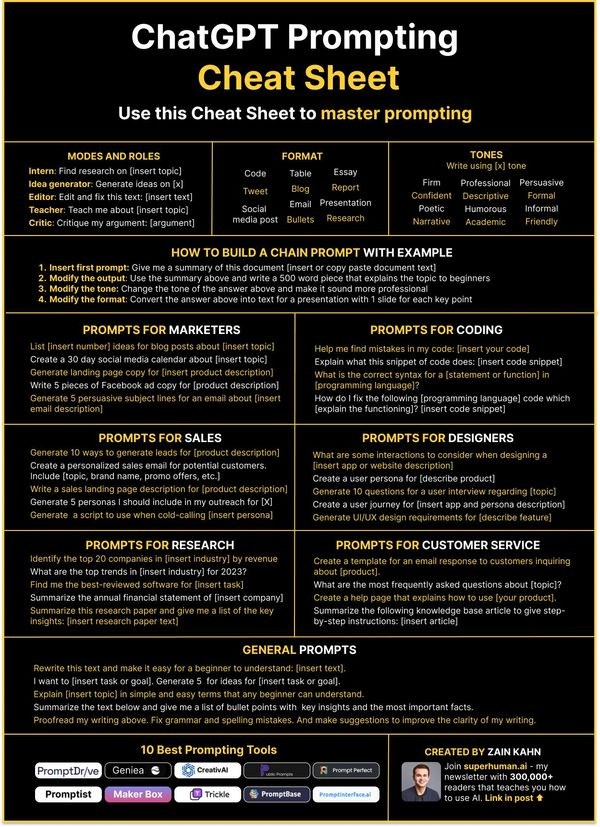 This Cheat Sheet is awesome at connecting different user roles—from idea generators to critics—and ChatGPT's awesome capabilities.
With its simple guidelines on creating chain prompts and specific prompts designed for sectors like marketing, sales, and research, it offers a clear path to unlock the model's full potential.
Plus, it includes different tones and formats, so you can customize ChatGPT's output to fit your needs perfectly.
***
## 2. [ChatGPT Cheat Sheet v3 (by Max Rascher)](https://www.linkedin.com/posts/maxrascher-ai_the-long-awaited-chatgpt-cheatsheet-v3-activity-7102235951954841600-kkvq/)
This Cheat Sheet is awesome at connecting different user roles—from idea generators to critics—and ChatGPT's awesome capabilities.
With its simple guidelines on creating chain prompts and specific prompts designed for sectors like marketing, sales, and research, it offers a clear path to unlock the model's full potential.
Plus, it includes different tones and formats, so you can customize ChatGPT's output to fit your needs perfectly.
***
## 2. [ChatGPT Cheat Sheet v3 (by Max Rascher)](https://www.linkedin.com/posts/maxrascher-ai_the-long-awaited-chatgpt-cheatsheet-v3-activity-7102235951954841600-kkvq/)
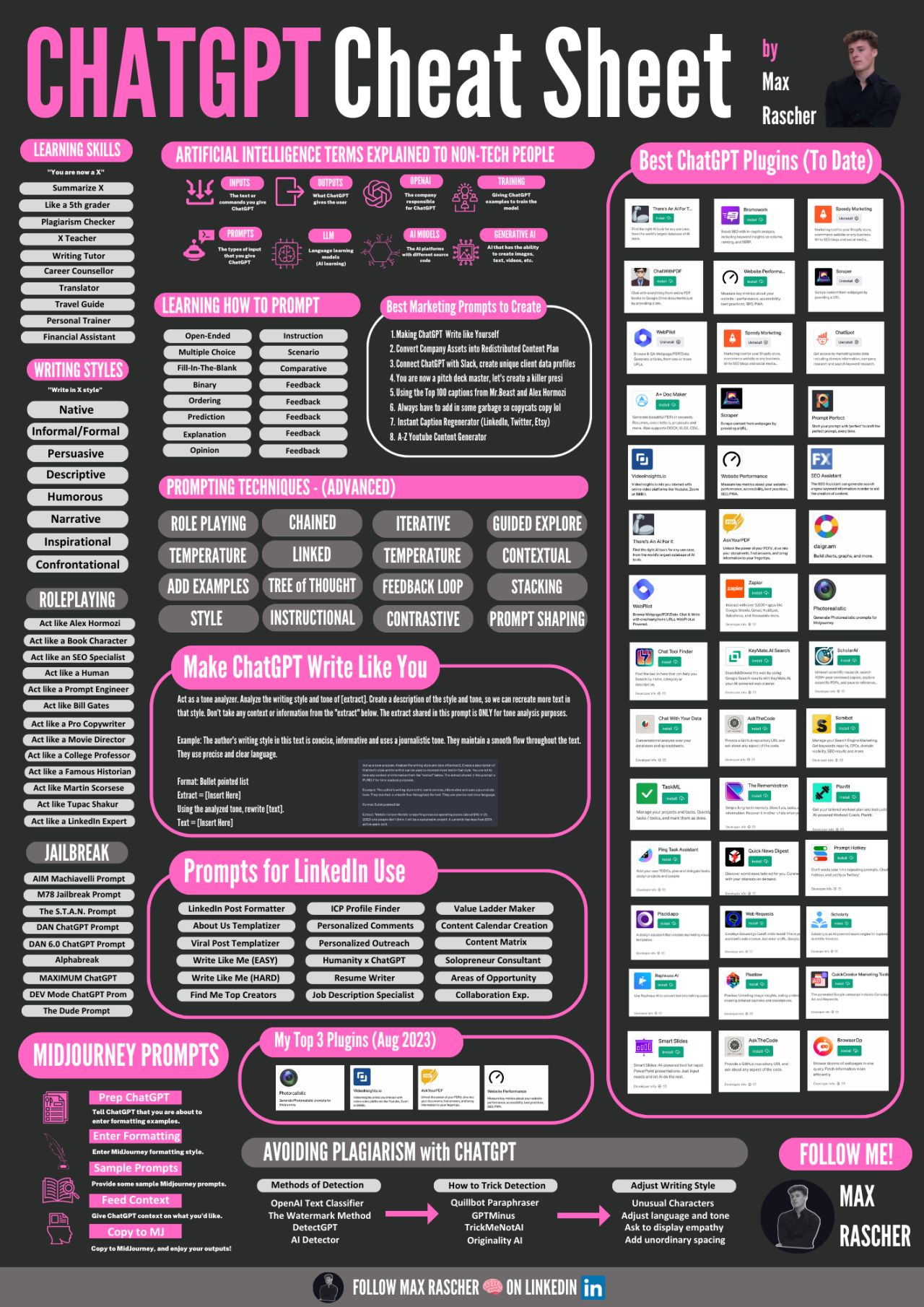 Max Rascher's ChatGPT Cheat Sheet is a super helpful guide for all kinds of users. It's got everything you need, from tips on writing like a pro to cool tricks for getting the most out of ChatGPT.
One of the best parts is the section on "Making ChatGPT Write Like You" - it's a game-changer! Plus, there's a curated list of awesome ChatGPT plugins that you won't want to miss.
This cheat sheet also has some great tips specifically for using ChatGPT on LinkedIn and even a section on how to avoid plagiarism. It's a really awesome guide that covers all the cool things you can do with ChatGPT in one place.
You're gonna love it!
***
## 3. [ChatGPT: Zero to Power User Cheat Sheet (by Pete Huang)](https://www.theneuron.ai/tutorial/chatgpt-cheat-sheet)
Max Rascher's ChatGPT Cheat Sheet is a super helpful guide for all kinds of users. It's got everything you need, from tips on writing like a pro to cool tricks for getting the most out of ChatGPT.
One of the best parts is the section on "Making ChatGPT Write Like You" - it's a game-changer! Plus, there's a curated list of awesome ChatGPT plugins that you won't want to miss.
This cheat sheet also has some great tips specifically for using ChatGPT on LinkedIn and even a section on how to avoid plagiarism. It's a really awesome guide that covers all the cool things you can do with ChatGPT in one place.
You're gonna love it!
***
## 3. [ChatGPT: Zero to Power User Cheat Sheet (by Pete Huang)](https://www.theneuron.ai/tutorial/chatgpt-cheat-sheet)
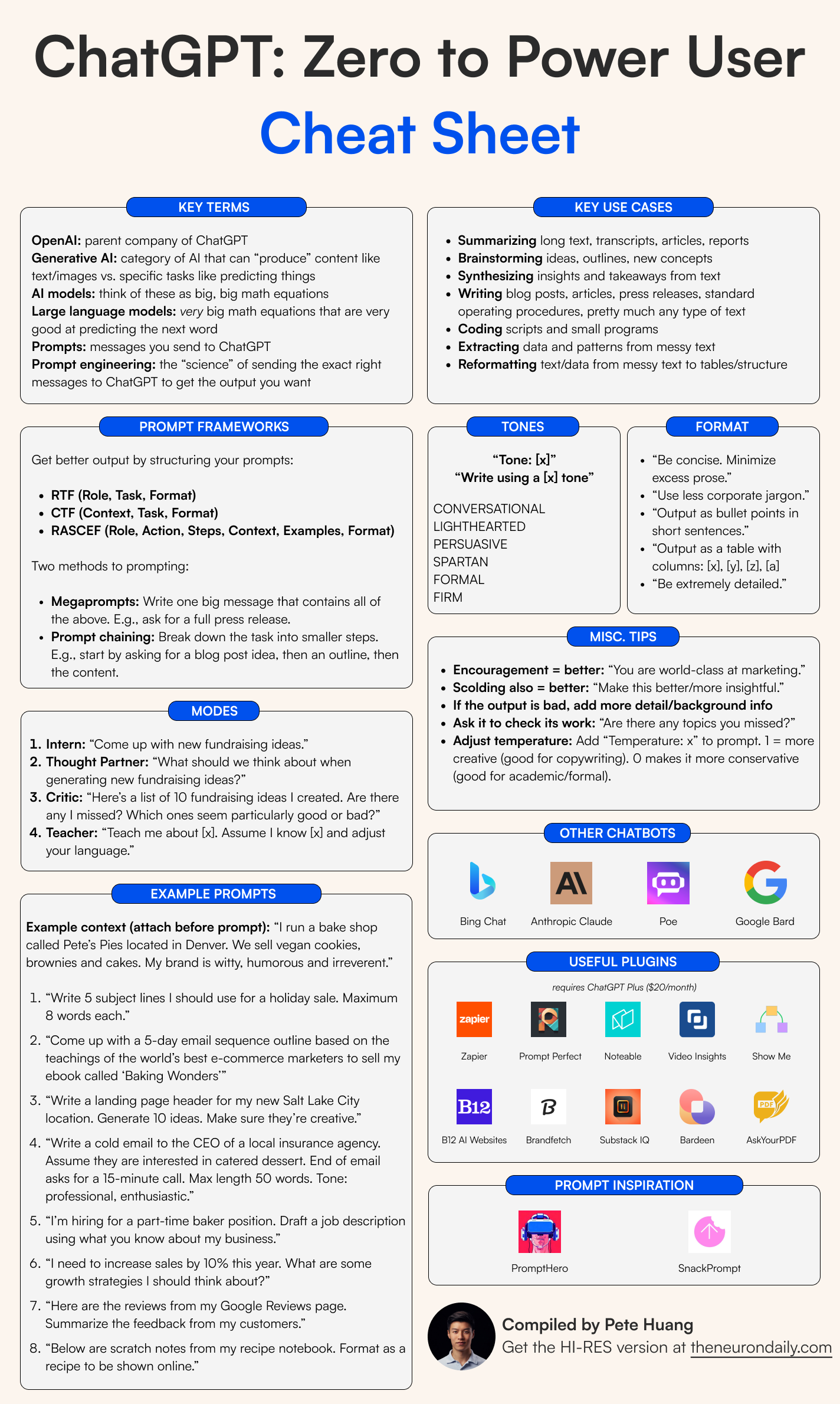 Pete Huang's "ChatGPT: Zero to Power User" Cheat Sheet is like a handy guide for users going from beginners to advanced ChatGPT users.
It covers important stuff like basic terms, how to structure prompts using different frameworks like RTF and RASCEF, and the details of setting tones and formats. It also has cool plugins that make it even better, and the example prompts show you how to use it in different situations.
The best part is the extra tips that give you encouragement and advice on getting the best results.
This awesome cheat sheet can really take your ChatGPT experience to the next level!
***
## 4. [**ChatGPT: From Zero to Hero Cheat Sheet (by AI Fire)**](https://www.aifire.co/c/ai-learning-resources)
Pete Huang's "ChatGPT: Zero to Power User" Cheat Sheet is like a handy guide for users going from beginners to advanced ChatGPT users.
It covers important stuff like basic terms, how to structure prompts using different frameworks like RTF and RASCEF, and the details of setting tones and formats. It also has cool plugins that make it even better, and the example prompts show you how to use it in different situations.
The best part is the extra tips that give you encouragement and advice on getting the best results.
This awesome cheat sheet can really take your ChatGPT experience to the next level!
***
## 4. [**ChatGPT: From Zero to Hero Cheat Sheet (by AI Fire)**](https://www.aifire.co/c/ai-learning-resources)
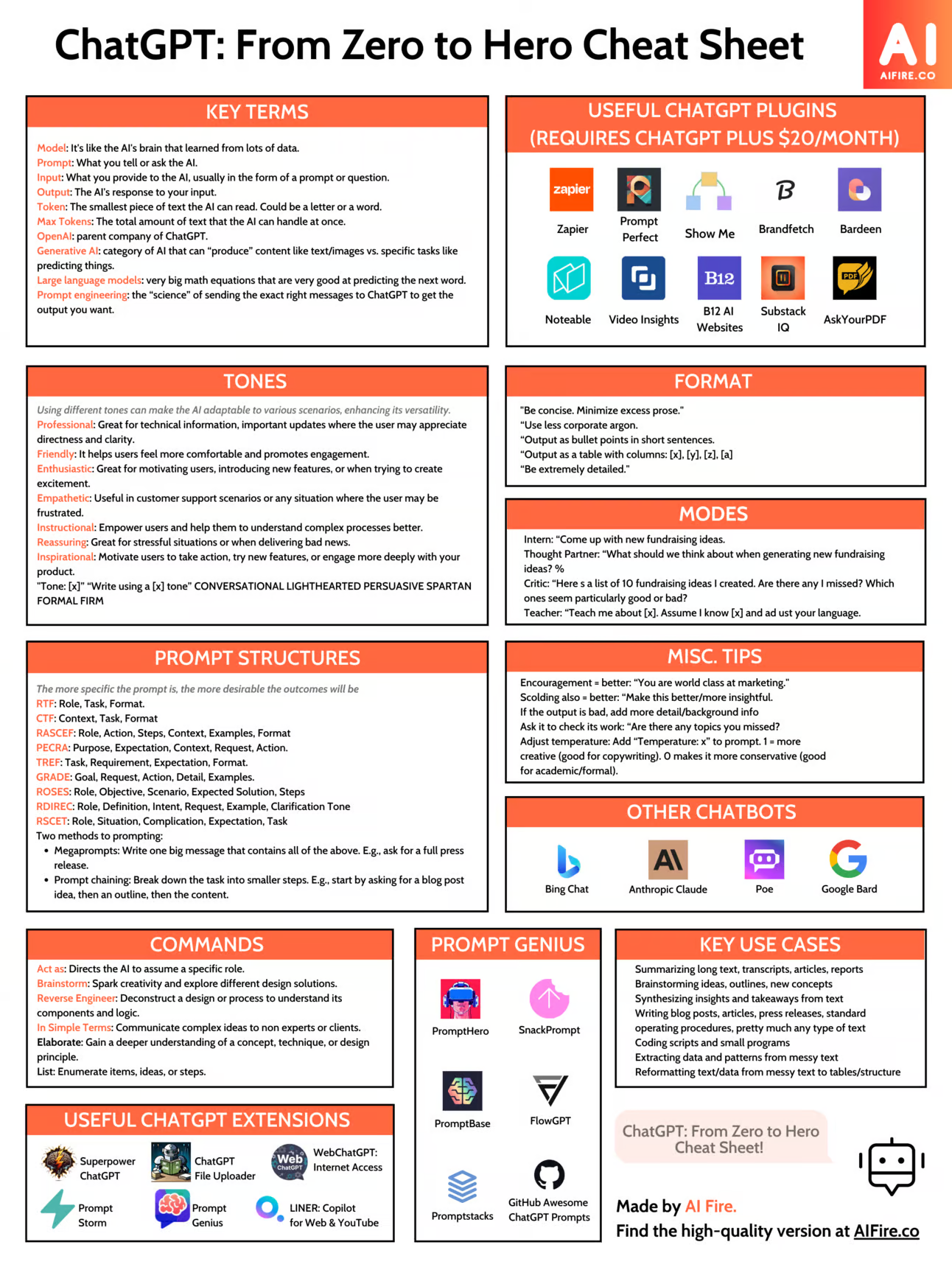 The "ChatGPT: From Zero to Hero Cheat Sheet" by AIFire.co is a helpful guide for navigating ChatGPT.
It explains important terms, guides you on structuring prompts with RTF and PEACH, and provides different tones and formats for better queries.
It offers commands to customize ChatGPT's responses and showcases extensions, plugins, and examples of other chatbots.
The cheat sheet includes real-life use cases and expert tips to help you become a ChatGPT power user.
It's a must-have for mastering ChatGPT!
***
## 5. [ChatGPT Mastery Cheat Sheet (by Zain Kahn)](https://www.linkedin.com/posts/zainkahn_the-only-chatgpt-guide-youll-ever-need-activity-7075084649441501184-5z90/)
The "ChatGPT: From Zero to Hero Cheat Sheet" by AIFire.co is a helpful guide for navigating ChatGPT.
It explains important terms, guides you on structuring prompts with RTF and PEACH, and provides different tones and formats for better queries.
It offers commands to customize ChatGPT's responses and showcases extensions, plugins, and examples of other chatbots.
The cheat sheet includes real-life use cases and expert tips to help you become a ChatGPT power user.
It's a must-have for mastering ChatGPT!
***
## 5. [ChatGPT Mastery Cheat Sheet (by Zain Kahn)](https://www.linkedin.com/posts/zainkahn_the-only-chatgpt-guide-youll-ever-need-activity-7075084649441501184-5z90/)
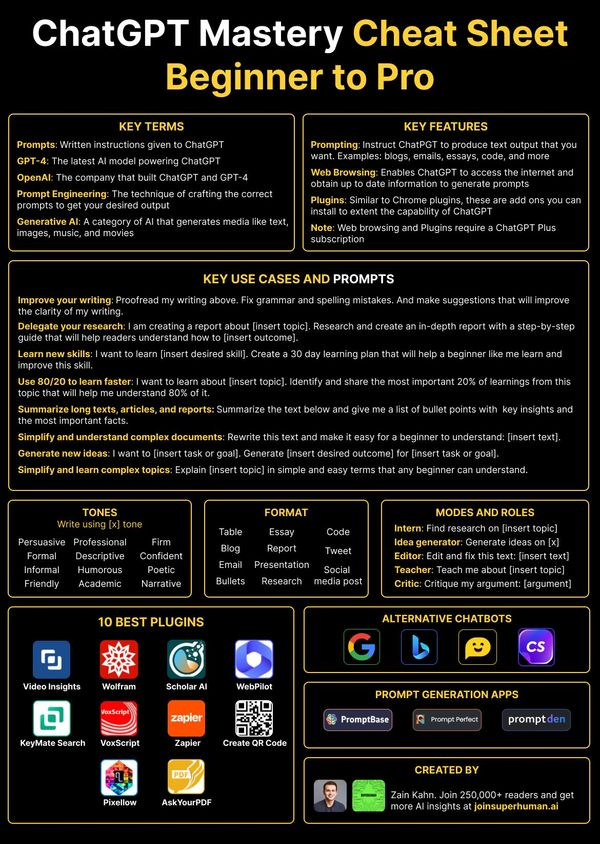 "ChatGPT Mastery Cheat Sheet: Beginner to Pro," created by Zain Kahn, is like a cool guide that helps users navigate through the fancy world of ChatGPT.
It explains important terms like "Prompts" and "Generative AI" in an easy-to-understand way, so users can confidently join the conversation.
But that's not all! It also gives practical examples and prompts for different things like making your text better or summarizing topics.
You can choose from different tones and formats to make your interactions just right. And if that's not enough, there are ten awesome plugins and even other chatbots to explore.
This cheat sheet is not just a guide, it's a key to becoming a ChatGPT pro, whether you're a beginner or an expert.
***
## 6. [ChatGPT for Designers (by Tibi David)](https://www.linkedin.com/posts/tibidavid_if-chatgpt-feels-like-a-maze-to-you-heres-activity-7074714789230391296-u8qA/)
"ChatGPT Mastery Cheat Sheet: Beginner to Pro," created by Zain Kahn, is like a cool guide that helps users navigate through the fancy world of ChatGPT.
It explains important terms like "Prompts" and "Generative AI" in an easy-to-understand way, so users can confidently join the conversation.
But that's not all! It also gives practical examples and prompts for different things like making your text better or summarizing topics.
You can choose from different tones and formats to make your interactions just right. And if that's not enough, there are ten awesome plugins and even other chatbots to explore.
This cheat sheet is not just a guide, it's a key to becoming a ChatGPT pro, whether you're a beginner or an expert.
***
## 6. [ChatGPT for Designers (by Tibi David)](https://www.linkedin.com/posts/tibidavid_if-chatgpt-feels-like-a-maze-to-you-heres-activity-7074714789230391296-u8qA/)
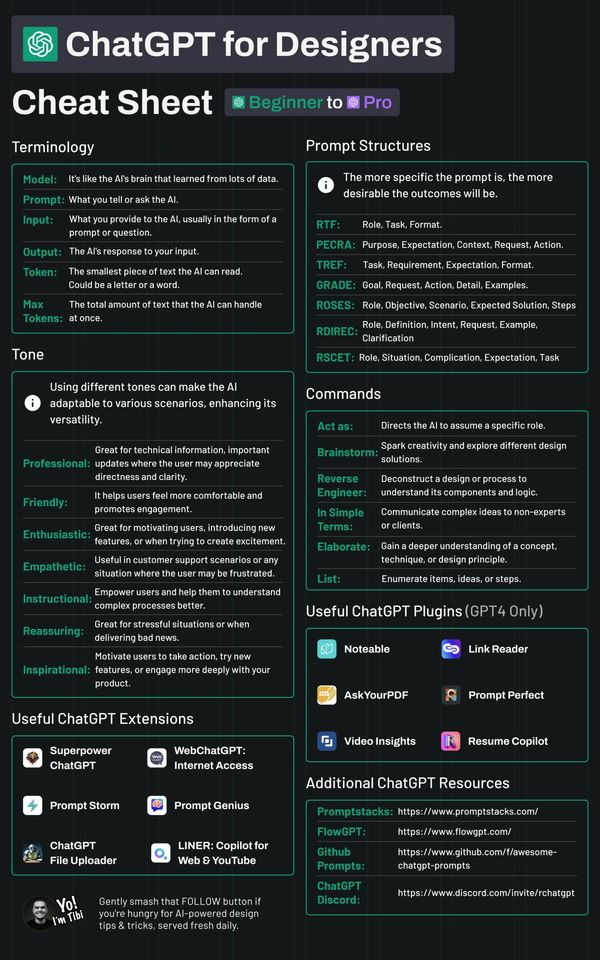 "ChatGPT for Designers: Cheat Sheet" is a super helpful guide for designers getting into AI.
It starts with simple terms like "Model" and "Tokens" and goes into different AI vibes from "Professional" to "Inspirational". The guide rocks with its prompt structures and commands, making AI interaction accurate and effortless.
The sheet wraps up with cool plugins for GPT-4 and resource links for a totally immersive AI-design experience.
In a nutshell, it's a handy toolkit for designers to master AI like a boss.
***
## 7. [The ChatGPT Cheat Sheet (by AI Fire)](https://www.aifire.co/c/ai-learning-resources)
"ChatGPT for Designers: Cheat Sheet" is a super helpful guide for designers getting into AI.
It starts with simple terms like "Model" and "Tokens" and goes into different AI vibes from "Professional" to "Inspirational". The guide rocks with its prompt structures and commands, making AI interaction accurate and effortless.
The sheet wraps up with cool plugins for GPT-4 and resource links for a totally immersive AI-design experience.
In a nutshell, it's a handy toolkit for designers to master AI like a boss.
***
## 7. [The ChatGPT Cheat Sheet (by AI Fire)](https://www.aifire.co/c/ai-learning-resources)
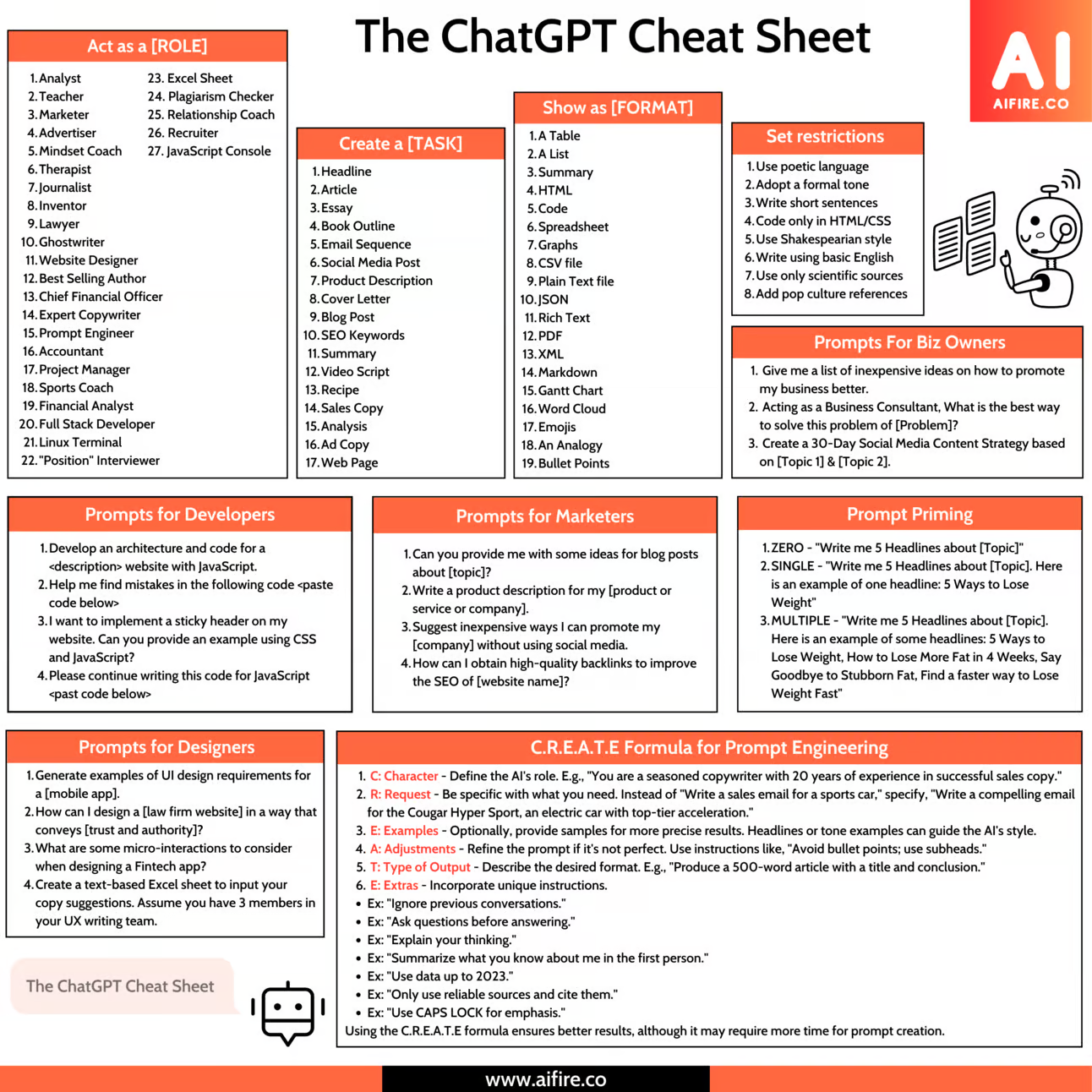 "The ChatGPT Cheat Sheet by AIFire.co" is a super helpful cheat sheet for all sorts of professionals using ChatGPT. It guides you on how you can take on different roles, like being an "Analyst" or an "Interviewer", and complete tasks like creating "Headlines" or "Email Sequences".
The best part? It explains the C.R.E.A.T.E formula that breaks down prompt engineering, so you can make the most of your interaction with AI.
It's a complete guide for getting the most out of ChatGPT and unlocking its full potential!
***
## What Makes a Great ChatGPT Cheat Sheet?
ChatGPT cheat sheets aren't just about listing commands or keywords. Like any cheat sheets, their efficiency is gauged by how seamlessly they bridge the gap between a user's needs and the AI's capabilities. Here's what sets apart a great ChatGPT cheat sheet from the rest:
1. **Comprehensive**: Covers both basic and advanced commands.
2. **Clear**: Avoids jargon, explaining concepts simply.
3. **Well-organized**: Uses logical groupings and clear headings.
4. **Example-rich**: Offers real-world applications for commands.
5. **Accessible**: Easily referenced, whether digitally or in print.
6. **Up-to-date**: Incorporates the latest ChatGPT changes and updates.
7. **Interactive**: Provides enriching, clickable elements for enhanced learning.
In short, it's not just a list but a user-friendly, evolving guide.
"The ChatGPT Cheat Sheet by AIFire.co" is a super helpful cheat sheet for all sorts of professionals using ChatGPT. It guides you on how you can take on different roles, like being an "Analyst" or an "Interviewer", and complete tasks like creating "Headlines" or "Email Sequences".
The best part? It explains the C.R.E.A.T.E formula that breaks down prompt engineering, so you can make the most of your interaction with AI.
It's a complete guide for getting the most out of ChatGPT and unlocking its full potential!
***
## What Makes a Great ChatGPT Cheat Sheet?
ChatGPT cheat sheets aren't just about listing commands or keywords. Like any cheat sheets, their efficiency is gauged by how seamlessly they bridge the gap between a user's needs and the AI's capabilities. Here's what sets apart a great ChatGPT cheat sheet from the rest:
1. **Comprehensive**: Covers both basic and advanced commands.
2. **Clear**: Avoids jargon, explaining concepts simply.
3. **Well-organized**: Uses logical groupings and clear headings.
4. **Example-rich**: Offers real-world applications for commands.
5. **Accessible**: Easily referenced, whether digitally or in print.
6. **Up-to-date**: Incorporates the latest ChatGPT changes and updates.
7. **Interactive**: Provides enriching, clickable elements for enhanced learning.
In short, it's not just a list but a user-friendly, evolving guide.