> ## Documentation Index
> Fetch the complete documentation index at: https://usefulai.com/llms.txt
> Use this file to discover all available pages before exploring further.

# Best AI Desktop Recall Tools in 2026

> We compared 7 AI desktop recall tools and picked the top 4, comparing Rewind, Screenpipe, and Windows Recall on search, privacy, and platform support.

<div className="uai-updated-row">Updated February 1, 2026</div>

AI Desktop Recall Tools record everything you do on your computer and let you search through your past activities to quickly find what you need. We compared 7 options; these 4 earned a spot.

## Best AI Desktop Recall Tools

<div className="uai-overview-table uai-overview-table--ranked">
  |  # | Tool                                                                                                                                                                                                                                                  | What it does                                                       |
  | -: | ----------------------------------------------------------------------------------------------------------------------------------------------------------------------------------------------------------------------------------------------------- | ------------------------------------------------------------------ |
  |  1 | <a href="https://www.rewind.ai/" target="_blank" rel="noreferrer"><img src={"/images/icons/48/rewind.ai.png"} alt="" noZoom />Rewind</a>                                                                                                              | Captures everything on your Mac and makes it searchable            |
  |  2 | <a href="https://screenpi.pe/" target="_blank" rel="noreferrer"><img src={"/images/icons/48/screenpi.pe.png"} alt="" noZoom />Screenpipe</a>                                                                                                          | Open-source recorder building a searchable database of your screen |
  |  3 | <a href="https://support.microsoft.com/en-us/windows/retrace-your-steps-with-recall-aa03f8a0-a78b-4b3e-b0a1-2eb8ac48701c" target="_blank" rel="noreferrer"><img src={"/images/icons/48/support.microsoft.com.png"} alt="" noZoom />Windows Recall</a> | Snapshots your PC activity so you can search it                    |
  |  4 | <a href="https://github.com/yuka-friends/Windrecorder" target="_blank" rel="noreferrer"><img src={"/images/icons/48/github.com.png"} alt="" noZoom />Windrecorder</a>                                                                                 | Open-source Windows screen recorder with OCR-based search          |
</div>

<label className="uai-overview-more">
  <input type="checkbox" className="uai-overview-toggle" />

  <span className="uai-overview-more-open"><span className="uai-overview-more-count">Show more</span><Icon icon="chevron-down" size={13} /></span>
  <span className="uai-overview-more-close"><span>Show less</span><Icon icon="chevron-up" size={13} /></span>
</label>

## How We Chose

A great AI desktop recall tool should deliver on these fronts:

* **Accurate recording** — captures everything on your screen without missing important details or activities.
* **Fast search** — find what you're looking for in seconds using simple keywords or phrases.
* **Privacy protection** — recorded data stays secure and private on your own device.
* **Easy setup** — works right out of the box without complicated configuration or technical knowledge.
* **Smart storage** — manages disk space efficiently while keeping your most important recordings accessible.

***

<div className="uai-itemcard" role="article">
  <div className="uai-itemcard-head">
    <span className="uai-itemcard-icon">
      <img src="https://mintcdn.com/usefulai/fTqNrv6I1z_YE97n/images/icons/144/rewind.ai.png?fit=max&auto=format&n=fTqNrv6I1z_YE97n&q=85&s=16081e50837c609f362dc6d798c34724" alt="" noZoom loading="lazy" width="144" height="144" data-path="images/icons/144/rewind.ai.png" />
    </span>

    <div className="uai-itemcard-identity">
      <div className="uai-itemcard-row uai-itemcard-row--title">
        ## [Rewind](https://www.rewind.ai/)
      </div>

      <div className="uai-itemcard-row">
        <span className="uai-itemcard-note uai-itemcard-note--green">Captures everything on your Mac and makes it searchable</span>
      </div>
    </div>

    <div className="uai-itemcard-end">
      <a href="https://www.rewind.ai/" target="_blank" rel="noreferrer" aria-label="Visit Rewind" className="uai-itemcard-cta no-underline">Visit Rewind</a>
    </div>
  </div>

  <div className="uai-itemcard-body">
    <div className="uai-itemcard-summary">
      Rewind runs silently in the background on your Mac, capturing everything you see and hear while making it all searchable through AI-powered recall.
    </div>

    <Frame>
      <iframe loading="lazy" src="https://www.youtube.com/embed/E25vOz0XNEg" title="YouTube video player" frameborder="0" className="w-full aspect-video rounded-xl" allow="accelerometer; autoplay; clipboard-write; encrypted-media; gyroscope; picture-in-picture; web-share" allowfullscreen />
    </Frame>

    <div className="uai-itemcard-details-group">
      <div className="uai-itemcard-details">
        <input type="checkbox" id="ai-desktop-recall-rewind-key-features" className="uai-itemcard-details-toggle" />

        <label htmlFor="ai-desktop-recall-rewind-key-features"><span>Key features</span><span className="uai-itemcard-details-chevron" /></label>

        <div className="uai-itemcard-details-body">
          * **Local Storage**: All recordings stay encrypted on your device without cloud uploads
          * **Ask Rewind**: AI assistant answers questions about your captured activities and generates summaries
          * **Meeting Recording**: Captures audio from any meeting app without adding bots to calls
          * **Visual Search**: Find screenshots containing specific text, images, or content you remember seeing
        </div>
      </div>

      <div className="uai-itemcard-details">
        <input type="checkbox" id="ai-desktop-recall-rewind-our-take" className="uai-itemcard-details-toggle" />

        <label htmlFor="ai-desktop-recall-rewind-our-take"><span>Our take</span><span className="uai-itemcard-details-chevron" /></label>

        <div className="uai-itemcard-details-body">
          The Ask Rewind feature stands out because it actually understands context from your screen recordings, not just basic search results. What makes this tool different is how it turns your entire digital history into conversational AI that can draft emails or create reports based on what you've actually done.
        </div>
      </div>
    </div>
  </div>
</div>

<div className="uai-itemcard" role="article">
  <div className="uai-itemcard-head">
    <span className="uai-itemcard-icon">
      <img src="https://mintcdn.com/usefulai/fTqNrv6I1z_YE97n/images/icons/144/screenpi.pe.png?fit=max&auto=format&n=fTqNrv6I1z_YE97n&q=85&s=cc33fd6cb0821eb046464a600e74b3d2" alt="" noZoom loading="lazy" width="144" height="144" data-path="images/icons/144/screenpi.pe.png" />
    </span>

    <div className="uai-itemcard-identity">
      <div className="uai-itemcard-row uai-itemcard-row--title">
        ## [Screenpipe](https://screenpi.pe/)
      </div>

      <div className="uai-itemcard-row">
        <span className="uai-itemcard-note uai-itemcard-note--green">Open-source recorder building a searchable database of your screen</span>
      </div>
    </div>

    <div className="uai-itemcard-end">
      <a href="https://screenpi.pe/" target="_blank" rel="noreferrer" aria-label="Visit Screenpipe" className="uai-itemcard-cta no-underline">Visit Screenpipe</a>
    </div>
  </div>

  <div className="uai-itemcard-body">
    <div className="uai-itemcard-summary">
      Screenpipe is an open-source tool that continuously records your screen and audio to create a searchable database of everything you do on your computer.
    </div>

    <Frame>
      <iframe loading="lazy" src="https://www.youtube.com/embed/dLLmIIcxmYo" title="YouTube video player" frameborder="0" className="w-full aspect-video rounded-xl" allow="accelerometer; autoplay; clipboard-write; encrypted-media; gyroscope; picture-in-picture; web-share" allowfullscreen />
    </Frame>

    <div className="uai-itemcard-details-group">
      <div className="uai-itemcard-details">
        <input type="checkbox" id="ai-desktop-recall-screenpipe-key-features" className="uai-itemcard-details-toggle" />

        <label htmlFor="ai-desktop-recall-screenpipe-key-features"><span>Key features</span><span className="uai-itemcard-details-chevron" /></label>

        <div className="uai-itemcard-details-body">
          * **24/7 Recording**: Captures all screen activity and audio without any manual intervention
          * **Local Processing**: Everything stays on your device with OCR and transcription happening entirely offline
          * **AI Plugin Store**: Install custom agents that use your recorded data for automation and recall tasks
          * **Cross-Platform**: Works on Windows, macOS, and Linux with multi-screen support
        </div>
      </div>

      <div className="uai-itemcard-details">
        <input type="checkbox" id="ai-desktop-recall-screenpipe-our-take" className="uai-itemcard-details-toggle" />

        <label htmlFor="ai-desktop-recall-screenpipe-our-take"><span>Our take</span><span className="uai-itemcard-details-chevron" /></label>

        <div className="uai-itemcard-details-body">
          The standout feature here is how Screenpipe turns your entire digital history into training data for personalized AI agents rather than just basic search. We find the plugin ecosystem particularly useful since it lets you build specific recall workflows that actually understand the context of what you were doing, not just keyword matches.
        </div>
      </div>
    </div>
  </div>
</div>

<div className="uai-itemcard" role="article">
  <div className="uai-itemcard-head">
    <span className="uai-itemcard-icon">
      <img src="https://mintcdn.com/usefulai/fTqNrv6I1z_YE97n/images/icons/144/support.microsoft.com.png?fit=max&auto=format&n=fTqNrv6I1z_YE97n&q=85&s=83f221651c177a267227b8b01781a125" alt="" noZoom loading="lazy" width="144" height="144" data-path="images/icons/144/support.microsoft.com.png" />
    </span>

    <div className="uai-itemcard-identity">
      <div className="uai-itemcard-row uai-itemcard-row--title">
        ## [Windows Recall](https://support.microsoft.com/en-us/windows/retrace-your-steps-with-recall-aa03f8a0-a78b-4b3e-b0a1-2eb8ac48701c)
      </div>

      <div className="uai-itemcard-row">
        <span className="uai-itemcard-note uai-itemcard-note--green">Snapshots your PC activity so you can search it</span>
      </div>
    </div>

    <div className="uai-itemcard-end">
      <a href="https://support.microsoft.com/en-us/windows/retrace-your-steps-with-recall-aa03f8a0-a78b-4b3e-b0a1-2eb8ac48701c" target="_blank" rel="noreferrer" aria-label="Visit Windows Recall" className="uai-itemcard-cta no-underline">Visit Windows Recall</a>
    </div>
  </div>

  <div className="uai-itemcard-body">
    <div className="uai-itemcard-summary">
      Windows Recall captures screenshots of your desktop activity every few seconds and uses AI to help you search and find anything you've previously seen on your PC.
    </div>

    <Frame>
      <iframe loading="lazy" src="https://www.youtube.com/embed/ZM_xZlk2AHc" title="YouTube video player" frameborder="0" className="w-full aspect-video rounded-xl" allow="accelerometer; autoplay; clipboard-write; encrypted-media; gyroscope; picture-in-picture; web-share" allowfullscreen />
    </Frame>

    <div className="uai-itemcard-details-group">
      <div className="uai-itemcard-details">
        <input type="checkbox" id="ai-desktop-recall-windows-recall-key-features" className="uai-itemcard-details-toggle" />

        <label htmlFor="ai-desktop-recall-windows-recall-key-features"><span>Key features</span><span className="uai-itemcard-details-chevron" /></label>

        <div className="uai-itemcard-details-body">
          * **Timeline browsing**: Scroll through past activity visually using an explorable timeline interface
          * **Natural language search**: Describe what you remember in everyday language to find content
          * **Local storage**: All snapshots stay encrypted on your device with Windows Hello protection
          * **App filtering**: Block specific programs and websites from being captured in snapshots
        </div>
      </div>

      <div className="uai-itemcard-details">
        <input type="checkbox" id="ai-desktop-recall-windows-recall-our-take" className="uai-itemcard-details-toggle" />

        <label htmlFor="ai-desktop-recall-windows-recall-our-take"><span>Our take</span><span className="uai-itemcard-details-chevron" /></label>

        <div className="uai-itemcard-details-body">
          The timeline feature makes it easy to visually browse through past work without remembering exact keywords or file names. The local-only storage approach gives us confidence that our data stays private, unlike cloud-based alternatives that upload your activity elsewhere.
        </div>
      </div>
    </div>
  </div>
</div>

<div className="uai-itemcard" role="article">
  <div className="uai-itemcard-head">
    <span className="uai-itemcard-icon">
      <img src="https://mintcdn.com/usefulai/Ez-pJDkPpztLE7Cr/images/icons/144/github.com.png?fit=max&auto=format&n=Ez-pJDkPpztLE7Cr&q=85&s=ae26fba344d6ff6a16b305e4452caac9" alt="" noZoom loading="lazy" width="144" height="144" data-path="images/icons/144/github.com.png" />
    </span>

    <div className="uai-itemcard-identity">
      <div className="uai-itemcard-row uai-itemcard-row--title">
        ## [Windrecorder](https://github.com/yuka-friends/Windrecorder)
      </div>

      <div className="uai-itemcard-row">
        <span className="uai-itemcard-note uai-itemcard-note--green">Open-source Windows screen recorder with OCR-based search</span>
      </div>
    </div>

    <div className="uai-itemcard-end">
      <a href="https://github.com/yuka-friends/Windrecorder" target="_blank" rel="noreferrer" aria-label="Visit Windrecorder" className="uai-itemcard-cta no-underline">Visit Windrecorder</a>
    </div>
  </div>

  <div className="uai-itemcard-body">
    <div className="uai-itemcard-summary">
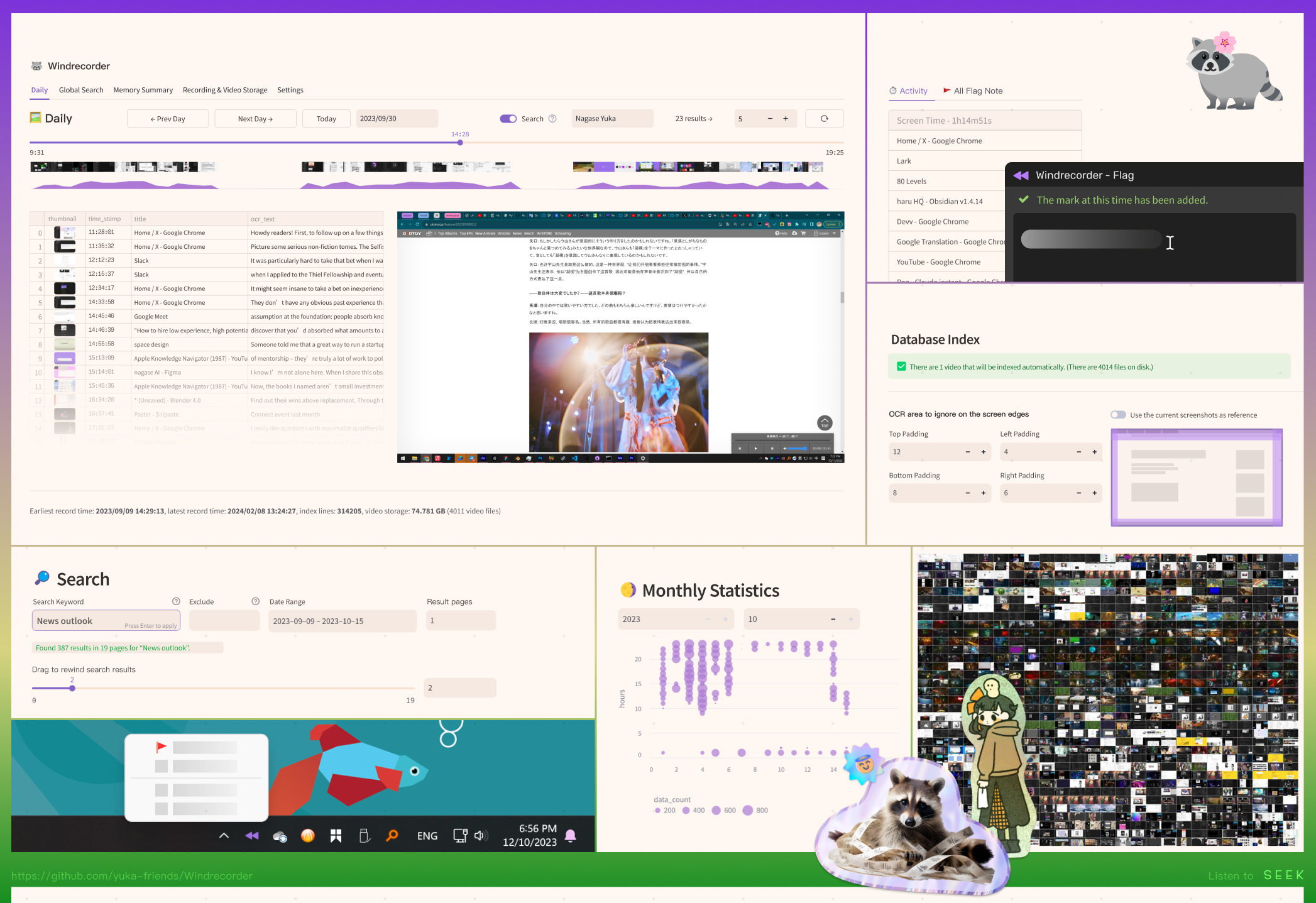
      Windrecorder is an open-source Windows app that continuously records your screen activity and creates a searchable database using OCR and image recognition.
    </div>

    <Frame>
      <img src="https://mintcdn.com/usefulai/jy_pjtOb48dK9VoI/images/tools/desktop-recall/windrecorder.png?fit=max&auto=format&n=jy_pjtOb48dK9VoI&q=85&s=0410fbacb757cdd00245a7465cee31a6" alt="Windrecorder" width="2094" height="1437" data-path="images/tools/desktop-recall/windrecorder.png" />
    </Frame>

    <div className="uai-itemcard-details-group">
      <div className="uai-itemcard-details">
        <input type="checkbox" id="ai-desktop-recall-windrecorder-key-features" className="uai-itemcard-details-toggle" />

        <label htmlFor="ai-desktop-recall-windrecorder-key-features"><span>Key features</span><span className="uai-itemcard-details-chevron" /></label>

        <div className="uai-itemcard-details-body">
          * **Local Processing**: Everything runs offline without sending data to external servers
          * **Multi-Engine OCR**: Supports WeChat OCR, Tesseract, and Rapid OCR for text recognition across 100+ languages
          * **Smart Indexing**: Only captures and indexes scenes when content actually changes to save storage space
          * **Flexible Recording**: Choose between automatic screenshots every 3 seconds or direct video recording in 15-minute segments
        </div>
      </div>

      <div className="uai-itemcard-details">
        <input type="checkbox" id="ai-desktop-recall-windrecorder-our-take" className="uai-itemcard-details-toggle" />

        <label htmlFor="ai-desktop-recall-windrecorder-our-take"><span>Our take</span><span className="uai-itemcard-details-chevron" /></label>

        <div className="uai-itemcard-details-body">
          The ability to search through months of screen history using just a few keywords feels almost like having a photographic memory for your computer. What sets Windrecorder apart is its commitment to privacy — we can rewind through everything we've done without worrying about our data leaving the machine.
        </div>
      </div>
    </div>
  </div>
</div>

## Frequently Asked Questions

<AccordionGroup>
  <Accordion title="What are AI Desktop Recall Tools?">
    AI Desktop Recall Tools are software applications that automatically capture screenshots of your computer activity and let you search through your past actions using simple descriptions. They help you quickly find anything you've seen or done on your PC by turning your screen history into a searchable database.
  </Accordion>

  <Accordion title="How do AI Desktop Recall Tools work?">
    These tools take periodic screenshots of your screen and analyze the content using AI to understand what's happening in each image. You can then search for past activities using natural language queries like "red shoes I was shopping for" or "presentation about sales numbers".
  </Accordion>

  <Accordion title="Are my data and privacy safe with AI Desktop Recall Tools?">
    Most modern AI Desktop Recall Tools store all your data locally on your device rather than sending it to external servers. Your screenshots and search data are encrypted and protected by biometric authentication, so only you can access your recorded activities.
  </Accordion>

  <Accordion title="Will AI Desktop Recall Tools slow down my computer?">
    These tools do use some system resources since they constantly capture and analyze your screen activity. You might notice slightly longer application load times or reduced available memory, especially on older computers with limited RAM.
  </Accordion>

  <Accordion title="Do I need technical skills to use AI Desktop Recall Tools?">
    No technical expertise is required to use these tools effectively. Most come with simple setup processes and work automatically in the background once installed, requiring only basic search queries to find what you need.
  </Accordion>

  <Accordion title="Are AI Desktop Recall Tools worth using?">
    These tools can save significant time by helping you instantly locate past work, conversations, or websites without manually searching through files and browser history. They're particularly valuable if you frequently need to reference previous activities or struggle to remember where you saw specific information.
  </Accordion>
</AccordionGroup>
