> ## Documentation Index
> Fetch the complete documentation index at: https://usefulai.com/llms.txt
> Use this file to discover all available pages before exploring further.
# 7 Best AI Trip Planners in June 2026
By [Alex](/about-us) · Updated Jun 2, 2026
AI trip planners turn scattered ideas and saved places into a mapped, editable itinerary with booking paths. The real question is whether you need a dedicated planner or whether ChatGPT plus Google Maps would do. We tested ten to find the ones worth using.
## Best AI Trip Planners
| # | Tool | Best For | Platform |
| - | ---------------------------------------------------------------------------------------------------------------------------------------------------------------------------------------------------------------------------------------------------------------------------------------------------------------------------------------------------------------------------------------------------------------------------------------------------------------------------------------------------------------------------------------------------------------------------------------------------------------------------------------------------------------------------------------------------------------------------------------------------------------------------------------------------------------------------------------------------------------------------------------------------------------------------------------------------------------------------------------------------------------------------------------------------------------------------------------------------------------------------------------------------------------------------------------------------------------------------------------------------------------------------------------------------------------------------------------------------------------------------------------------------------------------------------------------------------------- | ------------------------------------- | ----------------------------------- |
| 1 | [Mindtrip](https://mindtrip.ai/) | AI-first, map-centered trip planning | Web, iPhone |
| 2 | [Layla](https://layla.ai/) | Chat-first AI travel-agent planning | Web, iPhone, iPad, Android |
| 3 | [Trip.Planner](https://www.trip.com/blog/trip-planner/) | Bookable AI itinerary planning | Web, iPhone, iPad, Android |
| 4 | [Wanderlog](https://wanderlog.com/) | Practical trip workspace with AI help | Web, Mac, iPhone, iPad, Android |
| 5 | [GuideGeek](https://guidegeek.com/) | Messaging-based travel questions | WhatsApp, Instagram, Messenger, Web |
| 6 | [Stippl](https://www.stippl.io/) | All-in-one travel organization | Web, Mac, iPhone, Android |
| 7 | [Roamy](https://www.roamy.travel/) | Turning social saves into trips | iPhone |
## Do You Need an AI Trip Planner?
For a lot of trips, you don't. A general chatbot - ChatGPT, Claude, or Gemini - can brainstorm a credible itinerary, balance constraints, and turn messy notes into a plan. Pair it with an AI travel search like Google AI Mode Canvas or KAYAK Ask AI, and you can cover destination ideas, draft days, live flights, hotels, and rough budgets without opening a dedicated planner.
That combination is enough when you're traveling solo or as a couple, the trip is one or two destinations, you'll book direct, and you don't mind a few tabs.
A dedicated planner earns its place when more is going on. You want a durable plan a group can edit together or you're stitching saved places, reservations, routes, and budgets into one workspace.
***
## 1. [Mindtrip](https://mindtrip.ai/): Best for AI-first, map-centered trip planning
Mindtrip is the closest thing to a real AI trip planner in this set. You describe a trip, and the suggestions land as places on a map - so you can see whether a day is feasible or you've stacked six things on opposite ends of town. Inspiration from articles, reels, screenshots, and Google Maps becomes saved spots, collections, and trip hubs you can share with the people you're traveling with.
### What We Like
**The plan lives on a map.** Most AI itineraries are walls of text. Mindtrip shows your day as pins, which makes overstuffed mornings and cross-town zigzags obvious before you commit.
**It turns saved inspiration into trip material.** Articles, reels, screenshots, Google Maps links, and PDFs become places, collections, or full plans. If your travel ideas live across eight apps, this is the one that gathers them.
**Group planning sits inside the workspace.** Shared collections, itineraries, and group chats keep discussion and plan in one place, not scattered across DMs.
### What We Don't Like
**No official Android app.** Web works, but if you plan on Android - or anyone you travel with does - Layla, Wanderlog, or Stippl are easier recommendations.
### Platform Availability
Web, iPhone
### Who It's For (and Who Should Skip It)
Use this if you plan visually and want to stitch a multi-stop trip out of scattered inspiration. Skip it if you plan on Android - Wanderlog handles that - or if comparing live flights and hotels is the main job (Trip.Planner).
***
## 2. [Layla](https://layla.ai/): Best for chat-first AI travel-agent planning
Layla is what most people picture when they hear "AI trip planner": describe the trip in plain English, get back flights, hotels, activities, and a rough day plan with live prices. The map and editing tools don't match a real workspace, but the chat onramp is friendly if you don't want to open a blank itinerary.
### What We Like
**Conversational onramp lowers friction.** Describe the trip, constraints, and vibe; get a plan back. That's easier than opening a map and dragging pins, especially if you don't want to learn another planning app.
**Booking-aware suggestions, not just text.** Flights, hotels, trains, and activities come with live prices and bookable paths. You move from idea to comparable options without tab-switching.
**Broad device coverage.** iOS, iPadOS, Android, and web all work - useful if you switch devices or plan with friends on different phones.
### What We Don't Like
**Less workspace, more chatbot.** When you need map-first planning, drag-and-drop days, or saved-place organization, Layla feels thin. For that kind of structure, Mindtrip and Wanderlog are sharper.
### Platform Availability
Web, iPhone, iPad, Android
### Who It's For (and Who Should Skip It)
Use this if you want a travel-agent-style chat with booking baked in. Skip it if you need map editing or shared trip control - Mindtrip is more workspace-like.
***
## 3. [Trip.Planner](https://www.trip.com/blog/trip-planner/): Best for bookable AI itinerary planning
Trip.Planner by Trip.com is the strongest pick when you want AI planning tied to real bookable inventory. Generate an itinerary, edit it on a canvas, see it on a map, and book flights, hotels, and activities from inside one app. TripGenie handles the Q\&A and on-trip layer - menu translation, hotel comparisons, local questions, and booking support. The trade-off is that the whole plan lives inside Trip.com's marketplace.
### What We Like
**Planning and booking sit in one place.** Itinerary to flights, trains, hotels, and attractions without tab-switching - several steps collapsed into one workflow.
**The itinerary is actually editable.** Canvas-style reordering, renaming, replacing, deleting, and notes - not just generated text. Closer to a real planner than a search box pretending to be one.
**TripGenie covers the on-trip layer.** Snap a menu for translation, compare hotels mid-trip, ask local questions. Most planners stop at the itinerary; this one keeps helping.
### What We Don't Like
**You're inside Trip.com's marketplace.** Inventory, rewards, and booking terms shape what you see. If you'd rather book direct, Wanderlog or Mindtrip stay neutral.
### Platform Availability
Web, iPhone, iPad, Android
### Who It's For (and Who Should Skip It)
Use this if you already book through Trip.com and want AI planning and bookable inventory in one app. Skip it if you'd rather book direct with airlines - Mindtrip or Wanderlog stay independent of any marketplace.
***
## 4. [Wanderlog](https://wanderlog.com/): Best for practical trip workspace with AI help
Wanderlog isn't the most AI-native tool here, and that's the point. It's a real trip workspace - maps, route optimization, reservation imports, collaborative editing, budgets, and offline access - with AI help layered on top. If you've ever tried to run a group road trip out of Sheets, Maps, and email threads, this is the upgrade.
### What We Like
**It's an actual trip workspace.** Places, lodging, flights, restaurants, notes, reservations, budgets, expenses, and routes hold together in one app. Most AI itinerary tools generate text; Wanderlog gives you a plan you can run.
**Route planning is a core feature, not an afterthought.** For road trips, map-based stop optimization with distances and times beats another AI-generated list.
**Group collaboration that actually works.** Shared editing, permissions, and a single source of truth replace the usual mess of group chats, Google Docs, and forwarded confirmation emails.
### What We Don't Like
**AI-first generation is weaker.** If you want a complete plan from one prompt, Mindtrip, Layla, or Trip.Planner feel more direct. Wanderlog rewards effort.
### Platform Availability
Web, Mac, iPhone, iPad, Android
### Who It's For (and Who Should Skip It)
Use this for road trips, group trips, and detailed itineraries where the plan has to survive contact with real travel. Skip it if you want AI to invent the whole plan from one prompt - Mindtrip or Layla are more direct for that.
***
## 5. [GuideGeek](https://guidegeek.com/): Best for messaging-based travel questions
GuideGeek isn't a full itinerary workspace. It's an AI travel assistant living where you already chat - WhatsApp, Instagram DMs, Facebook Messenger, plus a web surface. Ask travel questions in plain language and get answers grounded in real-time data and maps.
### What We Like
**It works where you already chat.** No new app, no migration. Ask in WhatsApp, Instagram, or Messenger, then narrow by distance, budget, or hours.
**Strongest for in-the-moment decisions.** What's nearby, what's open, how to get there, what customs apply, whether an area is safe. Best when you need an answer in 30 seconds, not a 12-day itinerary.
### What We Don't Like
**Nothing to come back to.** No durable map, schedule, or shared plan. Once the chat scrolls, you're rebuilding from scratch. Pair with Mindtrip or Wanderlog for multi-day plans.
### Platform Availability
WhatsApp, Instagram, Messenger, Web
### Who It's For (and Who Should Skip It)
Use this for on-trip questions and quick local decisions. Skip it if you need a visual itinerary or shared workspace - GuideGeek is a companion to a real planner, not a replacement. Pair it with Mindtrip or Wanderlog.
***
## 6. [Stippl](https://www.stippl.io/): Best for all-in-one travel organization
Stippl is the broadest tool in the set. AI itinerary generation, route planning, day planning, budgets, expenses, journals, packing lists, reels, offline access, and an eSIM all live in one app. That's powerful if you want a single home for everything travel-related, and heavy if you just want a quick itinerary.
### What We Like
**Covers far more than itinerary generation.** Route planning, budgets, expenses, packing, journals, eSIM. One app instead of five, if you'd rather not stitch them together.
**AI plans drop into an editable workspace.** Generated itineraries land in route maps, day plans, notes, and shared trips - not a closed text bubble. Plans are starting points, not finished outputs.
**Budget and expense tracking are native.** Most planners help you decide where to go; few help you split costs with a group. Useful on longer trips.
### What We Don't Like
**Heavy if you only want a quick plan.** All-in-one means you're carrying packing, journals, reels, and eSIM whether you want them or not. Wonderplan or iPlan.ai handle quick draft itineraries with less weight.
### Platform Availability
Web, Mac, iPhone, Android
### Who It's For (and Who Should Skip It)
Use this if you want a single home for itinerary, route, budget, packing, and trip memory. Skip it if you want a lightweight itinerary generator - Wonderplan stays simpler, and Wanderlog gives you a deeper workspace.
***
## 7. [Roamy](https://www.roamy.travel/): Best for turning social saves into trips
Roamy solves a problem most travel apps ignore: you saved 40 reels, 20 TikToks, and a folder of screenshots, and have no idea where those places actually are. Roamy imports spots from Instagram, TikTok, Google Maps, and screenshots, drops them on a map, and routes them into days. It's iPhone-only, but if you plan from social saves, nothing here is more focused.
### What We Like
**Social saves become a usable map.** Instagram, TikTok, Google Maps, and screenshots go in; pinned places and a routed day come out.
**The trip starts from your taste.** Other tools push generic top-10 lists. Roamy works from places you already saved, so the output reflects you, not an algorithm's idea of the average tourist.
**Routes turn a wishlist into feasible days.** Saved spots become a day-by-day plan with travel times, not just a folder of links.
### What We Don't Like
**iPhone-only, no Android app.** Anyone in your group on Android is locked out. For mixed-device groups, Wanderlog or Layla cover more ground without that constraint.
**Not a blank-slate planner.** If you don't already have saved places, Roamy isn't where you start. For destination ideation, live booking, or full travel-agent help, Mindtrip, Layla, or Trip.Planner fit better.
### Platform Availability
iPhone
### Who It's For (and Who Should Skip It)
Use this if you already collect places before planning the route. Skip it if you plan on Android, want destination ideation from scratch, or need flights and hotels in the same app (Mindtrip or Trip.Planner).
## Selection Guide
* If you want a real AI map workspace with group planning → [Mindtrip](https://mindtrip.ai/)
* If you want chat-first planning with booking → [Layla](https://layla.ai/)
* If you already book through Trip.com and want planning integrated → [Trip.Planner](https://www.trip.com/blog/trip-planner/)
* For group road trips or detailed itineraries → [Wanderlog](https://wanderlog.com/)
* If you want quick answers in your messaging app → [GuideGeek](https://guidegeek.com/)
* If you want one app for itinerary, budget, packing, and eSIM → [Stippl](https://www.stippl.io/)
* If you plan from saved social posts → [Roamy](https://www.roamy.travel/)
## How We Evaluated
We evaluated ten AI trip planners and selected seven for the main ranking. We don't use affiliate links, accept sponsorships, or take payment from tool makers. Our recommendations come from hands-on use and judgment about what a real trip needs.
### Selection Criteria
**Planning depth.** Does it produce a real plan with maps, editable days, and saved places, or just a wall of generated text?
**Workspace durability.** Does the trip live somewhere you can return to, share, and edit, or does it disappear once the chat scrolls?
**Booking and inventory awareness.** Can the plan move toward real flights, hotels, and activities, or does it stop at suggestions?
**Platform reach.** Does it run where you and your travelmates actually plan - including Android, which several otherwise-strong tools still don't ship?
### How We Tested
We compared each tool on prompt adherence, map and route quality, editing reliability, group collaboration, offline access, and how well plans survived contact with a real trip - changes, additions, and group input. We paid attention to consistent friction points: stale place data and AI output that fell apart when constraints got specific.
## Alternatives to Consider
### Other Tools Worth Considering
* **[Tripadvisor Trips](https://www.tripadvisor.com/Trips)** - Solid if you already trust Tripadvisor reviews and want bookings nearby.
* **[iPlan.ai](https://iplan.ai/)** - Quick mobile itinerary drafts; weaker for complex or multi-city trips.
* **[Wonderplan](https://wonderplan.ai/)** - Simple web draft generator; good first pass.
* **[TripIt](https://www.tripit.com/)** - Booking organizer once you've made reservations, not a planner.
* **[Roadtrippers](https://roadtrippers.com/)** - Better for actual road trips and RV routing than for AI itineraries.
### Adjacent Categories
* **AI travel search and booking** - [Google AI Mode Canvas](https://blog.google/products-and-platforms/products/search/agentic-plans-booking-travel-canvas-ai-mode/), [KAYAK Ask AI](https://www.kayak.com/ai), [Booking.com AI Trip Planner](https://news.booking.com/bookingcom-launches-new-ai-trip-planner-to-enhance-travel-planning-experience/), [Expedia Activity Planner/Romie](https://www.expedia.com/newsroom/spring-product-release-2024/), [Priceline Penny](https://www.priceline.com/penny/about). Optimized for live prices and inventory, not a workspace. Choose this when flights, hotels, and availability matter most.
* **General-purpose AI chatbots** - [ChatGPT](https://chatgpt.com/), [Claude](https://claude.ai/), [Gemini](https://gemini.google.com/), [Perplexity](https://www.perplexity.ai/). Flexible reasoning and brainstorming, no travel-specific workspace, maps, or live inventory. Choose this when you want custom planning logic and will verify details elsewhere.
* **Travel organizers and itinerary managers** - [TripIt](https://www.tripit.com/), [Roadtrippers](https://roadtrippers.com/), [Polarsteps](https://www.polarsteps.com/). Systems of record for confirmations and navigation. Choose this after you've booked, not when building the trip.
## What You Need to Know Before Using AI Trip Planners
AI planners can sound confident about things they shouldn't. Three watch-outs are worth understanding before you build a trip around what one tells you.
### Confirm Live Facts Before You Book
AI plans get hours, prices, closures, and entry requirements wrong - sometimes confidently. For anything that costs money or affects entry (flights, hotels, restaurants on a tight schedule, visas, transit operators), verify against the official source. Map-grounded planners reduce hallucinated places, but they don't guarantee current details. Treat the AI plan as a draft, not a confirmation.
### Account Data and What's Stored
Most planners store your saved places, prompts, and trip details. Some are tied to a booking marketplace, which means your planning shapes ad surfaces too. If a trip involves anything sensitive (locations, companions, addresses), check whether sharing is private by default.
### Booking Through The Planner vs. Direct
Booking inside a planner is convenient, but the price you see may not be the best one. Marketplace fees and cancellation rules can differ from booking direct. Run a quick comparison on price and refund policy before committing - especially for flights, where direct-airline booking usually wins on changes.
## Frequently Asked Questions
An AI trip planner generates itineraries, suggests places, and helps organize a trip using natural language and travel data. The strongest ones add maps, editable days, saved places, collaboration, and booking paths - the difference between a tool you keep using and a chatbot prompt you forget about.
Some can. Wanderlog and Stippl support offline access on mobile, which matters internationally or in low-signal areas. Most web-first tools, including Mindtrip and Wonderplan, need a connection. Check offline behavior before relying on the tool day-of.
For brainstorming, no. For a trip you'll share, edit, save, and book, yes. A general chatbot handles ideas and constraints fine; a dedicated planner gives you a map, a workspace, and a plan that survives past the chat window.
Some do. Trip.Planner books through Trip.com; Layla and Tripadvisor have booking paths; Mindtrip is moving toward end-to-end. Most still hand off to airlines or marketplaces. Compare prices and cancellation rules before booking through the planner.
We update this guide as new tools launch and existing ones evolve. If you're still unsure, Mindtrip is the safest starting point for most trips - it's the closest thing to a real AI trip planner in the set. Questions or suggestions? Let us know.
 [Mindtrip](https://mindtrip.ai/) | AI-first, map-centered trip planning | Web, iPhone |
| 2 |
[Mindtrip](https://mindtrip.ai/) | AI-first, map-centered trip planning | Web, iPhone |
| 2 |  [Layla](https://layla.ai/) | Chat-first AI travel-agent planning | Web, iPhone, iPad, Android |
| 3 |
[Layla](https://layla.ai/) | Chat-first AI travel-agent planning | Web, iPhone, iPad, Android |
| 3 |  [Trip.Planner](https://www.trip.com/blog/trip-planner/) | Bookable AI itinerary planning | Web, iPhone, iPad, Android |
| 4 |
[Trip.Planner](https://www.trip.com/blog/trip-planner/) | Bookable AI itinerary planning | Web, iPhone, iPad, Android |
| 4 |  [Wanderlog](https://wanderlog.com/) | Practical trip workspace with AI help | Web, Mac, iPhone, iPad, Android |
| 5 |
[Wanderlog](https://wanderlog.com/) | Practical trip workspace with AI help | Web, Mac, iPhone, iPad, Android |
| 5 |  [GuideGeek](https://guidegeek.com/) | Messaging-based travel questions | WhatsApp, Instagram, Messenger, Web |
| 6 |
[GuideGeek](https://guidegeek.com/) | Messaging-based travel questions | WhatsApp, Instagram, Messenger, Web |
| 6 |  [Stippl](https://www.stippl.io/) | All-in-one travel organization | Web, Mac, iPhone, Android |
| 7 |
[Stippl](https://www.stippl.io/) | All-in-one travel organization | Web, Mac, iPhone, Android |
| 7 |  [Roamy](https://www.roamy.travel/) | Turning social saves into trips | iPhone |
## Do You Need an AI Trip Planner?
For a lot of trips, you don't. A general chatbot - ChatGPT, Claude, or Gemini - can brainstorm a credible itinerary, balance constraints, and turn messy notes into a plan. Pair it with an AI travel search like Google AI Mode Canvas or KAYAK Ask AI, and you can cover destination ideas, draft days, live flights, hotels, and rough budgets without opening a dedicated planner.
That combination is enough when you're traveling solo or as a couple, the trip is one or two destinations, you'll book direct, and you don't mind a few tabs.
A dedicated planner earns its place when more is going on. You want a durable plan a group can edit together or you're stitching saved places, reservations, routes, and budgets into one workspace.
***
## 1. [Mindtrip](https://mindtrip.ai/): Best for AI-first, map-centered trip planning
[Roamy](https://www.roamy.travel/) | Turning social saves into trips | iPhone |
## Do You Need an AI Trip Planner?
For a lot of trips, you don't. A general chatbot - ChatGPT, Claude, or Gemini - can brainstorm a credible itinerary, balance constraints, and turn messy notes into a plan. Pair it with an AI travel search like Google AI Mode Canvas or KAYAK Ask AI, and you can cover destination ideas, draft days, live flights, hotels, and rough budgets without opening a dedicated planner.
That combination is enough when you're traveling solo or as a couple, the trip is one or two destinations, you'll book direct, and you don't mind a few tabs.
A dedicated planner earns its place when more is going on. You want a durable plan a group can edit together or you're stitching saved places, reservations, routes, and budgets into one workspace.
***
## 1. [Mindtrip](https://mindtrip.ai/): Best for AI-first, map-centered trip planning
 Mindtrip is the closest thing to a real AI trip planner in this set. You describe a trip, and the suggestions land as places on a map - so you can see whether a day is feasible or you've stacked six things on opposite ends of town. Inspiration from articles, reels, screenshots, and Google Maps becomes saved spots, collections, and trip hubs you can share with the people you're traveling with.
### What We Like
**The plan lives on a map.** Most AI itineraries are walls of text. Mindtrip shows your day as pins, which makes overstuffed mornings and cross-town zigzags obvious before you commit.
**It turns saved inspiration into trip material.** Articles, reels, screenshots, Google Maps links, and PDFs become places, collections, or full plans. If your travel ideas live across eight apps, this is the one that gathers them.
**Group planning sits inside the workspace.** Shared collections, itineraries, and group chats keep discussion and plan in one place, not scattered across DMs.
### What We Don't Like
**No official Android app.** Web works, but if you plan on Android - or anyone you travel with does - Layla, Wanderlog, or Stippl are easier recommendations.
### Platform Availability
Web, iPhone
### Who It's For (and Who Should Skip It)
Use this if you plan visually and want to stitch a multi-stop trip out of scattered inspiration. Skip it if you plan on Android - Wanderlog handles that - or if comparing live flights and hotels is the main job (Trip.Planner).
***
## 2. [Layla](https://layla.ai/): Best for chat-first AI travel-agent planning
Layla is what most people picture when they hear "AI trip planner": describe the trip in plain English, get back flights, hotels, activities, and a rough day plan with live prices. The map and editing tools don't match a real workspace, but the chat onramp is friendly if you don't want to open a blank itinerary.
### What We Like
**Conversational onramp lowers friction.** Describe the trip, constraints, and vibe; get a plan back. That's easier than opening a map and dragging pins, especially if you don't want to learn another planning app.
**Booking-aware suggestions, not just text.** Flights, hotels, trains, and activities come with live prices and bookable paths. You move from idea to comparable options without tab-switching.
**Broad device coverage.** iOS, iPadOS, Android, and web all work - useful if you switch devices or plan with friends on different phones.
### What We Don't Like
**Less workspace, more chatbot.** When you need map-first planning, drag-and-drop days, or saved-place organization, Layla feels thin. For that kind of structure, Mindtrip and Wanderlog are sharper.
### Platform Availability
Web, iPhone, iPad, Android
### Who It's For (and Who Should Skip It)
Use this if you want a travel-agent-style chat with booking baked in. Skip it if you need map editing or shared trip control - Mindtrip is more workspace-like.
***
## 3. [Trip.Planner](https://www.trip.com/blog/trip-planner/): Best for bookable AI itinerary planning
Mindtrip is the closest thing to a real AI trip planner in this set. You describe a trip, and the suggestions land as places on a map - so you can see whether a day is feasible or you've stacked six things on opposite ends of town. Inspiration from articles, reels, screenshots, and Google Maps becomes saved spots, collections, and trip hubs you can share with the people you're traveling with.
### What We Like
**The plan lives on a map.** Most AI itineraries are walls of text. Mindtrip shows your day as pins, which makes overstuffed mornings and cross-town zigzags obvious before you commit.
**It turns saved inspiration into trip material.** Articles, reels, screenshots, Google Maps links, and PDFs become places, collections, or full plans. If your travel ideas live across eight apps, this is the one that gathers them.
**Group planning sits inside the workspace.** Shared collections, itineraries, and group chats keep discussion and plan in one place, not scattered across DMs.
### What We Don't Like
**No official Android app.** Web works, but if you plan on Android - or anyone you travel with does - Layla, Wanderlog, or Stippl are easier recommendations.
### Platform Availability
Web, iPhone
### Who It's For (and Who Should Skip It)
Use this if you plan visually and want to stitch a multi-stop trip out of scattered inspiration. Skip it if you plan on Android - Wanderlog handles that - or if comparing live flights and hotels is the main job (Trip.Planner).
***
## 2. [Layla](https://layla.ai/): Best for chat-first AI travel-agent planning
Layla is what most people picture when they hear "AI trip planner": describe the trip in plain English, get back flights, hotels, activities, and a rough day plan with live prices. The map and editing tools don't match a real workspace, but the chat onramp is friendly if you don't want to open a blank itinerary.
### What We Like
**Conversational onramp lowers friction.** Describe the trip, constraints, and vibe; get a plan back. That's easier than opening a map and dragging pins, especially if you don't want to learn another planning app.
**Booking-aware suggestions, not just text.** Flights, hotels, trains, and activities come with live prices and bookable paths. You move from idea to comparable options without tab-switching.
**Broad device coverage.** iOS, iPadOS, Android, and web all work - useful if you switch devices or plan with friends on different phones.
### What We Don't Like
**Less workspace, more chatbot.** When you need map-first planning, drag-and-drop days, or saved-place organization, Layla feels thin. For that kind of structure, Mindtrip and Wanderlog are sharper.
### Platform Availability
Web, iPhone, iPad, Android
### Who It's For (and Who Should Skip It)
Use this if you want a travel-agent-style chat with booking baked in. Skip it if you need map editing or shared trip control - Mindtrip is more workspace-like.
***
## 3. [Trip.Planner](https://www.trip.com/blog/trip-planner/): Best for bookable AI itinerary planning
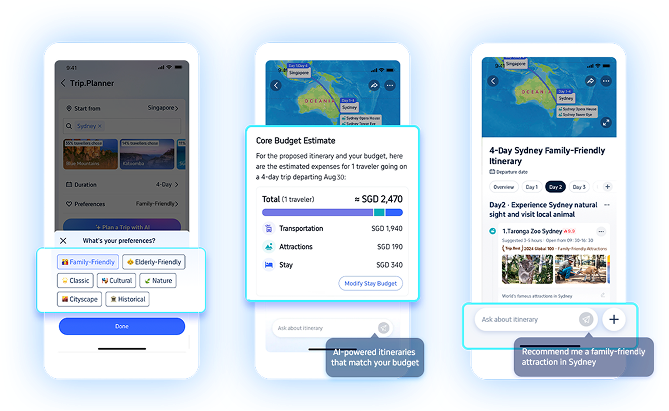 Trip.Planner by Trip.com is the strongest pick when you want AI planning tied to real bookable inventory. Generate an itinerary, edit it on a canvas, see it on a map, and book flights, hotels, and activities from inside one app. TripGenie handles the Q\&A and on-trip layer - menu translation, hotel comparisons, local questions, and booking support. The trade-off is that the whole plan lives inside Trip.com's marketplace.
### What We Like
**Planning and booking sit in one place.** Itinerary to flights, trains, hotels, and attractions without tab-switching - several steps collapsed into one workflow.
**The itinerary is actually editable.** Canvas-style reordering, renaming, replacing, deleting, and notes - not just generated text. Closer to a real planner than a search box pretending to be one.
**TripGenie covers the on-trip layer.** Snap a menu for translation, compare hotels mid-trip, ask local questions. Most planners stop at the itinerary; this one keeps helping.
### What We Don't Like
**You're inside Trip.com's marketplace.** Inventory, rewards, and booking terms shape what you see. If you'd rather book direct, Wanderlog or Mindtrip stay neutral.
### Platform Availability
Web, iPhone, iPad, Android
### Who It's For (and Who Should Skip It)
Use this if you already book through Trip.com and want AI planning and bookable inventory in one app. Skip it if you'd rather book direct with airlines - Mindtrip or Wanderlog stay independent of any marketplace.
***
## 4. [Wanderlog](https://wanderlog.com/): Best for practical trip workspace with AI help
Trip.Planner by Trip.com is the strongest pick when you want AI planning tied to real bookable inventory. Generate an itinerary, edit it on a canvas, see it on a map, and book flights, hotels, and activities from inside one app. TripGenie handles the Q\&A and on-trip layer - menu translation, hotel comparisons, local questions, and booking support. The trade-off is that the whole plan lives inside Trip.com's marketplace.
### What We Like
**Planning and booking sit in one place.** Itinerary to flights, trains, hotels, and attractions without tab-switching - several steps collapsed into one workflow.
**The itinerary is actually editable.** Canvas-style reordering, renaming, replacing, deleting, and notes - not just generated text. Closer to a real planner than a search box pretending to be one.
**TripGenie covers the on-trip layer.** Snap a menu for translation, compare hotels mid-trip, ask local questions. Most planners stop at the itinerary; this one keeps helping.
### What We Don't Like
**You're inside Trip.com's marketplace.** Inventory, rewards, and booking terms shape what you see. If you'd rather book direct, Wanderlog or Mindtrip stay neutral.
### Platform Availability
Web, iPhone, iPad, Android
### Who It's For (and Who Should Skip It)
Use this if you already book through Trip.com and want AI planning and bookable inventory in one app. Skip it if you'd rather book direct with airlines - Mindtrip or Wanderlog stay independent of any marketplace.
***
## 4. [Wanderlog](https://wanderlog.com/): Best for practical trip workspace with AI help
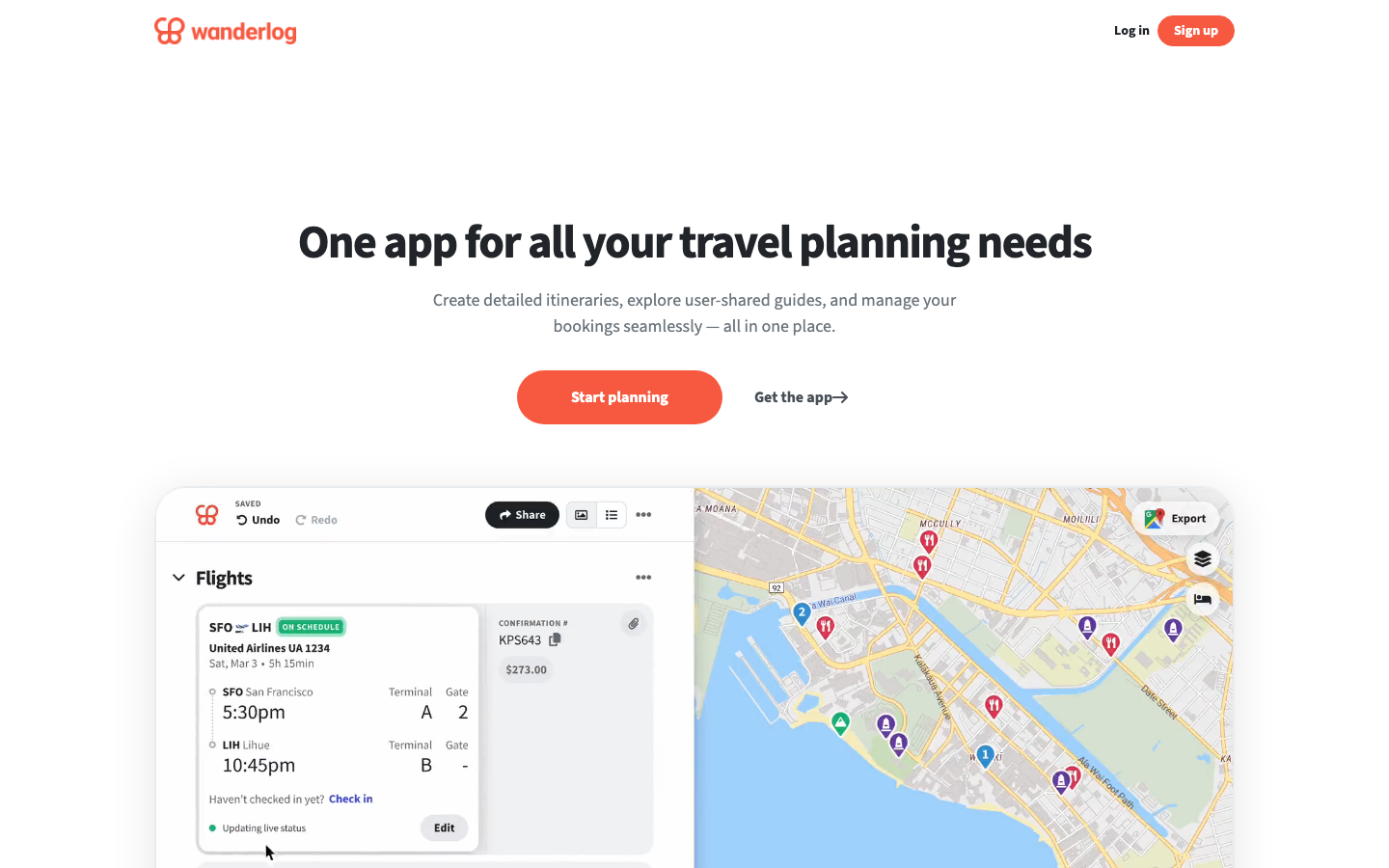 Wanderlog isn't the most AI-native tool here, and that's the point. It's a real trip workspace - maps, route optimization, reservation imports, collaborative editing, budgets, and offline access - with AI help layered on top. If you've ever tried to run a group road trip out of Sheets, Maps, and email threads, this is the upgrade.
### What We Like
**It's an actual trip workspace.** Places, lodging, flights, restaurants, notes, reservations, budgets, expenses, and routes hold together in one app. Most AI itinerary tools generate text; Wanderlog gives you a plan you can run.
**Route planning is a core feature, not an afterthought.** For road trips, map-based stop optimization with distances and times beats another AI-generated list.
**Group collaboration that actually works.** Shared editing, permissions, and a single source of truth replace the usual mess of group chats, Google Docs, and forwarded confirmation emails.
### What We Don't Like
**AI-first generation is weaker.** If you want a complete plan from one prompt, Mindtrip, Layla, or Trip.Planner feel more direct. Wanderlog rewards effort.
### Platform Availability
Web, Mac, iPhone, iPad, Android
### Who It's For (and Who Should Skip It)
Use this for road trips, group trips, and detailed itineraries where the plan has to survive contact with real travel. Skip it if you want AI to invent the whole plan from one prompt - Mindtrip or Layla are more direct for that.
***
## 5. [GuideGeek](https://guidegeek.com/): Best for messaging-based travel questions
Wanderlog isn't the most AI-native tool here, and that's the point. It's a real trip workspace - maps, route optimization, reservation imports, collaborative editing, budgets, and offline access - with AI help layered on top. If you've ever tried to run a group road trip out of Sheets, Maps, and email threads, this is the upgrade.
### What We Like
**It's an actual trip workspace.** Places, lodging, flights, restaurants, notes, reservations, budgets, expenses, and routes hold together in one app. Most AI itinerary tools generate text; Wanderlog gives you a plan you can run.
**Route planning is a core feature, not an afterthought.** For road trips, map-based stop optimization with distances and times beats another AI-generated list.
**Group collaboration that actually works.** Shared editing, permissions, and a single source of truth replace the usual mess of group chats, Google Docs, and forwarded confirmation emails.
### What We Don't Like
**AI-first generation is weaker.** If you want a complete plan from one prompt, Mindtrip, Layla, or Trip.Planner feel more direct. Wanderlog rewards effort.
### Platform Availability
Web, Mac, iPhone, iPad, Android
### Who It's For (and Who Should Skip It)
Use this for road trips, group trips, and detailed itineraries where the plan has to survive contact with real travel. Skip it if you want AI to invent the whole plan from one prompt - Mindtrip or Layla are more direct for that.
***
## 5. [GuideGeek](https://guidegeek.com/): Best for messaging-based travel questions
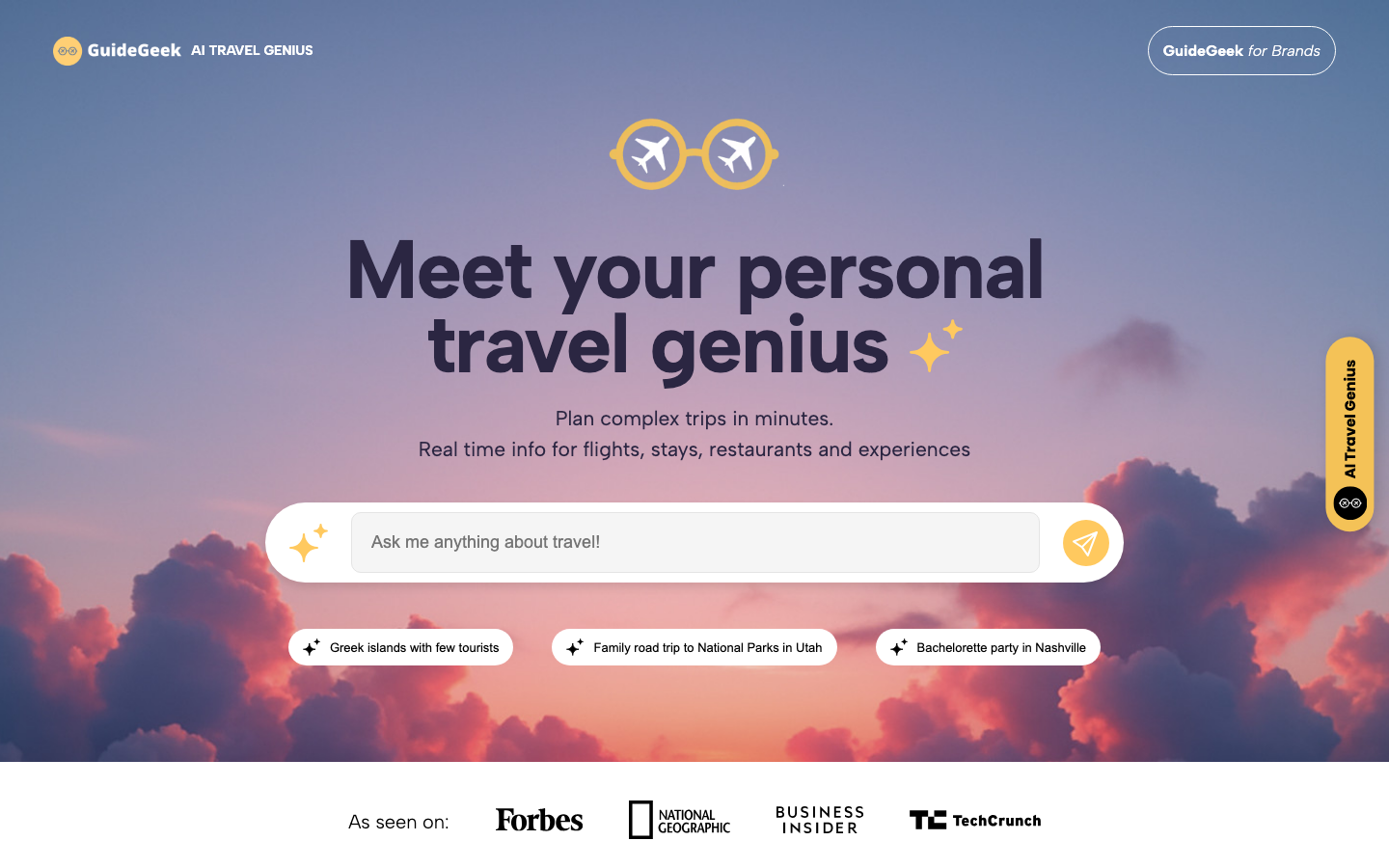 GuideGeek isn't a full itinerary workspace. It's an AI travel assistant living where you already chat - WhatsApp, Instagram DMs, Facebook Messenger, plus a web surface. Ask travel questions in plain language and get answers grounded in real-time data and maps.
### What We Like
**It works where you already chat.** No new app, no migration. Ask in WhatsApp, Instagram, or Messenger, then narrow by distance, budget, or hours.
**Strongest for in-the-moment decisions.** What's nearby, what's open, how to get there, what customs apply, whether an area is safe. Best when you need an answer in 30 seconds, not a 12-day itinerary.
### What We Don't Like
**Nothing to come back to.** No durable map, schedule, or shared plan. Once the chat scrolls, you're rebuilding from scratch. Pair with Mindtrip or Wanderlog for multi-day plans.
### Platform Availability
WhatsApp, Instagram, Messenger, Web
### Who It's For (and Who Should Skip It)
Use this for on-trip questions and quick local decisions. Skip it if you need a visual itinerary or shared workspace - GuideGeek is a companion to a real planner, not a replacement. Pair it with Mindtrip or Wanderlog.
***
## 6. [Stippl](https://www.stippl.io/): Best for all-in-one travel organization
GuideGeek isn't a full itinerary workspace. It's an AI travel assistant living where you already chat - WhatsApp, Instagram DMs, Facebook Messenger, plus a web surface. Ask travel questions in plain language and get answers grounded in real-time data and maps.
### What We Like
**It works where you already chat.** No new app, no migration. Ask in WhatsApp, Instagram, or Messenger, then narrow by distance, budget, or hours.
**Strongest for in-the-moment decisions.** What's nearby, what's open, how to get there, what customs apply, whether an area is safe. Best when you need an answer in 30 seconds, not a 12-day itinerary.
### What We Don't Like
**Nothing to come back to.** No durable map, schedule, or shared plan. Once the chat scrolls, you're rebuilding from scratch. Pair with Mindtrip or Wanderlog for multi-day plans.
### Platform Availability
WhatsApp, Instagram, Messenger, Web
### Who It's For (and Who Should Skip It)
Use this for on-trip questions and quick local decisions. Skip it if you need a visual itinerary or shared workspace - GuideGeek is a companion to a real planner, not a replacement. Pair it with Mindtrip or Wanderlog.
***
## 6. [Stippl](https://www.stippl.io/): Best for all-in-one travel organization
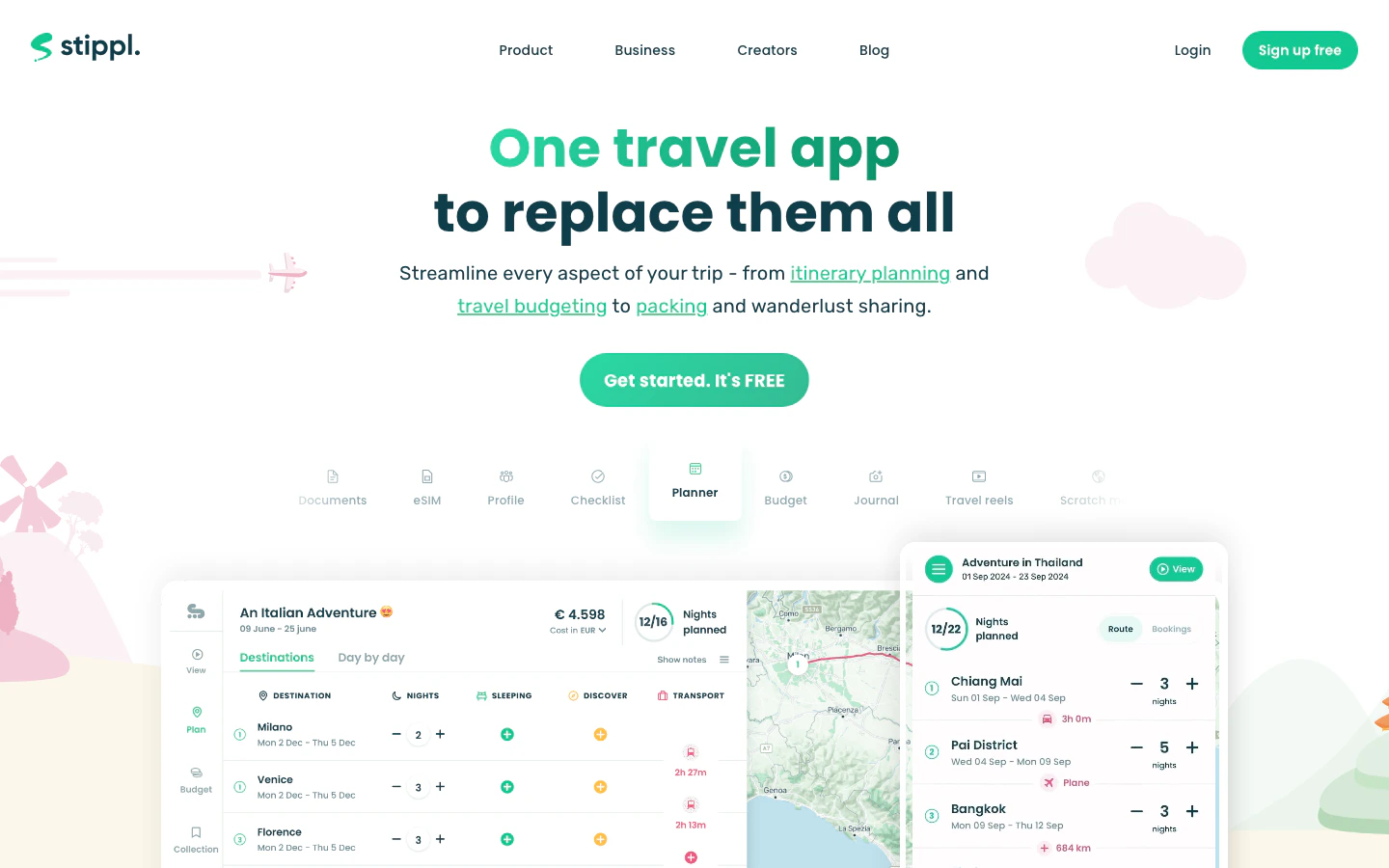 Stippl is the broadest tool in the set. AI itinerary generation, route planning, day planning, budgets, expenses, journals, packing lists, reels, offline access, and an eSIM all live in one app. That's powerful if you want a single home for everything travel-related, and heavy if you just want a quick itinerary.
### What We Like
**Covers far more than itinerary generation.** Route planning, budgets, expenses, packing, journals, eSIM. One app instead of five, if you'd rather not stitch them together.
**AI plans drop into an editable workspace.** Generated itineraries land in route maps, day plans, notes, and shared trips - not a closed text bubble. Plans are starting points, not finished outputs.
**Budget and expense tracking are native.** Most planners help you decide where to go; few help you split costs with a group. Useful on longer trips.
### What We Don't Like
**Heavy if you only want a quick plan.** All-in-one means you're carrying packing, journals, reels, and eSIM whether you want them or not. Wonderplan or iPlan.ai handle quick draft itineraries with less weight.
### Platform Availability
Web, Mac, iPhone, Android
### Who It's For (and Who Should Skip It)
Use this if you want a single home for itinerary, route, budget, packing, and trip memory. Skip it if you want a lightweight itinerary generator - Wonderplan stays simpler, and Wanderlog gives you a deeper workspace.
***
## 7. [Roamy](https://www.roamy.travel/): Best for turning social saves into trips
Stippl is the broadest tool in the set. AI itinerary generation, route planning, day planning, budgets, expenses, journals, packing lists, reels, offline access, and an eSIM all live in one app. That's powerful if you want a single home for everything travel-related, and heavy if you just want a quick itinerary.
### What We Like
**Covers far more than itinerary generation.** Route planning, budgets, expenses, packing, journals, eSIM. One app instead of five, if you'd rather not stitch them together.
**AI plans drop into an editable workspace.** Generated itineraries land in route maps, day plans, notes, and shared trips - not a closed text bubble. Plans are starting points, not finished outputs.
**Budget and expense tracking are native.** Most planners help you decide where to go; few help you split costs with a group. Useful on longer trips.
### What We Don't Like
**Heavy if you only want a quick plan.** All-in-one means you're carrying packing, journals, reels, and eSIM whether you want them or not. Wonderplan or iPlan.ai handle quick draft itineraries with less weight.
### Platform Availability
Web, Mac, iPhone, Android
### Who It's For (and Who Should Skip It)
Use this if you want a single home for itinerary, route, budget, packing, and trip memory. Skip it if you want a lightweight itinerary generator - Wonderplan stays simpler, and Wanderlog gives you a deeper workspace.
***
## 7. [Roamy](https://www.roamy.travel/): Best for turning social saves into trips
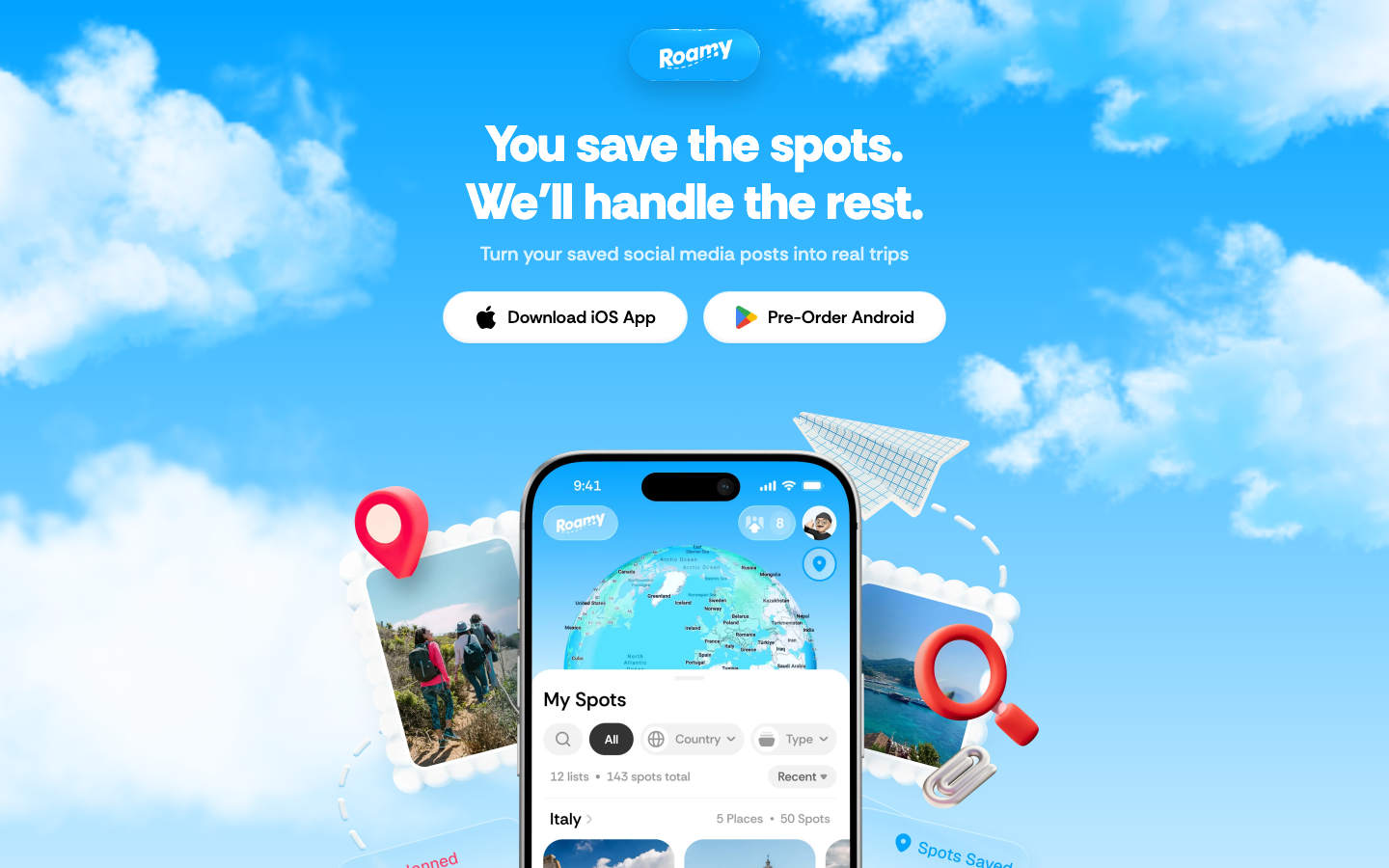 Roamy solves a problem most travel apps ignore: you saved 40 reels, 20 TikToks, and a folder of screenshots, and have no idea where those places actually are. Roamy imports spots from Instagram, TikTok, Google Maps, and screenshots, drops them on a map, and routes them into days. It's iPhone-only, but if you plan from social saves, nothing here is more focused.
### What We Like
**Social saves become a usable map.** Instagram, TikTok, Google Maps, and screenshots go in; pinned places and a routed day come out.
**The trip starts from your taste.** Other tools push generic top-10 lists. Roamy works from places you already saved, so the output reflects you, not an algorithm's idea of the average tourist.
**Routes turn a wishlist into feasible days.** Saved spots become a day-by-day plan with travel times, not just a folder of links.
### What We Don't Like
**iPhone-only, no Android app.** Anyone in your group on Android is locked out. For mixed-device groups, Wanderlog or Layla cover more ground without that constraint.
**Not a blank-slate planner.** If you don't already have saved places, Roamy isn't where you start. For destination ideation, live booking, or full travel-agent help, Mindtrip, Layla, or Trip.Planner fit better.
### Platform Availability
iPhone
### Who It's For (and Who Should Skip It)
Use this if you already collect places before planning the route. Skip it if you plan on Android, want destination ideation from scratch, or need flights and hotels in the same app (Mindtrip or Trip.Planner).
## Selection Guide
* If you want a real AI map workspace with group planning → [Mindtrip](https://mindtrip.ai/)
* If you want chat-first planning with booking → [Layla](https://layla.ai/)
* If you already book through Trip.com and want planning integrated → [Trip.Planner](https://www.trip.com/blog/trip-planner/)
* For group road trips or detailed itineraries → [Wanderlog](https://wanderlog.com/)
* If you want quick answers in your messaging app → [GuideGeek](https://guidegeek.com/)
* If you want one app for itinerary, budget, packing, and eSIM → [Stippl](https://www.stippl.io/)
* If you plan from saved social posts → [Roamy](https://www.roamy.travel/)
## How We Evaluated
We evaluated ten AI trip planners and selected seven for the main ranking. We don't use affiliate links, accept sponsorships, or take payment from tool makers. Our recommendations come from hands-on use and judgment about what a real trip needs.
### Selection Criteria
**Planning depth.** Does it produce a real plan with maps, editable days, and saved places, or just a wall of generated text?
**Workspace durability.** Does the trip live somewhere you can return to, share, and edit, or does it disappear once the chat scrolls?
**Booking and inventory awareness.** Can the plan move toward real flights, hotels, and activities, or does it stop at suggestions?
**Platform reach.** Does it run where you and your travelmates actually plan - including Android, which several otherwise-strong tools still don't ship?
### How We Tested
We compared each tool on prompt adherence, map and route quality, editing reliability, group collaboration, offline access, and how well plans survived contact with a real trip - changes, additions, and group input. We paid attention to consistent friction points: stale place data and AI output that fell apart when constraints got specific.
## Alternatives to Consider
### Other Tools Worth Considering
* **[Tripadvisor Trips](https://www.tripadvisor.com/Trips)** - Solid if you already trust Tripadvisor reviews and want bookings nearby.
* **[iPlan.ai](https://iplan.ai/)** - Quick mobile itinerary drafts; weaker for complex or multi-city trips.
* **[Wonderplan](https://wonderplan.ai/)** - Simple web draft generator; good first pass.
* **[TripIt](https://www.tripit.com/)** - Booking organizer once you've made reservations, not a planner.
* **[Roadtrippers](https://roadtrippers.com/)** - Better for actual road trips and RV routing than for AI itineraries.
### Adjacent Categories
* **AI travel search and booking** - [Google AI Mode Canvas](https://blog.google/products-and-platforms/products/search/agentic-plans-booking-travel-canvas-ai-mode/), [KAYAK Ask AI](https://www.kayak.com/ai), [Booking.com AI Trip Planner](https://news.booking.com/bookingcom-launches-new-ai-trip-planner-to-enhance-travel-planning-experience/), [Expedia Activity Planner/Romie](https://www.expedia.com/newsroom/spring-product-release-2024/), [Priceline Penny](https://www.priceline.com/penny/about). Optimized for live prices and inventory, not a workspace. Choose this when flights, hotels, and availability matter most.
* **General-purpose AI chatbots** - [ChatGPT](https://chatgpt.com/), [Claude](https://claude.ai/), [Gemini](https://gemini.google.com/), [Perplexity](https://www.perplexity.ai/). Flexible reasoning and brainstorming, no travel-specific workspace, maps, or live inventory. Choose this when you want custom planning logic and will verify details elsewhere.
* **Travel organizers and itinerary managers** - [TripIt](https://www.tripit.com/), [Roadtrippers](https://roadtrippers.com/), [Polarsteps](https://www.polarsteps.com/). Systems of record for confirmations and navigation. Choose this after you've booked, not when building the trip.
## What You Need to Know Before Using AI Trip Planners
AI planners can sound confident about things they shouldn't. Three watch-outs are worth understanding before you build a trip around what one tells you.
### Confirm Live Facts Before You Book
AI plans get hours, prices, closures, and entry requirements wrong - sometimes confidently. For anything that costs money or affects entry (flights, hotels, restaurants on a tight schedule, visas, transit operators), verify against the official source. Map-grounded planners reduce hallucinated places, but they don't guarantee current details. Treat the AI plan as a draft, not a confirmation.
### Account Data and What's Stored
Most planners store your saved places, prompts, and trip details. Some are tied to a booking marketplace, which means your planning shapes ad surfaces too. If a trip involves anything sensitive (locations, companions, addresses), check whether sharing is private by default.
### Booking Through The Planner vs. Direct
Booking inside a planner is convenient, but the price you see may not be the best one. Marketplace fees and cancellation rules can differ from booking direct. Run a quick comparison on price and refund policy before committing - especially for flights, where direct-airline booking usually wins on changes.
## Frequently Asked Questions
Roamy solves a problem most travel apps ignore: you saved 40 reels, 20 TikToks, and a folder of screenshots, and have no idea where those places actually are. Roamy imports spots from Instagram, TikTok, Google Maps, and screenshots, drops them on a map, and routes them into days. It's iPhone-only, but if you plan from social saves, nothing here is more focused.
### What We Like
**Social saves become a usable map.** Instagram, TikTok, Google Maps, and screenshots go in; pinned places and a routed day come out.
**The trip starts from your taste.** Other tools push generic top-10 lists. Roamy works from places you already saved, so the output reflects you, not an algorithm's idea of the average tourist.
**Routes turn a wishlist into feasible days.** Saved spots become a day-by-day plan with travel times, not just a folder of links.
### What We Don't Like
**iPhone-only, no Android app.** Anyone in your group on Android is locked out. For mixed-device groups, Wanderlog or Layla cover more ground without that constraint.
**Not a blank-slate planner.** If you don't already have saved places, Roamy isn't where you start. For destination ideation, live booking, or full travel-agent help, Mindtrip, Layla, or Trip.Planner fit better.
### Platform Availability
iPhone
### Who It's For (and Who Should Skip It)
Use this if you already collect places before planning the route. Skip it if you plan on Android, want destination ideation from scratch, or need flights and hotels in the same app (Mindtrip or Trip.Planner).
## Selection Guide
* If you want a real AI map workspace with group planning → [Mindtrip](https://mindtrip.ai/)
* If you want chat-first planning with booking → [Layla](https://layla.ai/)
* If you already book through Trip.com and want planning integrated → [Trip.Planner](https://www.trip.com/blog/trip-planner/)
* For group road trips or detailed itineraries → [Wanderlog](https://wanderlog.com/)
* If you want quick answers in your messaging app → [GuideGeek](https://guidegeek.com/)
* If you want one app for itinerary, budget, packing, and eSIM → [Stippl](https://www.stippl.io/)
* If you plan from saved social posts → [Roamy](https://www.roamy.travel/)
## How We Evaluated
We evaluated ten AI trip planners and selected seven for the main ranking. We don't use affiliate links, accept sponsorships, or take payment from tool makers. Our recommendations come from hands-on use and judgment about what a real trip needs.
### Selection Criteria
**Planning depth.** Does it produce a real plan with maps, editable days, and saved places, or just a wall of generated text?
**Workspace durability.** Does the trip live somewhere you can return to, share, and edit, or does it disappear once the chat scrolls?
**Booking and inventory awareness.** Can the plan move toward real flights, hotels, and activities, or does it stop at suggestions?
**Platform reach.** Does it run where you and your travelmates actually plan - including Android, which several otherwise-strong tools still don't ship?
### How We Tested
We compared each tool on prompt adherence, map and route quality, editing reliability, group collaboration, offline access, and how well plans survived contact with a real trip - changes, additions, and group input. We paid attention to consistent friction points: stale place data and AI output that fell apart when constraints got specific.
## Alternatives to Consider
### Other Tools Worth Considering
* **[Tripadvisor Trips](https://www.tripadvisor.com/Trips)** - Solid if you already trust Tripadvisor reviews and want bookings nearby.
* **[iPlan.ai](https://iplan.ai/)** - Quick mobile itinerary drafts; weaker for complex or multi-city trips.
* **[Wonderplan](https://wonderplan.ai/)** - Simple web draft generator; good first pass.
* **[TripIt](https://www.tripit.com/)** - Booking organizer once you've made reservations, not a planner.
* **[Roadtrippers](https://roadtrippers.com/)** - Better for actual road trips and RV routing than for AI itineraries.
### Adjacent Categories
* **AI travel search and booking** - [Google AI Mode Canvas](https://blog.google/products-and-platforms/products/search/agentic-plans-booking-travel-canvas-ai-mode/), [KAYAK Ask AI](https://www.kayak.com/ai), [Booking.com AI Trip Planner](https://news.booking.com/bookingcom-launches-new-ai-trip-planner-to-enhance-travel-planning-experience/), [Expedia Activity Planner/Romie](https://www.expedia.com/newsroom/spring-product-release-2024/), [Priceline Penny](https://www.priceline.com/penny/about). Optimized for live prices and inventory, not a workspace. Choose this when flights, hotels, and availability matter most.
* **General-purpose AI chatbots** - [ChatGPT](https://chatgpt.com/), [Claude](https://claude.ai/), [Gemini](https://gemini.google.com/), [Perplexity](https://www.perplexity.ai/). Flexible reasoning and brainstorming, no travel-specific workspace, maps, or live inventory. Choose this when you want custom planning logic and will verify details elsewhere.
* **Travel organizers and itinerary managers** - [TripIt](https://www.tripit.com/), [Roadtrippers](https://roadtrippers.com/), [Polarsteps](https://www.polarsteps.com/). Systems of record for confirmations and navigation. Choose this after you've booked, not when building the trip.
## What You Need to Know Before Using AI Trip Planners
AI planners can sound confident about things they shouldn't. Three watch-outs are worth understanding before you build a trip around what one tells you.
### Confirm Live Facts Before You Book
AI plans get hours, prices, closures, and entry requirements wrong - sometimes confidently. For anything that costs money or affects entry (flights, hotels, restaurants on a tight schedule, visas, transit operators), verify against the official source. Map-grounded planners reduce hallucinated places, but they don't guarantee current details. Treat the AI plan as a draft, not a confirmation.
### Account Data and What's Stored
Most planners store your saved places, prompts, and trip details. Some are tied to a booking marketplace, which means your planning shapes ad surfaces too. If a trip involves anything sensitive (locations, companions, addresses), check whether sharing is private by default.
### Booking Through The Planner vs. Direct
Booking inside a planner is convenient, but the price you see may not be the best one. Marketplace fees and cancellation rules can differ from booking direct. Run a quick comparison on price and refund policy before committing - especially for flights, where direct-airline booking usually wins on changes.
## Frequently Asked Questions