We compared 10 AI trip planners and picked the 7 worth using, compared on map quality, editable itineraries, booking paths, and offline access.
Updated June 2, 2026
AI trip planners turn scattered ideas and saved places into a mapped, editable itinerary with booking paths. The real question is whether you need a dedicated planner or whether ChatGPT plus Google Maps would do. We compared ten to find the ones worth using.
For a lot of trips, you don’t. A general chatbot - ChatGPT, Claude, or Gemini - can brainstorm a credible itinerary, balance constraints, and turn messy notes into a plan. Pair it with an AI travel search like Google AI Mode Canvas or KAYAK Ask AI, and you can cover destination ideas, draft days, live flights, hotels, and rough budgets without opening a dedicated planner.That combination is enough when you’re traveling solo or as a couple, the trip is one or two destinations, you’ll book direct, and you don’t mind a few tabs.A dedicated planner earns its place when more is going on. You want a durable plan a group can edit together or you’re stitching saved places, reservations, routes, and budgets into one workspace.
Mindtrip is the closest thing to a real AI trip planner in this set. You describe a trip, and the suggestions land as places on a map - so you can see whether a day is feasible or you’ve stacked six things on opposite ends of town. Inspiration from articles, reels, screenshots, and Google Maps becomes saved spots, collections, and trip hubs you can share with the people you’re traveling with.
Platforms Type Workspace
The plan lives on a map - your day shows as pins, so overstuffed mornings and cross-town zigzags are obvious before you commit.
It turns saved inspiration into trip material - articles, reels, screenshots, Maps links, and PDFs become places, collections, or full plans.
Group planning sits inside the workspace - shared collections, itineraries, and group chats keep discussion and plan in one place.
No official Android app - web works, but for Android travelers Layla, Wanderlog, or Stippl are easier picks.
Use this if you plan visually and want to stitch a multi-stop trip out of scattered inspiration. Skip it if you plan on Android - Wanderlog handles that - or if comparing live flights and hotels is the main job (Trip.Planner).
Layla is what most people picture when they hear “AI trip planner”: describe the trip in plain English, get back flights, hotels, activities, and a rough day plan with live prices. The map and editing tools don’t match a real workspace, but the chat onramp is friendly if you don’t want to open a blank itinerary.
Platforms Type Chat
Conversational onramp lowers friction - describe the trip, constraints, and vibe and get a plan back, no new app to learn.
Booking-aware suggestions, not just text - flights, hotels, trains, and activities come with live prices and bookable paths.
Broad device coverage - iOS, iPadOS, Android, and web all work, useful across devices or planning with friends.
Less workspace, more chatbot - thin for map-first planning, drag-and-drop days, or saved-place organization; Mindtrip and Wanderlog are sharper.
Use this if you want a travel-agent-style chat with booking baked in. Skip it if you need map editing or shared trip control - Mindtrip is more workspace-like.
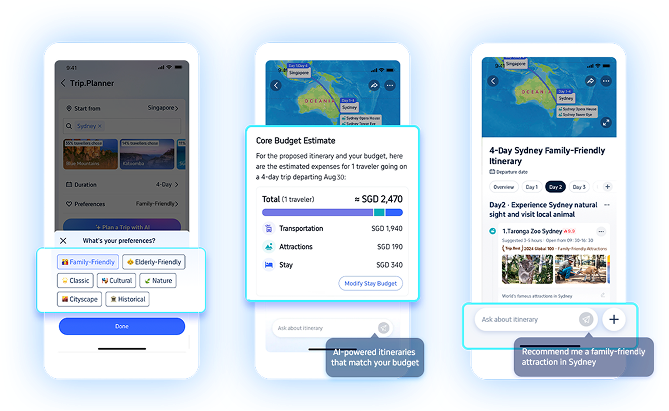
Trip.Planner by Trip.com is the strongest pick when you want AI planning tied to real bookable inventory. Generate an itinerary, edit it on a canvas, see it on a map, and book flights, hotels, and activities from inside one app. TripGenie handles the Q&A and on-trip layer - menu translation, hotel comparisons, local questions, and booking support. The trade-off is that the whole plan lives inside Trip.com’s marketplace.
Platforms Type Booking
Planning and booking sit in one place - itinerary to flights, trains, hotels, and attractions without tab-switching.
The itinerary is actually editable - canvas-style reordering, renaming, replacing, and notes, not just generated text.
TripGenie covers the on-trip layer - snap a menu to translate, compare hotels mid-trip, or ask local questions.
You’re inside Trip.com’s marketplace - inventory, rewards, and booking terms shape what you see, where Wanderlog or Mindtrip stay neutral.
Use this if you already book through Trip.com and want AI planning and bookable inventory in one app. Skip it if you’d rather book direct with airlines - Mindtrip or Wanderlog stay independent of any marketplace.
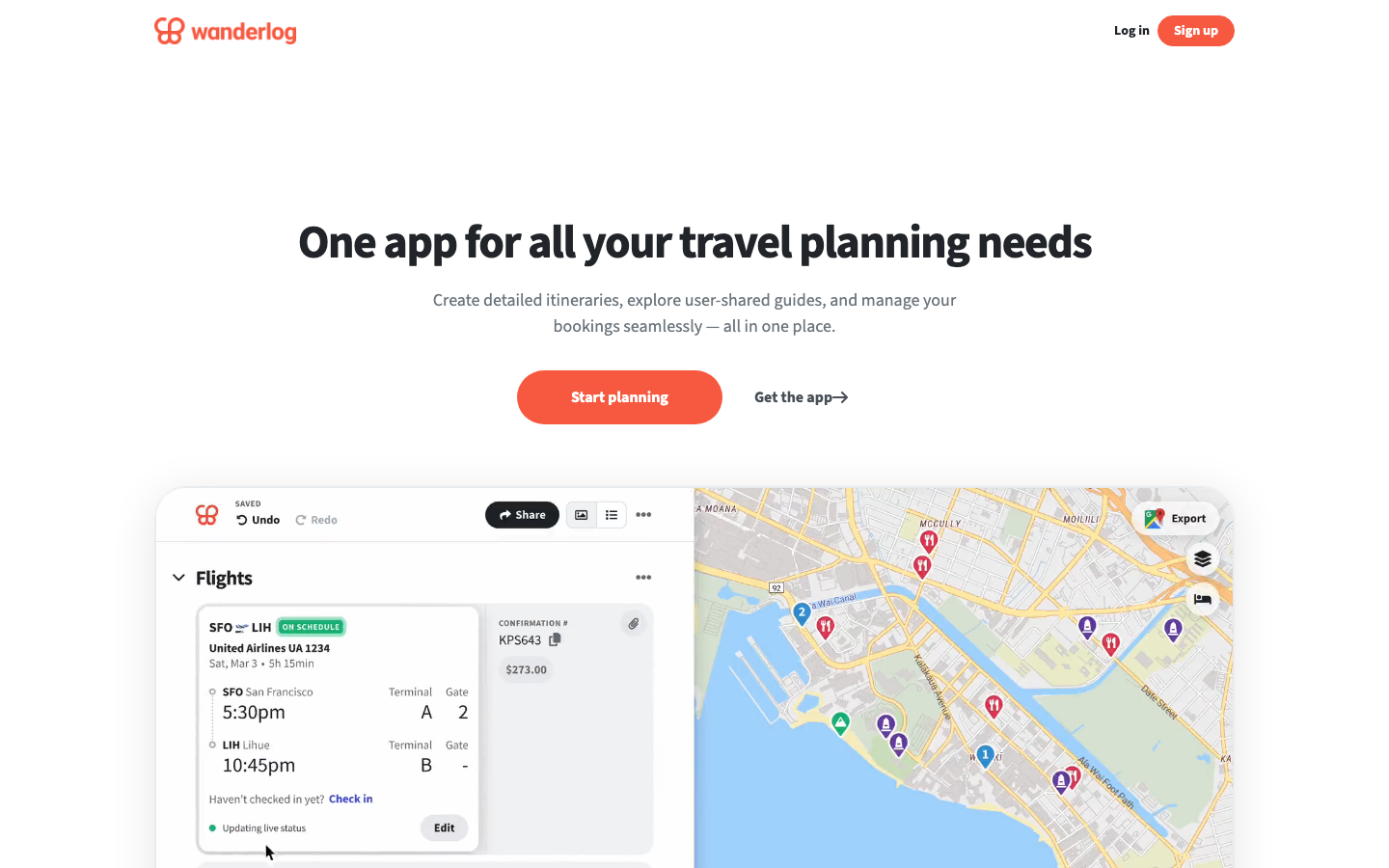
Wanderlog isn’t the most AI-native tool here, and that’s the point. It’s a real trip workspace - maps, route optimization, reservation imports, collaborative editing, budgets, and offline access - with AI help layered on top. If you’ve ever tried to run a group road trip out of Sheets, Maps, and email threads, this is the upgrade.
Platforms Type Workspace
It’s an actual trip workspace - places, lodging, flights, restaurants, notes, budgets, and routes hold together in one app you can run.
Route planning is a core feature, not an afterthought - map-based stop optimization with distances and times beats another AI list for road trips.
Group collaboration that actually works - shared editing, permissions, and a single source of truth replace group chats and forwarded emails.
AI-first generation is weaker - for a complete plan from one prompt, Mindtrip, Layla, or Trip.Planner feel more direct; Wanderlog rewards effort.
Use this for road trips, group trips, and detailed itineraries where the plan has to survive contact with real travel. Skip it if you want AI to invent the whole plan from one prompt - Mindtrip or Layla are more direct for that.
GuideGeek isn’t a full itinerary workspace. It’s an AI travel assistant living where you already chat - WhatsApp, Instagram DMs, Facebook Messenger, plus a web surface. Ask travel questions in plain language and get answers grounded in real-time data and maps.
Platforms Type Chat
It works where you already chat - ask in WhatsApp, Instagram, or Messenger and narrow by distance, budget, or hours, no new app.
Strongest for in-the-moment decisions - what’s nearby, open, safe, or how to get there when you need an answer in 30 seconds.
Nothing to come back to - no durable map, schedule, or shared plan, so once the chat scrolls you rebuild from scratch.
Use this for on-trip questions and quick local decisions. Skip it if you need a visual itinerary or shared workspace - GuideGeek is a companion to a real planner, not a replacement. Pair it with Mindtrip or Wanderlog.
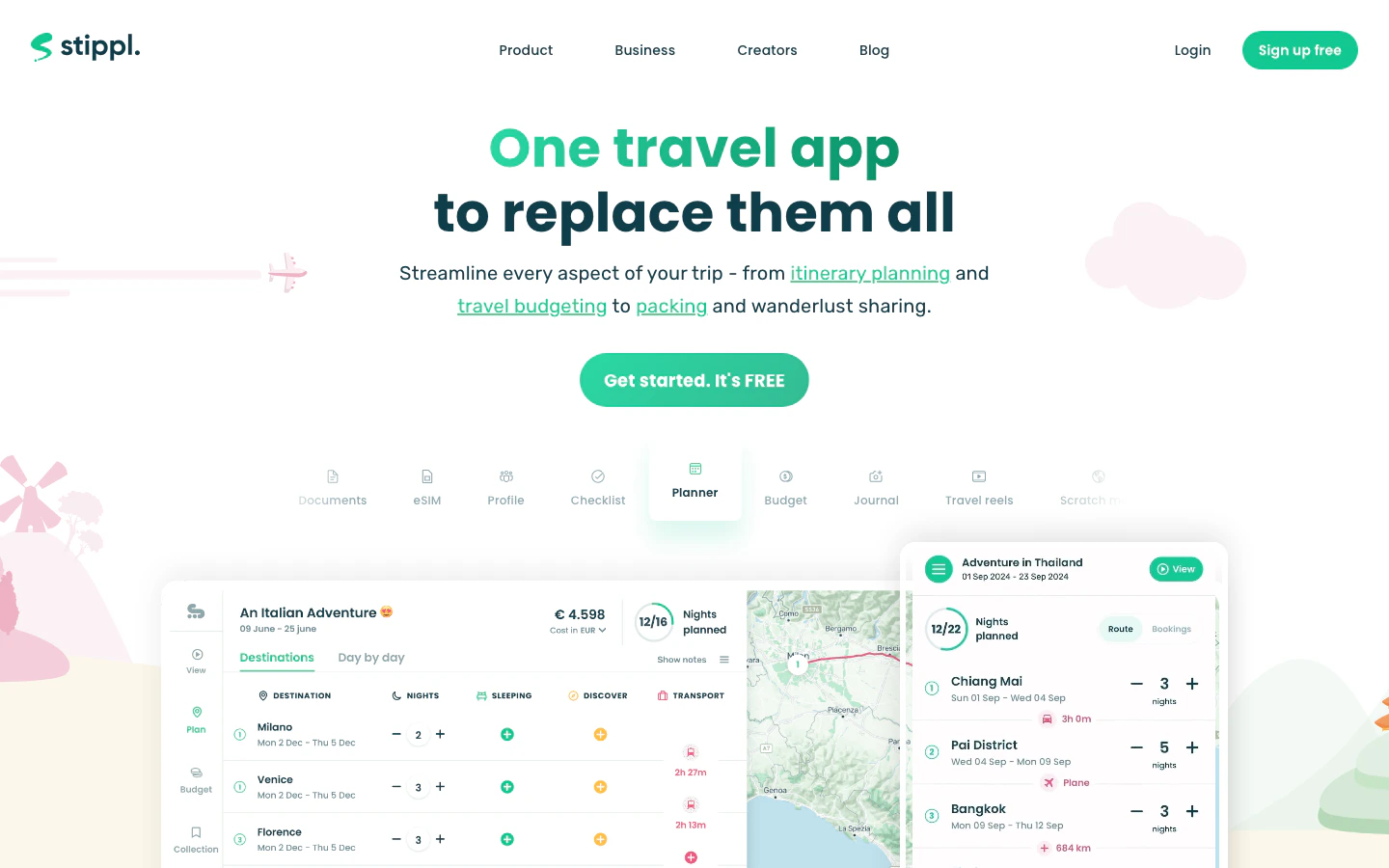
Stippl is the broadest tool in the set. AI itinerary generation, route planning, day planning, budgets, expenses, journals, packing lists, reels, offline access, and an eSIM all live in one app. That’s powerful if you want a single home for everything travel-related, and heavy if you just want a quick itinerary.
Platforms Type Workspace
Covers far more than itinerary generation - route planning, budgets, expenses, packing, journals, and eSIM in one app instead of five.
AI plans drop into an editable workspace - generated itineraries land in route maps, day plans, and shared trips, not a closed text bubble.
Budget and expense tracking are native - few planners help you split costs with a group, useful on longer trips.
Heavy if you only want a quick plan - you carry packing, journals, and eSIM whether you want them or not; Wonderplan or iPlan.ai are lighter.
Use this if you want a single home for itinerary, route, budget, packing, and trip memory. Skip it if you want a lightweight itinerary generator - Wonderplan stays simpler, and Wanderlog gives you a deeper workspace.
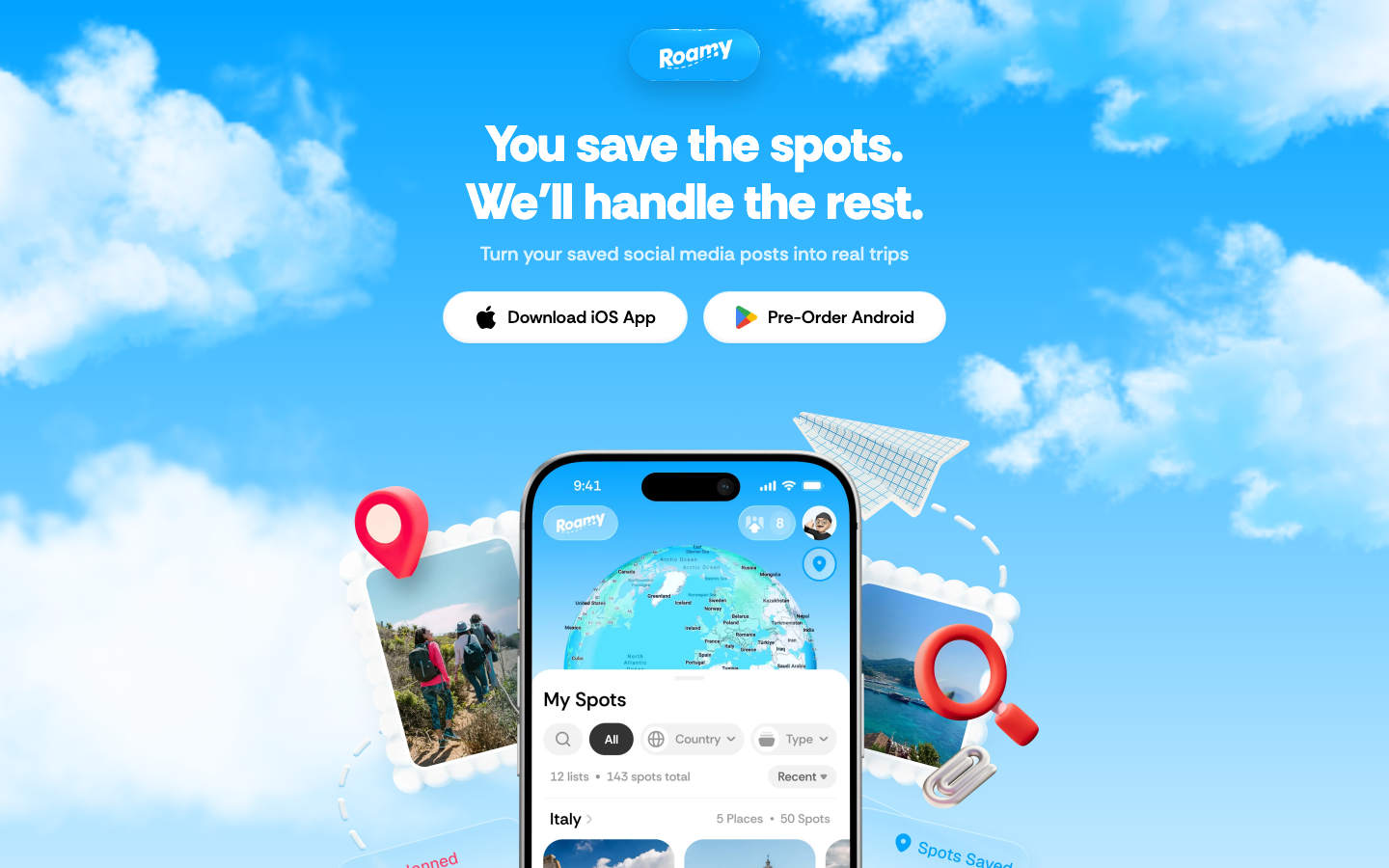
Roamy solves a problem most travel apps ignore: you saved 40 reels, 20 TikToks, and a folder of screenshots, and have no idea where those places actually are. Roamy imports spots from Instagram, TikTok, Google Maps, and screenshots, drops them on a map, and routes them into days. It’s iPhone-only, but if you plan from social saves, nothing here is more focused.
Platforms Type Social
Social saves become a usable map - Instagram, TikTok, Maps, and screenshots go in; pinned places and a routed day come out.
The trip starts from your taste - it works from places you already saved, so the output reflects you, not an average-tourist list.
Routes turn a wishlist into feasible days - saved spots become a day-by-day plan with travel times, not just a folder of links.
iPhone-only, no Android app - anyone in your group on Android is locked out, where Wanderlog or Layla cover mixed-device groups.
Not a blank-slate planner - without saved places it isn’t where you start; Mindtrip, Layla, or Trip.Planner fit ideation and booking.
Use this if you already collect places before planning the route. Skip it if you plan on Android, want destination ideation from scratch, or need flights and hotels in the same app (Mindtrip or Trip.Planner).
If you want a real AI map workspace with group planning → MindtripIf you want chat-first planning with booking → LaylaIf you already book through Trip.com and want planning integrated → Trip.PlannerFor group road trips or detailed itineraries → WanderlogIf you want quick answers in your messaging app → GuideGeekIf you want one app for itinerary, budget, packing, and eSIM → StipplIf you plan from saved social posts → Roamy
We evaluated ten AI trip planners and selected seven for the main ranking. We don’t use affiliate links, accept sponsorships, or take payment from tool makers. Our recommendations come from hands-on use and judgment about what a real trip needs.
We compared each tool on prompt adherence, map and route quality, editing reliability, group collaboration, offline access, and how well plans survived contact with a real trip - changes, additions, and group input. We paid attention to consistent friction points: stale place data and AI output that fell apart when constraints got specific.
What You Need to Know Before Using AI Trip Planners
AI planners can sound confident about things they shouldn’t. Three watch-outs are worth understanding before you build a trip around what one tells you.
AI plans get hours, prices, closures, and entry requirements wrong - sometimes confidently. For anything that costs money or affects entry (flights, hotels, restaurants on a tight schedule, visas, transit operators), verify against the official source. Map-grounded planners reduce hallucinated places, but they don’t guarantee current details. Treat the AI plan as a draft, not a confirmation.
Most planners store your saved places, prompts, and trip details. Some are tied to a booking marketplace, which means your planning shapes ad surfaces too. If a trip involves anything sensitive (locations, companions, addresses), check whether sharing is private by default.
Booking inside a planner is convenient, but the price you see may not be the best one. Marketplace fees and cancellation rules can differ from booking direct. Run a quick comparison on price and refund policy before committing - especially for flights, where direct-airline booking usually wins on changes.
General-purpose AI chatbots (ChatGPT, Claude, Gemini, Perplexity): Flexible reasoning and brainstorming, no travel-specific workspace, maps, or live inventory. Choose this when you want custom planning logic and will verify details elsewhere.
Travel organizers and itinerary managers (TripIt, Roadtrippers, Polarsteps): Systems of record for confirmations and navigation. Choose this after you’ve booked, not when building the trip.
An AI trip planner generates itineraries, suggests places, and helps organize a trip using natural language and travel data. The strongest ones add maps, editable days, saved places, collaboration, and booking paths - the difference between a tool you keep using and a chatbot prompt you forget about.
Can I use an AI trip planner offline?
Some can. Wanderlog and Stippl support offline access on mobile, which matters internationally or in low-signal areas. Most web-first tools, including Mindtrip and Wonderplan, need a connection. Check offline behavior before relying on the tool day-of.
Are AI trip planners better than just asking ChatGPT to plan a trip?
For brainstorming, no. For a trip you’ll share, edit, save, and book, yes. A general chatbot handles ideas and constraints fine; a dedicated planner gives you a map, a workspace, and a plan that survives past the chat window.
Do AI trip planners actually book flights and hotels?
Some do. Trip.Planner books through Trip.com; Layla and Tripadvisor have booking paths; Mindtrip is moving toward end-to-end. Most still hand off to airlines or marketplaces. Compare prices and cancellation rules before booking through the planner.
We update this guide as new tools launch and existing ones evolve. If you’re still unsure, Mindtrip is the safest starting point for most trips - it’s the closest thing to a real AI trip planner in the set. Questions or suggestions? Let us know.
Was this page helpful?
⌘I
{"docsConfig":{"theme":"luma","$schema":"https://mintlify.com/docs.json","name":"Useful AI","description":"Useful AI helps people find, compare, and learn practical AI tools, models, courses, guides, and resources.","colors":{"primary":"#000000","light":"#ffffff","dark":"#000000"},"logo":{"light":"https://mintcdn.com/usefulai/TukEV5gATx8azBBm/logo-icon.svg?fit=max\u0026auto=format\u0026n=TukEV5gATx8azBBm\u0026q=85\u0026s=57400ad8c532e03bb1fd7345ebfd8537","dark":"https://mintcdn.com/usefulai/TukEV5gATx8azBBm/logo-icon-dark.svg?fit=max\u0026auto=format\u0026n=TukEV5gATx8azBBm\u0026q=85\u0026s=cadf9ff8793b68f2f5ff9d8eb48d0564"},"favicon":"https://mintcdn.com/usefulai/LMn8K2dt36OSmQDE/favicon.svg?fit=max\u0026auto=format\u0026n=LMn8K2dt36OSmQDE\u0026q=85\u0026s=af301d243bd81ba4ec1dbc871f6981cd","appearance":{"default":"light"},"background":{"color":{"dark":"#090c10"}},"footer":{"socials":{"linkedin":"https://www.linkedin.com/company/usefulai"},"links":[{"header":"Company","items":[{"label":"About Us","href":"/about-us"},{"label":"Privacy","href":"/privacy"},{"label":"Terms","href":"/terms"}]}]},"search":{"prompt":"Search AI tools, models, courses, and guides"},"seo":{"indexing":"all"},"integrations":{"clarity":{"projectId":"lsiokxfop1"},"ga4":{"measurementId":"G-R0NFT3CXD9"}},"styling":{"latex":true},"navigation":{"global":{},"pages":[]}},"deployment":{"deploymentMetadataValue":{"subdomain":"usefulai","hasAudioNarration":false,"actualSubdomain":"usefulai","customDomains":["usefulai.com"],"gitSource":{"type":"github","owner":"usefulaios","repo":"usefulai","deployBranch":"main","contentDirectory":"mintlify/live","isPrivate":true,"mountPath":"","label":""},"chroma":{"liveDeploymentHistoryId":"6a9b592deaf13c8167f1bc47","collectionId":"e298dabe-1386-4aa7-bd9c-b5a4fe999b97","schemaVersion":"v3","latestBuiltDeploymentHistoryId":"6a9b592deaf13c8167f1bc47"},"feedback":{"agentFeedback":true,"thumbs":true},"entitlements":{},"buildId":"6a9b592deaf13c8167f1bc47","clientVersion":"0.0.3965","searchFilterCounts":[{"language":"default","tag":"Tools","count":74},{"language":"default","tag":"More Tools","count":43},{"language":"default","tag":"Use Cases","count":25},{"language":"default","tag":"Models","count":18},{"language":"default","tag":"By Tool","count":17},{"language":"default","tag":"Feeds","count":17},{"language":"default","tag":"Courses","count":16},{"language":"default","tag":"Plugins","count":14},{"language":"default","tag":"By Category","count":14},{"language":"default","tag":"Guides","count":12}]},"assistantConfig":{"enableAskAiButton":false,"enableStarterQuestions":false,"enableAskAiSearchBar":true},"hasChatPermissions":false,"hasWebMcpPermissions":false,"toggles":[{"name":"kill-isr","enabled":true,"variant":{"name":"disabled","enabled":false,"feature_enabled":true},"impressionData":false},{"name":"agent-mintlify-slack","enabled":true,"variant":{"name":"disabled","enabled":false,"feature_enabled":true},"impressionData":false},{"name":"editor-v7-file-tree","enabled":true,"variant":{"name":"disabled","enabled":false,"feature_enabled":true},"impressionData":false},{"name":"agent-integrations-settings","enabled":true,"variant":{"name":"disabled","enabled":false,"feature_enabled":true},"impressionData":false},{"name":"automations-pr-grouping","enabled":true,"variant":{"name":"disabled","enabled":false,"feature_enabled":true},"impressionData":false},{"name":"custom-prefix","enabled":true,"variant":{"name":"disabled","enabled":false,"feature_enabled":true},"impressionData":false},{"name":"analytics-v7","enabled":true,"variant":{"name":"disabled","enabled":false,"feature_enabled":true},"impressionData":false},{"name":"user-flows-analytics","enabled":true,"variant":{"name":"disabled","enabled":false,"feature_enabled":true},"impressionData":false},{"name":"no-publish-flow","enabled":true,"variant":{"name":"disabled","enabled":false,"feature_enabled":true},"impressionData":false},{"name":"workos-onboarding","enabled":true,"variant":{"name":"disabled","enabled":false,"feature_enabled":true},"impressionData":false},{"name":"llms-txt-v2","enabled":true,"variant":{"name":"disabled","enabled":false,"feature_enabled":true},"impressionData":false},{"name":"pause-universal-search-reconcile","enabled":true,"variant":{"name":"disabled","enabled":false,"feature_enabled":true},"impressionData":false},{"name":"snapshot-serving-live","enabled":true,"variant":{"name":"disabled","enabled":false,"feature_enabled":true},"impressionData":false},{"name":"stripTemperatureMiddleware","enabled":true,"variant":{"name":"disabled","enabled":false,"feature_enabled":true},"impressionData":false},{"name":"per-site-search-delta","enabled":true,"variant":{"name":"disabled","enabled":false,"feature_enabled":true},"impressionData":false},{"name":"support-platform-pylon-zendesk","enabled":true,"variant":{"name":"disabled","enabled":false,"feature_enabled":true},"impressionData":false},{"name":"snapshot-serving","enabled":true,"variant":{"name":"disabled","enabled":false,"feature_enabled":true},"impressionData":false},{"name":"instant-rollback","enabled":true,"variant":{"name":"disabled","enabled":false,"feature_enabled":true},"impressionData":false},{"name":"granular-notifications-server","enabled":true,"variant":{"name":"disabled","enabled":false,"feature_enabled":true},"impressionData":false},{"name":"granular-notifications","enabled":true,"variant":{"name":"disabled","enabled":false,"feature_enabled":true},"impressionData":false},{"name":"editor-private-page-search","enabled":true,"variant":{"name":"disabled","enabled":false,"feature_enabled":true},"impressionData":false},{"name":"automations-fable","enabled":true,"variant":{"name":"disabled","enabled":false,"feature_enabled":true},"impressionData":false},{"name":"fixed-ai-action-pricing","enabled":true,"variant":{"name":"disabled","enabled":false,"feature_enabled":true},"impressionData":false},{"name":"automation-resolve-merge-conflict","enabled":true,"variant":{"name":"disabled","enabled":false,"feature_enabled":true},"impressionData":false},{"name":"scoped-publishing","enabled":true,"variant":{"name":"disabled","enabled":false,"feature_enabled":true},"impressionData":false},{"name":"mintql","enabled":true,"variant":{"name":"disabled","enabled":false,"feature_enabled":true},"impressionData":false},{"name":"page-level-analytics","enabled":true,"variant":{"name":"disabled","enabled":false,"feature_enabled":true},"impressionData":false},{"name":"editor-version-history-v2","enabled":true,"variant":{"name":"disabled","enabled":false,"feature_enabled":true},"impressionData":false},{"name":"editor-nav-generations","enabled":true,"variant":{"name":"disabled","enabled":false,"feature_enabled":true},"impressionData":false},{"name":"billing-page-v2","enabled":true,"variant":{"name":"disabled","enabled":false,"feature_enabled":true},"impressionData":false},{"name":"workspace-projects","enabled":true,"variant":{"name":"disabled","enabled":false,"feature_enabled":true},"impressionData":false},{"name":"assistant-v5","enabled":true,"variant":{"name":"disabled","enabled":false,"feature_enabled":true},"impressionData":false},{"name":"byok-sep-25","enabled":true,"variant":{"name":"disabled","enabled":false,"feature_enabled":true},"impressionData":false},{"name":"fork-pr-previews","enabled":true,"variant":{"name":"disabled","enabled":false,"feature_enabled":true},"impressionData":false},{"name":"revalidation-jwt","enabled":true,"variant":{"name":"disabled","enabled":false,"feature_enabled":true},"impressionData":false},{"name":"vite-origin","enabled":true,"variant":{"name":"disabled","enabled":false,"feature_enabled":true},"impressionData":false},{"name":"editor-agent-model-picker","enabled":true,"variant":{"name":"disabled","enabled":false,"feature_enabled":true},"impressionData":false},{"name":"billing-updated-9-15","enabled":true,"variant":{"name":"disabled","enabled":false,"feature_enabled":true},"impressionData":false},{"name":"hobby-abuse-scan","enabled":true,"variant":{"name":"disabled","enabled":false,"feature_enabled":true},"impressionData":false},{"name":"dashboard-inbox","enabled":true,"variant":{"name":"disabled","enabled":false,"feature_enabled":true},"impressionData":false}],"isAtlas":false,"googleFontsInlined":false},"customCss":[{"filePath":"style.css","href":"/_mintlify/custom/usefulai/c71ee03586990199/style.css"}],"page":{"pagePath":"tools/ai-travel-assistants","slug":"/tools/ai-travel-assistants","pageMetadata":{"title":"Best AI Trip Planners in 2026","description":"We compared 10 AI trip planners and picked the 7 worth using, compared on map quality, editable itineraries, booking paths, and offline access.","sidebarTitle":"Travel Planners","og:title":"Best AI Trip Planners in 2026","og:description":"We compared 10 AI trip planners and picked the 7 worth using, compared on map quality, editable itineraries, booking paths, and offline access.","mode":"wide","hideFooterPagination":true,"href":"/tools/ai-travel-assistants"},"description":{"compiledSource":"\"use strict\";\nconst {jsx: _jsx} = arguments[0];\nconst {useMDXComponents: _provideComponents} = arguments[0];\nfunction _createMdxContent(props) {\n const _components = {\n p: \"p\",\n ..._provideComponents(),\n ...props.components\n };\n return _jsx(_components.p, {\n children: \"We compared 10 AI trip planners and picked the 7 worth using, compared on map quality, editable itineraries, booking paths, and offline access.\"\n });\n}\nfunction MDXContent(props = {}) {\n const {wrapper: MDXLayout} = {\n ..._provideComponents(),\n ...props.components\n };\n return MDXLayout ? _jsx(MDXLayout, {\n ...props,\n children: _jsx(_createMdxContent, {\n ...props\n })\n }) : _createMdxContent(props);\n}\nreturn {\n default: MDXContent\n};\n","frontmatter":{},"scope":{}},"pageType":"default","mdx":{"mdxSource":{"compiledSource":"\"use strict\";const{Fragment:_Fragment,jsx:_jsx,jsxs:_jsxs}=arguments[0];const{useMDXComponents:_provideComponents}=arguments[0];function _createMdxContent(props){const _components={a:`a`,hr:`hr`,li:`li`,p:`p`,strong:`strong`,tbody:`tbody`,td:`td`,th:`th`,thead:`thead`,tr:`tr`,ul:`ul`,..._provideComponents(),...props.components},{Accordion,AccordionGroup,Frame,Heading,Icon,OptimizedImage,Table}=_components;if(!Accordion)_missingMdxReference(`Accordion`,true);if(!AccordionGroup)_missingMdxReference(`AccordionGroup`,true);if(!Frame)_missingMdxReference(`Frame`,true);if(!Heading)_missingMdxReference(`Heading`,true);if(!Icon)_missingMdxReference(`Icon`,true);if(!OptimizedImage)_missingMdxReference(`OptimizedImage`,true);if(!Table)_missingMdxReference(`Table`,true);return _jsxs(_Fragment,{children:[_jsx(`div`,{className:`uai-updated-row`,children:`Updated June 2, 2026`}),`\n`,_jsx(_components.p,{children:`AI trip planners turn scattered ideas and saved places into a mapped, editable itinerary with booking paths. The real question is whether you need a dedicated planner or whether ChatGPT plus Google Maps would do. We compared ten to find the ones worth using.`}),`\n`,_jsx(Heading,{level:`2`,id:`best-ai-trip-planners`,children:`Best AI Trip Planners`}),`\n`,_jsx(`div`,{className:`uai-overview-table uai-overview-table--ranked`,children:_jsxs(Table,{children:[_jsx(_components.thead,{children:_jsxs(_components.tr,{children:[_jsx(_components.th,{style:{textAlign:`right`},children:`#`}),_jsx(_components.th,{children:`Tool`}),_jsx(_components.th,{children:`Best for`}),_jsx(_components.th,{children:`Type`})]})}),_jsxs(_components.tbody,{children:[_jsxs(_components.tr,{children:[_jsx(_components.td,{\"data-numeric\":`true`,style:{textAlign:`right`},children:`1`}),_jsx(_components.td,{children:_jsxs(`a`,{href:`https://mindtrip.ai/`,target:`_blank`,rel:`noreferrer`,children:[_jsx(`img`,{src:`/images/icons/48/mindtrip.ai.png`,alt:``,noZoom:true}),`Mindtrip`]})}),_jsx(_components.td,{children:`AI-first, map-centered trip planning`}),_jsx(_components.td,{children:_jsx(`span`,{className:`uai-badge uai-badge--sky`,children:`Workspace`})})]}),_jsxs(_components.tr,{children:[_jsx(_components.td,{\"data-numeric\":`true`,style:{textAlign:`right`},children:`2`}),_jsx(_components.td,{children:_jsxs(`a`,{href:`https://layla.ai/`,target:`_blank`,rel:`noreferrer`,children:[_jsx(`img`,{src:`/images/icons/48/layla.ai.png`,alt:``,noZoom:true}),`Layla`]})}),_jsx(_components.td,{children:`Chat-first AI travel-agent planning`}),_jsx(_components.td,{children:_jsx(`span`,{className:`uai-badge uai-badge--violet`,children:`Chat`})})]}),_jsxs(_components.tr,{children:[_jsx(_components.td,{\"data-numeric\":`true`,style:{textAlign:`right`},children:`3`}),_jsx(_components.td,{children:_jsxs(`a`,{href:`https://www.trip.com/blog/trip-planner/`,target:`_blank`,rel:`noreferrer`,children:[_jsx(`img`,{src:`/images/icons/48/trip.com.png`,alt:``,noZoom:true}),`Trip.Planner`]})}),_jsx(_components.td,{children:`Bookable AI itinerary planning`}),_jsx(_components.td,{children:_jsx(`span`,{className:`uai-badge uai-badge--amber`,children:`Booking`})})]}),_jsxs(_components.tr,{children:[_jsx(_components.td,{\"data-numeric\":`true`,style:{textAlign:`right`},children:`4`}),_jsx(_components.td,{children:_jsxs(`a`,{href:`https://wanderlog.com/`,target:`_blank`,rel:`noreferrer`,children:[_jsx(`img`,{src:`/images/icons/48/wanderlog.com.png`,alt:``,noZoom:true}),`Wanderlog`]})}),_jsx(_components.td,{children:`Practical trip workspace with AI help`}),_jsx(_components.td,{children:_jsx(`span`,{className:`uai-badge uai-badge--sky`,children:`Workspace`})})]}),_jsxs(_components.tr,{children:[_jsx(_components.td,{\"data-numeric\":`true`,style:{textAlign:`right`},children:`5`}),_jsx(_components.td,{children:_jsxs(`a`,{href:`https://guidegeek.com/`,target:`_blank`,rel:`noreferrer`,children:[_jsx(`img`,{src:`/images/icons/48/guidegeek.com.png`,alt:``,noZoom:true}),`GuideGeek`]})}),_jsx(_components.td,{children:`Messaging-based travel questions`}),_jsx(_components.td,{children:_jsx(`span`,{className:`uai-badge uai-badge--violet`,children:`Chat`})})]}),_jsxs(_components.tr,{children:[_jsx(_components.td,{\"data-numeric\":`true`,style:{textAlign:`right`},children:`6`}),_jsx(_components.td,{children:_jsxs(`a`,{href:`https://www.stippl.io/`,target:`_blank`,rel:`noreferrer`,children:[_jsx(`img`,{src:`/images/icons/48/stippl.io.png`,alt:``,noZoom:true}),`Stippl`]})}),_jsx(_components.td,{children:`All-in-one travel organization`}),_jsx(_components.td,{children:_jsx(`span`,{className:`uai-badge uai-badge--sky`,children:`Workspace`})})]}),_jsxs(_components.tr,{children:[_jsx(_components.td,{\"data-numeric\":`true`,style:{textAlign:`right`},children:`7`}),_jsx(_components.td,{children:_jsxs(`a`,{href:`https://www.roamy.travel/`,target:`_blank`,rel:`noreferrer`,children:[_jsx(`img`,{src:`/images/icons/48/roamy.travel.png`,alt:``,noZoom:true}),`Roamy`]})}),_jsx(_components.td,{children:`Turning social saves into trips`}),_jsx(_components.td,{children:_jsx(`span`,{className:`uai-badge uai-badge--zinc`,children:`Social`})})]})]})]})}),`\n`,_jsxs(`label`,{className:`uai-overview-more`,children:[_jsx(`input`,{type:`checkbox`,className:`uai-overview-toggle`}),_jsxs(`span`,{className:`uai-overview-more-open`,children:[_jsx(`span`,{className:`uai-overview-more-count`,children:`Show more`}),_jsx(Icon,{icon:`chevron-down`,size:13})]}),_jsxs(`span`,{className:`uai-overview-more-close`,children:[_jsx(`span`,{children:`Show less`}),_jsx(Icon,{icon:`chevron-up`,size:13})]})]}),`\n`,_jsx(Heading,{level:`2`,id:`do-you-need-an-ai-trip-planner`,children:`Do You Need an AI Trip Planner?`}),`\n`,_jsx(_components.p,{children:`For a lot of trips, you don’t. A general chatbot - ChatGPT, Claude, or Gemini - can brainstorm a credible itinerary, balance constraints, and turn messy notes into a plan. Pair it with an AI travel search like Google AI Mode Canvas or KAYAK Ask AI, and you can cover destination ideas, draft days, live flights, hotels, and rough budgets without opening a dedicated planner.`}),`\n`,_jsx(_components.p,{children:`That combination is enough when you’re traveling solo or as a couple, the trip is one or two destinations, you’ll book direct, and you don’t mind a few tabs.`}),`\n`,_jsx(_components.p,{children:`A dedicated planner earns its place when more is going on. You want a durable plan a group can edit together or you’re stitching saved places, reservations, routes, and budgets into one workspace.`}),`\n`,_jsx(_components.hr,{}),`\n`,_jsxs(`div`,{className:`uai-itemcard`,role:`article`,children:[_jsxs(`div`,{className:`uai-itemcard-head`,children:[_jsx(`span`,{className:`uai-itemcard-icon`,children:_jsx(`img`,{src:`https://mintcdn.com/usefulai/Te6KzZ86-OxPuEC2/images/icons/144/mindtrip.ai.png?fit=max\u0026auto=format\u0026n=Te6KzZ86-OxPuEC2\u0026q=85\u0026s=9d4b1a5401a1293a0e6243610a2d7cd7`,alt:``,noZoom:true,loading:`lazy`,\"data-og-width\":`144`,width:`144`,\"data-og-height\":`144`,height:`144`,\"data-path\":`images/icons/144/mindtrip.ai.png`,\"data-optimize\":`true`,\"data-opv\":`3`,srcset:`https://mintcdn.com/usefulai/Te6KzZ86-OxPuEC2/images/icons/144/mindtrip.ai.png?w=280\u0026fit=max\u0026auto=format\u0026n=Te6KzZ86-OxPuEC2\u0026q=85\u0026s=ea9b493a322d546a4488cadacafc20d8 280w, https://mintcdn.com/usefulai/Te6KzZ86-OxPuEC2/images/icons/144/mindtrip.ai.png?w=560\u0026fit=max\u0026auto=format\u0026n=Te6KzZ86-OxPuEC2\u0026q=85\u0026s=a31a883dbcaaff514c9fc4ccdc66e218 560w, https://mintcdn.com/usefulai/Te6KzZ86-OxPuEC2/images/icons/144/mindtrip.ai.png?w=840\u0026fit=max\u0026auto=format\u0026n=Te6KzZ86-OxPuEC2\u0026q=85\u0026s=922642e6a6bfae50464f45e795e0f628 840w, https://mintcdn.com/usefulai/Te6KzZ86-OxPuEC2/images/icons/144/mindtrip.ai.png?w=1100\u0026fit=max\u0026auto=format\u0026n=Te6KzZ86-OxPuEC2\u0026q=85\u0026s=aea4f5f9b7e5c25ef8e592997e39a255 1100w, https://mintcdn.com/usefulai/Te6KzZ86-OxPuEC2/images/icons/144/mindtrip.ai.png?w=1650\u0026fit=max\u0026auto=format\u0026n=Te6KzZ86-OxPuEC2\u0026q=85\u0026s=eaeb6aada854e5436bc9fedd1a13558e 1650w, https://mintcdn.com/usefulai/Te6KzZ86-OxPuEC2/images/icons/144/mindtrip.ai.png?w=2500\u0026fit=max\u0026auto=format\u0026n=Te6KzZ86-OxPuEC2\u0026q=85\u0026s=6d9a18956aca9680de936bae42e6dcaf 2500w`})}),_jsxs(`div`,{className:`uai-itemcard-identity`,children:[_jsx(`div`,{className:`uai-itemcard-row uai-itemcard-row--title`,children:_jsx(Heading,{level:`2`,id:`mindtrip`,children:_jsx(_components.a,{href:`https://mindtrip.ai/`,children:`Mindtrip`})})}),_jsx(`div`,{className:`uai-itemcard-row`,children:_jsx(`span`,{className:`uai-itemcard-note uai-itemcard-note--green`,children:`Best for AI-first, map-centered trip planning`})})]}),_jsx(`div`,{className:`uai-itemcard-end`,children:_jsx(`a`,{href:`https://mindtrip.ai/`,target:`_blank`,rel:`noreferrer`,\"aria-label\":`Visit Mindtrip`,className:`uai-itemcard-cta mint-no-underline`,children:`Visit Mindtrip`})})]}),_jsxs(`div`,{className:`uai-itemcard-body`,children:[_jsx(`div`,{className:`uai-itemcard-summary`,children:_jsx(_components.p,{children:`Mindtrip is the closest thing to a real AI trip planner in this set. You describe a trip, and the suggestions land as places on a map - so you can see whether a day is feasible or you’ve stacked six things on opposite ends of town. Inspiration from articles, reels, screenshots, and Google Maps becomes saved spots, collections, and trip hubs you can share with the people you’re traveling with.`})}),_jsx(Frame,{children:_jsx(OptimizedImage,{src:`https://mintcdn.com/usefulai/ebOalvrLDzrX4rWk/images/tools/travel-assistants/mindtrip.png?fit=max\u0026auto=format\u0026n=ebOalvrLDzrX4rWk\u0026q=85\u0026s=0327c3994b11344734e5acc0f7e89637`,alt:`Mindtrip AI trip planner interface`,\"data-og-width\":`1440`,width:`1440`,\"data-og-height\":`900`,height:`900`,\"data-path\":`images/tools/travel-assistants/mindtrip.png`,\"data-optimize\":`true`,\"data-opv\":`3`,srcset:`https://mintcdn.com/usefulai/ebOalvrLDzrX4rWk/images/tools/travel-assistants/mindtrip.png?w=280\u0026fit=max\u0026auto=format\u0026n=ebOalvrLDzrX4rWk\u0026q=85\u0026s=2b14eaab1c52f476061ce6156605e53f 280w, https://mintcdn.com/usefulai/ebOalvrLDzrX4rWk/images/tools/travel-assistants/mindtrip.png?w=560\u0026fit=max\u0026auto=format\u0026n=ebOalvrLDzrX4rWk\u0026q=85\u0026s=3fd6ba6630eb1cda22990154c406b509 560w, https://mintcdn.com/usefulai/ebOalvrLDzrX4rWk/images/tools/travel-assistants/mindtrip.png?w=840\u0026fit=max\u0026auto=format\u0026n=ebOalvrLDzrX4rWk\u0026q=85\u0026s=758b62c4858cc7ae26192de192788d3e 840w, https://mintcdn.com/usefulai/ebOalvrLDzrX4rWk/images/tools/travel-assistants/mindtrip.png?w=1100\u0026fit=max\u0026auto=format\u0026n=ebOalvrLDzrX4rWk\u0026q=85\u0026s=c7312def989f016c1f27901ae5605c37 1100w, https://mintcdn.com/usefulai/ebOalvrLDzrX4rWk/images/tools/travel-assistants/mindtrip.png?w=1650\u0026fit=max\u0026auto=format\u0026n=ebOalvrLDzrX4rWk\u0026q=85\u0026s=54a01ef3c03705b46435c5399d9313f4 1650w, https://mintcdn.com/usefulai/ebOalvrLDzrX4rWk/images/tools/travel-assistants/mindtrip.png?w=2500\u0026fit=max\u0026auto=format\u0026n=ebOalvrLDzrX4rWk\u0026q=85\u0026s=85822bac2203e408ab47b488fe934b17 2500w`})}),_jsxs(`div`,{className:`uai-itemcard-facts`,\"aria-label\":`Mindtrip facts`,children:[_jsxs(`span`,{children:[`Platforms `,_jsxs(`span`,{className:`uai-itemcard-platforms`,\"aria-label\":`Web, iPhone`,children:[_jsx(`span`,{title:`Web`,className:`uai-itemcard-pficon uai-itemcard-pficon--globe`}),_jsx(`span`,{title:`iPhone`,className:`uai-itemcard-pficon uai-itemcard-pficon--mobile`})]})]}),_jsxs(`span`,{children:[`Type `,_jsx(`strong`,{children:`Workspace`})]})]}),_jsxs(`div`,{className:`uai-itemcard-details-group`,children:[_jsxs(`div`,{className:`uai-itemcard-details`,children:[_jsx(`input`,{type:`checkbox`,id:`ai-travel-assistants-mindtrip-strengths`,className:`uai-itemcard-details-toggle`}),_jsxs(`label`,{htmlFor:`ai-travel-assistants-mindtrip-strengths`,children:[_jsx(`span`,{children:`Strengths`}),_jsx(`span`,{className:`uai-itemcard-details-chevron`})]}),_jsx(`div`,{className:`uai-itemcard-details-body`,children:_jsxs(`ul`,{children:[_jsx(`li`,{children:`The plan lives on a map - your day shows as pins, so overstuffed mornings and cross-town zigzags are obvious before you commit.`}),_jsx(`li`,{children:`It turns saved inspiration into trip material - articles, reels, screenshots, Maps links, and PDFs become places, collections, or full plans.`}),_jsx(`li`,{children:`Group planning sits inside the workspace - shared collections, itineraries, and group chats keep discussion and plan in one place.`})]})})]}),_jsxs(`div`,{className:`uai-itemcard-details`,children:[_jsx(`input`,{type:`checkbox`,id:`ai-travel-assistants-mindtrip-weaknesses`,className:`uai-itemcard-details-toggle`}),_jsxs(`label`,{htmlFor:`ai-travel-assistants-mindtrip-weaknesses`,children:[_jsx(`span`,{children:`Weaknesses`}),_jsx(`span`,{className:`uai-itemcard-details-chevron`})]}),_jsx(`div`,{className:`uai-itemcard-details-body`,children:_jsx(`ul`,{children:_jsx(`li`,{children:`No official Android app - web works, but for Android travelers Layla, Wanderlog, or Stippl are easier picks.`})})})]}),_jsxs(`div`,{className:`uai-itemcard-details`,children:[_jsx(`input`,{type:`checkbox`,id:`ai-travel-assistants-mindtrip-who-it-s-for`,className:`uai-itemcard-details-toggle`}),_jsxs(`label`,{htmlFor:`ai-travel-assistants-mindtrip-who-it-s-for`,children:[_jsx(`span`,{children:`Who it’s for`}),_jsx(`span`,{className:`uai-itemcard-details-chevron`})]}),_jsx(`div`,{className:`uai-itemcard-details-body`,children:_jsx(_components.p,{children:`Use this if you plan visually and want to stitch a multi-stop trip out of scattered inspiration. Skip it if you plan on Android - Wanderlog handles that - or if comparing live flights and hotels is the main job (Trip.Planner).`})})]})]})]})]}),`\n`,_jsxs(`div`,{className:`uai-itemcard`,role:`article`,children:[_jsxs(`div`,{className:`uai-itemcard-head`,children:[_jsx(`span`,{className:`uai-itemcard-icon`,children:_jsx(`img`,{src:`https://mintcdn.com/usefulai/52KaILwddzz5TNZ_/images/icons/144/layla.ai.png?fit=max\u0026auto=format\u0026n=52KaILwddzz5TNZ_\u0026q=85\u0026s=c20b4afd9d07bee4dbb9e93598f750df`,alt:``,noZoom:true,loading:`lazy`,\"data-og-width\":`144`,width:`144`,\"data-og-height\":`144`,height:`144`,\"data-path\":`images/icons/144/layla.ai.png`,\"data-optimize\":`true`,\"data-opv\":`3`,srcset:`https://mintcdn.com/usefulai/52KaILwddzz5TNZ_/images/icons/144/layla.ai.png?w=280\u0026fit=max\u0026auto=format\u0026n=52KaILwddzz5TNZ_\u0026q=85\u0026s=ab02375b8fe27d8169fb6486eaa82060 280w, https://mintcdn.com/usefulai/52KaILwddzz5TNZ_/images/icons/144/layla.ai.png?w=560\u0026fit=max\u0026auto=format\u0026n=52KaILwddzz5TNZ_\u0026q=85\u0026s=f09bc170ce9203b491e2d08a7f719a4b 560w, https://mintcdn.com/usefulai/52KaILwddzz5TNZ_/images/icons/144/layla.ai.png?w=840\u0026fit=max\u0026auto=format\u0026n=52KaILwddzz5TNZ_\u0026q=85\u0026s=6b938c8f21ef535e6ede7cd91b0fd24a 840w, https://mintcdn.com/usefulai/52KaILwddzz5TNZ_/images/icons/144/layla.ai.png?w=1100\u0026fit=max\u0026auto=format\u0026n=52KaILwddzz5TNZ_\u0026q=85\u0026s=e6bcb1cceba9da644b6f3aee0120f1c3 1100w, https://mintcdn.com/usefulai/52KaILwddzz5TNZ_/images/icons/144/layla.ai.png?w=1650\u0026fit=max\u0026auto=format\u0026n=52KaILwddzz5TNZ_\u0026q=85\u0026s=7229262040fb6c4e2b63689c289a5a46 1650w, https://mintcdn.com/usefulai/52KaILwddzz5TNZ_/images/icons/144/layla.ai.png?w=2500\u0026fit=max\u0026auto=format\u0026n=52KaILwddzz5TNZ_\u0026q=85\u0026s=0f47b9c70827f4ce110ce28531eb648a 2500w`})}),_jsxs(`div`,{className:`uai-itemcard-identity`,children:[_jsx(`div`,{className:`uai-itemcard-row uai-itemcard-row--title`,children:_jsx(Heading,{level:`2`,id:`layla`,children:_jsx(_components.a,{href:`https://layla.ai/`,children:`Layla`})})}),_jsx(`div`,{className:`uai-itemcard-row`,children:_jsx(`span`,{className:`uai-itemcard-note uai-itemcard-note--green`,children:`Best for chat-first AI travel-agent planning`})})]}),_jsx(`div`,{className:`uai-itemcard-end`,children:_jsx(`a`,{href:`https://layla.ai/`,target:`_blank`,rel:`noreferrer`,\"aria-label\":`Visit Layla`,className:`uai-itemcard-cta mint-no-underline`,children:`Visit Layla`})})]}),_jsxs(`div`,{className:`uai-itemcard-body`,children:[_jsx(`div`,{className:`uai-itemcard-summary`,children:_jsx(_components.p,{children:`Layla is what most people picture when they hear “AI trip planner”: describe the trip in plain English, get back flights, hotels, activities, and a rough day plan with live prices. The map and editing tools don’t match a real workspace, but the chat onramp is friendly if you don’t want to open a blank itinerary.`})}),_jsxs(`div`,{className:`uai-itemcard-facts`,\"aria-label\":`Layla facts`,children:[_jsxs(`span`,{children:[`Platforms `,_jsxs(`span`,{className:`uai-itemcard-platforms`,\"aria-label\":`Web, iPhone, iPad, Android`,children:[_jsx(`span`,{title:`Web`,className:`uai-itemcard-pficon uai-itemcard-pficon--globe`}),_jsx(`span`,{title:`iPhone`,className:`uai-itemcard-pficon uai-itemcard-pficon--mobile`}),_jsx(`span`,{title:`iPad`,className:`uai-itemcard-pficon uai-itemcard-pficon--tablet`}),_jsx(`span`,{title:`Android`,className:`uai-itemcard-pficon uai-itemcard-pficon--android`})]})]}),_jsxs(`span`,{children:[`Type `,_jsx(`strong`,{children:`Chat`})]})]}),_jsxs(`div`,{className:`uai-itemcard-details-group`,children:[_jsxs(`div`,{className:`uai-itemcard-details`,children:[_jsx(`input`,{type:`checkbox`,id:`ai-travel-assistants-layla-strengths`,className:`uai-itemcard-details-toggle`}),_jsxs(`label`,{htmlFor:`ai-travel-assistants-layla-strengths`,children:[_jsx(`span`,{children:`Strengths`}),_jsx(`span`,{className:`uai-itemcard-details-chevron`})]}),_jsx(`div`,{className:`uai-itemcard-details-body`,children:_jsxs(`ul`,{children:[_jsx(`li`,{children:`Conversational onramp lowers friction - describe the trip, constraints, and vibe and get a plan back, no new app to learn.`}),_jsx(`li`,{children:`Booking-aware suggestions, not just text - flights, hotels, trains, and activities come with live prices and bookable paths.`}),_jsx(`li`,{children:`Broad device coverage - iOS, iPadOS, Android, and web all work, useful across devices or planning with friends.`})]})})]}),_jsxs(`div`,{className:`uai-itemcard-details`,children:[_jsx(`input`,{type:`checkbox`,id:`ai-travel-assistants-layla-weaknesses`,className:`uai-itemcard-details-toggle`}),_jsxs(`label`,{htmlFor:`ai-travel-assistants-layla-weaknesses`,children:[_jsx(`span`,{children:`Weaknesses`}),_jsx(`span`,{className:`uai-itemcard-details-chevron`})]}),_jsx(`div`,{className:`uai-itemcard-details-body`,children:_jsx(`ul`,{children:_jsx(`li`,{children:`Less workspace, more chatbot - thin for map-first planning, drag-and-drop days, or saved-place organization; Mindtrip and Wanderlog are sharper.`})})})]}),_jsxs(`div`,{className:`uai-itemcard-details`,children:[_jsx(`input`,{type:`checkbox`,id:`ai-travel-assistants-layla-who-it-s-for`,className:`uai-itemcard-details-toggle`}),_jsxs(`label`,{htmlFor:`ai-travel-assistants-layla-who-it-s-for`,children:[_jsx(`span`,{children:`Who it’s for`}),_jsx(`span`,{className:`uai-itemcard-details-chevron`})]}),_jsx(`div`,{className:`uai-itemcard-details-body`,children:_jsx(_components.p,{children:`Use this if you want a travel-agent-style chat with booking baked in. Skip it if you need map editing or shared trip control - Mindtrip is more workspace-like.`})})]})]})]})]}),`\n`,_jsxs(`div`,{className:`uai-itemcard`,role:`article`,children:[_jsxs(`div`,{className:`uai-itemcard-head`,children:[_jsx(`span`,{className:`uai-itemcard-icon`,children:_jsx(`img`,{src:`https://mintcdn.com/usefulai/sV7VJe4pqO2Le0pu/images/icons/144/trip.com.png?fit=max\u0026auto=format\u0026n=sV7VJe4pqO2Le0pu\u0026q=85\u0026s=9942fb2522b43c0861f33cf069b749f6`,alt:``,noZoom:true,loading:`lazy`,\"data-og-width\":`144`,width:`144`,\"data-og-height\":`144`,height:`144`,\"data-path\":`images/icons/144/trip.com.png`,\"data-optimize\":`true`,\"data-opv\":`3`,srcset:`https://mintcdn.com/usefulai/sV7VJe4pqO2Le0pu/images/icons/144/trip.com.png?w=280\u0026fit=max\u0026auto=format\u0026n=sV7VJe4pqO2Le0pu\u0026q=85\u0026s=56d282adbf5324a00eb95e954b47cb92 280w, https://mintcdn.com/usefulai/sV7VJe4pqO2Le0pu/images/icons/144/trip.com.png?w=560\u0026fit=max\u0026auto=format\u0026n=sV7VJe4pqO2Le0pu\u0026q=85\u0026s=14550f46a9ecf2c8b6c08401781c87e2 560w, https://mintcdn.com/usefulai/sV7VJe4pqO2Le0pu/images/icons/144/trip.com.png?w=840\u0026fit=max\u0026auto=format\u0026n=sV7VJe4pqO2Le0pu\u0026q=85\u0026s=1fe13ca907c66bfaaae0326f99f66126 840w, https://mintcdn.com/usefulai/sV7VJe4pqO2Le0pu/images/icons/144/trip.com.png?w=1100\u0026fit=max\u0026auto=format\u0026n=sV7VJe4pqO2Le0pu\u0026q=85\u0026s=2a2ccb2f93138a80aaacd2b7a2ac06df 1100w, https://mintcdn.com/usefulai/sV7VJe4pqO2Le0pu/images/icons/144/trip.com.png?w=1650\u0026fit=max\u0026auto=format\u0026n=sV7VJe4pqO2Le0pu\u0026q=85\u0026s=54499ea764620a48dfe2f8e21afdfaa1 1650w, https://mintcdn.com/usefulai/sV7VJe4pqO2Le0pu/images/icons/144/trip.com.png?w=2500\u0026fit=max\u0026auto=format\u0026n=sV7VJe4pqO2Le0pu\u0026q=85\u0026s=84b93b31fb4ca27402a2deb8074182ea 2500w`})}),_jsxs(`div`,{className:`uai-itemcard-identity`,children:[_jsx(`div`,{className:`uai-itemcard-row uai-itemcard-row--title`,children:_jsx(Heading,{level:`2`,id:`trip-planner`,children:_jsx(_components.a,{href:`https://www.trip.com/blog/trip-planner/`,children:`Trip.Planner`})})}),_jsx(`div`,{className:`uai-itemcard-row`,children:_jsx(`span`,{className:`uai-itemcard-note uai-itemcard-note--green`,children:`Best for bookable AI itinerary planning`})})]}),_jsx(`div`,{className:`uai-itemcard-end`,children:_jsx(`a`,{href:`https://www.trip.com/blog/trip-planner/`,target:`_blank`,rel:`noreferrer`,\"aria-label\":`Visit Trip.Planner`,className:`uai-itemcard-cta mint-no-underline`,children:`Visit Trip.Planner`})})]}),_jsxs(`div`,{className:`uai-itemcard-body`,children:[_jsx(`div`,{className:`uai-itemcard-summary`,children:_jsx(_components.p,{children:`Trip.Planner by Trip.com is the strongest pick when you want AI planning tied to real bookable inventory. Generate an itinerary, edit it on a canvas, see it on a map, and book flights, hotels, and activities from inside one app. TripGenie handles the Q\u0026A and on-trip layer - menu translation, hotel comparisons, local questions, and booking support. The trade-off is that the whole plan lives inside Trip.com’s marketplace.`})}),_jsx(Frame,{children:_jsx(OptimizedImage,{src:`https://mintcdn.com/usefulai/ebOalvrLDzrX4rWk/images/tools/travel-assistants/trip-com-trip-planner.png?fit=max\u0026auto=format\u0026n=ebOalvrLDzrX4rWk\u0026q=85\u0026s=527fc8f9661c6cfb66f7f8472d23e260`,alt:`Trip.Planner itinerary planning interface`,\"data-og-width\":`669`,width:`669`,\"data-og-height\":`411`,height:`411`,\"data-path\":`images/tools/travel-assistants/trip-com-trip-planner.png`,\"data-optimize\":`true`,\"data-opv\":`3`,srcset:`https://mintcdn.com/usefulai/ebOalvrLDzrX4rWk/images/tools/travel-assistants/trip-com-trip-planner.png?w=280\u0026fit=max\u0026auto=format\u0026n=ebOalvrLDzrX4rWk\u0026q=85\u0026s=19f6db3c3c9274e2a82c3f41e5012d5f 280w, https://mintcdn.com/usefulai/ebOalvrLDzrX4rWk/images/tools/travel-assistants/trip-com-trip-planner.png?w=560\u0026fit=max\u0026auto=format\u0026n=ebOalvrLDzrX4rWk\u0026q=85\u0026s=573b82f059153e29e2d64ac7bc01139e 560w, https://mintcdn.com/usefulai/ebOalvrLDzrX4rWk/images/tools/travel-assistants/trip-com-trip-planner.png?w=840\u0026fit=max\u0026auto=format\u0026n=ebOalvrLDzrX4rWk\u0026q=85\u0026s=10f568eec893e9c0b5e793ffb29d56c9 840w, https://mintcdn.com/usefulai/ebOalvrLDzrX4rWk/images/tools/travel-assistants/trip-com-trip-planner.png?w=1100\u0026fit=max\u0026auto=format\u0026n=ebOalvrLDzrX4rWk\u0026q=85\u0026s=460168e20ca4e951d17d9e1bf97d632e 1100w, https://mintcdn.com/usefulai/ebOalvrLDzrX4rWk/images/tools/travel-assistants/trip-com-trip-planner.png?w=1650\u0026fit=max\u0026auto=format\u0026n=ebOalvrLDzrX4rWk\u0026q=85\u0026s=37c23eb517e011b7f7e14743f22d7fff 1650w, https://mintcdn.com/usefulai/ebOalvrLDzrX4rWk/images/tools/travel-assistants/trip-com-trip-planner.png?w=2500\u0026fit=max\u0026auto=format\u0026n=ebOalvrLDzrX4rWk\u0026q=85\u0026s=89f5c0484768be10256589acdde8b902 2500w`})}),_jsxs(`div`,{className:`uai-itemcard-facts`,\"aria-label\":`Trip.Planner facts`,children:[_jsxs(`span`,{children:[`Platforms `,_jsxs(`span`,{className:`uai-itemcard-platforms`,\"aria-label\":`Web, iPhone, iPad, Android`,children:[_jsx(`span`,{title:`Web`,className:`uai-itemcard-pficon uai-itemcard-pficon--globe`}),_jsx(`span`,{title:`iPhone`,className:`uai-itemcard-pficon uai-itemcard-pficon--mobile`}),_jsx(`span`,{title:`iPad`,className:`uai-itemcard-pficon uai-itemcard-pficon--tablet`}),_jsx(`span`,{title:`Android`,className:`uai-itemcard-pficon uai-itemcard-pficon--android`})]})]}),_jsxs(`span`,{children:[`Type `,_jsx(`strong`,{children:`Booking`})]})]}),_jsxs(`div`,{className:`uai-itemcard-details-group`,children:[_jsxs(`div`,{className:`uai-itemcard-details`,children:[_jsx(`input`,{type:`checkbox`,id:`ai-travel-assistants-trip-planner-strengths`,className:`uai-itemcard-details-toggle`}),_jsxs(`label`,{htmlFor:`ai-travel-assistants-trip-planner-strengths`,children:[_jsx(`span`,{children:`Strengths`}),_jsx(`span`,{className:`uai-itemcard-details-chevron`})]}),_jsx(`div`,{className:`uai-itemcard-details-body`,children:_jsxs(`ul`,{children:[_jsx(`li`,{children:`Planning and booking sit in one place - itinerary to flights, trains, hotels, and attractions without tab-switching.`}),_jsx(`li`,{children:`The itinerary is actually editable - canvas-style reordering, renaming, replacing, and notes, not just generated text.`}),_jsx(`li`,{children:`TripGenie covers the on-trip layer - snap a menu to translate, compare hotels mid-trip, or ask local questions.`})]})})]}),_jsxs(`div`,{className:`uai-itemcard-details`,children:[_jsx(`input`,{type:`checkbox`,id:`ai-travel-assistants-trip-planner-weaknesses`,className:`uai-itemcard-details-toggle`}),_jsxs(`label`,{htmlFor:`ai-travel-assistants-trip-planner-weaknesses`,children:[_jsx(`span`,{children:`Weaknesses`}),_jsx(`span`,{className:`uai-itemcard-details-chevron`})]}),_jsx(`div`,{className:`uai-itemcard-details-body`,children:_jsx(`ul`,{children:_jsx(`li`,{children:`You’re inside Trip.com’s marketplace - inventory, rewards, and booking terms shape what you see, where Wanderlog or Mindtrip stay neutral.`})})})]}),_jsxs(`div`,{className:`uai-itemcard-details`,children:[_jsx(`input`,{type:`checkbox`,id:`ai-travel-assistants-trip-planner-who-it-s-for`,className:`uai-itemcard-details-toggle`}),_jsxs(`label`,{htmlFor:`ai-travel-assistants-trip-planner-who-it-s-for`,children:[_jsx(`span`,{children:`Who it’s for`}),_jsx(`span`,{className:`uai-itemcard-details-chevron`})]}),_jsx(`div`,{className:`uai-itemcard-details-body`,children:_jsx(_components.p,{children:`Use this if you already book through Trip.com and want AI planning and bookable inventory in one app. Skip it if you’d rather book direct with airlines - Mindtrip or Wanderlog stay independent of any marketplace.`})})]})]})]})]}),`\n`,_jsxs(`div`,{className:`uai-itemcard`,role:`article`,children:[_jsxs(`div`,{className:`uai-itemcard-head`,children:[_jsx(`span`,{className:`uai-itemcard-icon`,children:_jsx(`img`,{src:`https://mintcdn.com/usefulai/sV7VJe4pqO2Le0pu/images/icons/144/wanderlog.com.png?fit=max\u0026auto=format\u0026n=sV7VJe4pqO2Le0pu\u0026q=85\u0026s=44508e1f728f437d0d32baec7647489a`,alt:``,noZoom:true,loading:`lazy`,\"data-og-width\":`144`,width:`144`,\"data-og-height\":`144`,height:`144`,\"data-path\":`images/icons/144/wanderlog.com.png`,\"data-optimize\":`true`,\"data-opv\":`3`,srcset:`https://mintcdn.com/usefulai/sV7VJe4pqO2Le0pu/images/icons/144/wanderlog.com.png?w=280\u0026fit=max\u0026auto=format\u0026n=sV7VJe4pqO2Le0pu\u0026q=85\u0026s=8e3935d8a0966433c5a45edc5c82beae 280w, https://mintcdn.com/usefulai/sV7VJe4pqO2Le0pu/images/icons/144/wanderlog.com.png?w=560\u0026fit=max\u0026auto=format\u0026n=sV7VJe4pqO2Le0pu\u0026q=85\u0026s=d12f6b3e2e08cef68f5398c0ef95610b 560w, https://mintcdn.com/usefulai/sV7VJe4pqO2Le0pu/images/icons/144/wanderlog.com.png?w=840\u0026fit=max\u0026auto=format\u0026n=sV7VJe4pqO2Le0pu\u0026q=85\u0026s=5e56a6122438de665b26884e8e0951f6 840w, https://mintcdn.com/usefulai/sV7VJe4pqO2Le0pu/images/icons/144/wanderlog.com.png?w=1100\u0026fit=max\u0026auto=format\u0026n=sV7VJe4pqO2Le0pu\u0026q=85\u0026s=b3ce8130a8eb0fcfa5382d576df28d6f 1100w, https://mintcdn.com/usefulai/sV7VJe4pqO2Le0pu/images/icons/144/wanderlog.com.png?w=1650\u0026fit=max\u0026auto=format\u0026n=sV7VJe4pqO2Le0pu\u0026q=85\u0026s=224ae5c57d3f89703e8b30ce8066c204 1650w, https://mintcdn.com/usefulai/sV7VJe4pqO2Le0pu/images/icons/144/wanderlog.com.png?w=2500\u0026fit=max\u0026auto=format\u0026n=sV7VJe4pqO2Le0pu\u0026q=85\u0026s=72bb3f4fd659a4a0d635030cd74f48cf 2500w`})}),_jsxs(`div`,{className:`uai-itemcard-identity`,children:[_jsx(`div`,{className:`uai-itemcard-row uai-itemcard-row--title`,children:_jsx(Heading,{level:`2`,id:`wanderlog`,children:_jsx(_components.a,{href:`https://wanderlog.com/`,children:`Wanderlog`})})}),_jsx(`div`,{className:`uai-itemcard-row`,children:_jsx(`span`,{className:`uai-itemcard-note uai-itemcard-note--green`,children:`Best for practical trip workspace with AI help`})})]}),_jsx(`div`,{className:`uai-itemcard-end`,children:_jsx(`a`,{href:`https://wanderlog.com/`,target:`_blank`,rel:`noreferrer`,\"aria-label\":`Visit Wanderlog`,className:`uai-itemcard-cta mint-no-underline`,children:`Visit Wanderlog`})})]}),_jsxs(`div`,{className:`uai-itemcard-body`,children:[_jsx(`div`,{className:`uai-itemcard-summary`,children:_jsx(_components.p,{children:`Wanderlog isn’t the most AI-native tool here, and that’s the point. It’s a real trip workspace - maps, route optimization, reservation imports, collaborative editing, budgets, and offline access - with AI help layered on top. If you’ve ever tried to run a group road trip out of Sheets, Maps, and email threads, this is the upgrade.`})}),_jsx(Frame,{children:_jsx(OptimizedImage,{src:`https://mintcdn.com/usefulai/ebOalvrLDzrX4rWk/images/tools/travel-assistants/wanderlog.png?fit=max\u0026auto=format\u0026n=ebOalvrLDzrX4rWk\u0026q=85\u0026s=c46ad8bd11833a3b0639967f774ddfce`,alt:`Wanderlog trip planning workspace`,\"data-og-width\":`1440`,width:`1440`,\"data-og-height\":`900`,height:`900`,\"data-path\":`images/tools/travel-assistants/wanderlog.png`,\"data-optimize\":`true`,\"data-opv\":`3`,srcset:`https://mintcdn.com/usefulai/ebOalvrLDzrX4rWk/images/tools/travel-assistants/wanderlog.png?w=280\u0026fit=max\u0026auto=format\u0026n=ebOalvrLDzrX4rWk\u0026q=85\u0026s=60ab104db5bcbb733d480fc1941bb042 280w, https://mintcdn.com/usefulai/ebOalvrLDzrX4rWk/images/tools/travel-assistants/wanderlog.png?w=560\u0026fit=max\u0026auto=format\u0026n=ebOalvrLDzrX4rWk\u0026q=85\u0026s=107873994b9b047b40361620bf448513 560w, https://mintcdn.com/usefulai/ebOalvrLDzrX4rWk/images/tools/travel-assistants/wanderlog.png?w=840\u0026fit=max\u0026auto=format\u0026n=ebOalvrLDzrX4rWk\u0026q=85\u0026s=9f4b533cc2d462a983c6d858cef26d57 840w, https://mintcdn.com/usefulai/ebOalvrLDzrX4rWk/images/tools/travel-assistants/wanderlog.png?w=1100\u0026fit=max\u0026auto=format\u0026n=ebOalvrLDzrX4rWk\u0026q=85\u0026s=abd814447ca4d4dee8088b0e606beb6f 1100w, https://mintcdn.com/usefulai/ebOalvrLDzrX4rWk/images/tools/travel-assistants/wanderlog.png?w=1650\u0026fit=max\u0026auto=format\u0026n=ebOalvrLDzrX4rWk\u0026q=85\u0026s=c3f8f54d9859865a95ddade93607456d 1650w, https://mintcdn.com/usefulai/ebOalvrLDzrX4rWk/images/tools/travel-assistants/wanderlog.png?w=2500\u0026fit=max\u0026auto=format\u0026n=ebOalvrLDzrX4rWk\u0026q=85\u0026s=a8130845d3ea1839dfdf03702cc83c4d 2500w`})}),_jsxs(`div`,{className:`uai-itemcard-facts`,\"aria-label\":`Wanderlog facts`,children:[_jsxs(`span`,{children:[`Platforms `,_jsxs(`span`,{className:`uai-itemcard-platforms`,\"aria-label\":`Web, Mac, iPhone, iPad, Android`,children:[_jsx(`span`,{title:`Web`,className:`uai-itemcard-pficon uai-itemcard-pficon--globe`}),_jsx(`span`,{title:`Mac`,className:`uai-itemcard-pficon uai-itemcard-pficon--apple`}),_jsx(`span`,{title:`iPhone`,className:`uai-itemcard-pficon uai-itemcard-pficon--mobile`}),_jsx(`span`,{title:`iPad`,className:`uai-itemcard-pficon uai-itemcard-pficon--tablet`}),_jsx(`span`,{title:`Android`,className:`uai-itemcard-pficon uai-itemcard-pficon--android`})]})]}),_jsxs(`span`,{children:[`Type `,_jsx(`strong`,{children:`Workspace`})]})]}),_jsxs(`div`,{className:`uai-itemcard-details-group`,children:[_jsxs(`div`,{className:`uai-itemcard-details`,children:[_jsx(`input`,{type:`checkbox`,id:`ai-travel-assistants-wanderlog-strengths`,className:`uai-itemcard-details-toggle`}),_jsxs(`label`,{htmlFor:`ai-travel-assistants-wanderlog-strengths`,children:[_jsx(`span`,{children:`Strengths`}),_jsx(`span`,{className:`uai-itemcard-details-chevron`})]}),_jsx(`div`,{className:`uai-itemcard-details-body`,children:_jsxs(`ul`,{children:[_jsx(`li`,{children:`It’s an actual trip workspace - places, lodging, flights, restaurants, notes, budgets, and routes hold together in one app you can run.`}),_jsx(`li`,{children:`Route planning is a core feature, not an afterthought - map-based stop optimization with distances and times beats another AI list for road trips.`}),_jsx(`li`,{children:`Group collaboration that actually works - shared editing, permissions, and a single source of truth replace group chats and forwarded emails.`})]})})]}),_jsxs(`div`,{className:`uai-itemcard-details`,children:[_jsx(`input`,{type:`checkbox`,id:`ai-travel-assistants-wanderlog-weaknesses`,className:`uai-itemcard-details-toggle`}),_jsxs(`label`,{htmlFor:`ai-travel-assistants-wanderlog-weaknesses`,children:[_jsx(`span`,{children:`Weaknesses`}),_jsx(`span`,{className:`uai-itemcard-details-chevron`})]}),_jsx(`div`,{className:`uai-itemcard-details-body`,children:_jsx(`ul`,{children:_jsx(`li`,{children:`AI-first generation is weaker - for a complete plan from one prompt, Mindtrip, Layla, or Trip.Planner feel more direct; Wanderlog rewards effort.`})})})]}),_jsxs(`div`,{className:`uai-itemcard-details`,children:[_jsx(`input`,{type:`checkbox`,id:`ai-travel-assistants-wanderlog-who-it-s-for`,className:`uai-itemcard-details-toggle`}),_jsxs(`label`,{htmlFor:`ai-travel-assistants-wanderlog-who-it-s-for`,children:[_jsx(`span`,{children:`Who it’s for`}),_jsx(`span`,{className:`uai-itemcard-details-chevron`})]}),_jsx(`div`,{className:`uai-itemcard-details-body`,children:_jsx(_components.p,{children:`Use this for road trips, group trips, and detailed itineraries where the plan has to survive contact with real travel. Skip it if you want AI to invent the whole plan from one prompt - Mindtrip or Layla are more direct for that.`})})]})]})]})]}),`\n`,_jsxs(`div`,{className:`uai-itemcard`,role:`article`,children:[_jsxs(`div`,{className:`uai-itemcard-head`,children:[_jsx(`span`,{className:`uai-itemcard-icon`,children:_jsx(`img`,{src:`https://mintcdn.com/usefulai/Ez-pJDkPpztLE7Cr/images/icons/144/guidegeek.com.png?fit=max\u0026auto=format\u0026n=Ez-pJDkPpztLE7Cr\u0026q=85\u0026s=51f85d61f56a94324c13ea8c89ae71b2`,alt:``,noZoom:true,loading:`lazy`,\"data-og-width\":`144`,width:`144`,\"data-og-height\":`144`,height:`144`,\"data-path\":`images/icons/144/guidegeek.com.png`,\"data-optimize\":`true`,\"data-opv\":`3`,srcset:`https://mintcdn.com/usefulai/Ez-pJDkPpztLE7Cr/images/icons/144/guidegeek.com.png?w=280\u0026fit=max\u0026auto=format\u0026n=Ez-pJDkPpztLE7Cr\u0026q=85\u0026s=3ae5886dda047c3dd7a618d74f4697e0 280w, https://mintcdn.com/usefulai/Ez-pJDkPpztLE7Cr/images/icons/144/guidegeek.com.png?w=560\u0026fit=max\u0026auto=format\u0026n=Ez-pJDkPpztLE7Cr\u0026q=85\u0026s=90a1d6fbbd6a3485671afba032ba97f2 560w, https://mintcdn.com/usefulai/Ez-pJDkPpztLE7Cr/images/icons/144/guidegeek.com.png?w=840\u0026fit=max\u0026auto=format\u0026n=Ez-pJDkPpztLE7Cr\u0026q=85\u0026s=03e866b810d3576bcce04e4f6ac5befe 840w, https://mintcdn.com/usefulai/Ez-pJDkPpztLE7Cr/images/icons/144/guidegeek.com.png?w=1100\u0026fit=max\u0026auto=format\u0026n=Ez-pJDkPpztLE7Cr\u0026q=85\u0026s=2212f1c35ea2c13723d4fb8cff88c32c 1100w, https://mintcdn.com/usefulai/Ez-pJDkPpztLE7Cr/images/icons/144/guidegeek.com.png?w=1650\u0026fit=max\u0026auto=format\u0026n=Ez-pJDkPpztLE7Cr\u0026q=85\u0026s=d9016ae0d2ca57dc5d84f637274e7e12 1650w, https://mintcdn.com/usefulai/Ez-pJDkPpztLE7Cr/images/icons/144/guidegeek.com.png?w=2500\u0026fit=max\u0026auto=format\u0026n=Ez-pJDkPpztLE7Cr\u0026q=85\u0026s=b23d69658b6d56c6861e1a8c5544d9aa 2500w`})}),_jsxs(`div`,{className:`uai-itemcard-identity`,children:[_jsx(`div`,{className:`uai-itemcard-row uai-itemcard-row--title`,children:_jsx(Heading,{level:`2`,id:`guidegeek`,children:_jsx(_components.a,{href:`https://guidegeek.com/`,children:`GuideGeek`})})}),_jsx(`div`,{className:`uai-itemcard-row`,children:_jsx(`span`,{className:`uai-itemcard-note uai-itemcard-note--green`,children:`Best for messaging-based travel questions`})})]}),_jsx(`div`,{className:`uai-itemcard-end`,children:_jsx(`a`,{href:`https://guidegeek.com/`,target:`_blank`,rel:`noreferrer`,\"aria-label\":`Visit GuideGeek`,className:`uai-itemcard-cta mint-no-underline`,children:`Visit GuideGeek`})})]}),_jsxs(`div`,{className:`uai-itemcard-body`,children:[_jsx(`div`,{className:`uai-itemcard-summary`,children:_jsx(_components.p,{children:`GuideGeek isn’t a full itinerary workspace. It’s an AI travel assistant living where you already chat - WhatsApp, Instagram DMs, Facebook Messenger, plus a web surface. Ask travel questions in plain language and get answers grounded in real-time data and maps.`})}),_jsx(Frame,{children:_jsx(OptimizedImage,{src:`https://mintcdn.com/usefulai/ebOalvrLDzrX4rWk/images/tools/travel-assistants/guidegeek.png?fit=max\u0026auto=format\u0026n=ebOalvrLDzrX4rWk\u0026q=85\u0026s=f743a1e99bb8439ca59c030b2cf7ff3a`,alt:`GuideGeek AI travel assistant interface`,\"data-og-width\":`1440`,width:`1440`,\"data-og-height\":`900`,height:`900`,\"data-path\":`images/tools/travel-assistants/guidegeek.png`,\"data-optimize\":`true`,\"data-opv\":`3`,srcset:`https://mintcdn.com/usefulai/ebOalvrLDzrX4rWk/images/tools/travel-assistants/guidegeek.png?w=280\u0026fit=max\u0026auto=format\u0026n=ebOalvrLDzrX4rWk\u0026q=85\u0026s=58a668d0568a09b2a98efefb6e775f01 280w, https://mintcdn.com/usefulai/ebOalvrLDzrX4rWk/images/tools/travel-assistants/guidegeek.png?w=560\u0026fit=max\u0026auto=format\u0026n=ebOalvrLDzrX4rWk\u0026q=85\u0026s=8f4bf61312d7d0c8686a4b15125dd849 560w, https://mintcdn.com/usefulai/ebOalvrLDzrX4rWk/images/tools/travel-assistants/guidegeek.png?w=840\u0026fit=max\u0026auto=format\u0026n=ebOalvrLDzrX4rWk\u0026q=85\u0026s=aae9b55137f9da9c902bf0238ac86fee 840w, https://mintcdn.com/usefulai/ebOalvrLDzrX4rWk/images/tools/travel-assistants/guidegeek.png?w=1100\u0026fit=max\u0026auto=format\u0026n=ebOalvrLDzrX4rWk\u0026q=85\u0026s=878c14a10910622b9517f255da7ededa 1100w, https://mintcdn.com/usefulai/ebOalvrLDzrX4rWk/images/tools/travel-assistants/guidegeek.png?w=1650\u0026fit=max\u0026auto=format\u0026n=ebOalvrLDzrX4rWk\u0026q=85\u0026s=fe116e37f059640f78f0d35651c932d3 1650w, https://mintcdn.com/usefulai/ebOalvrLDzrX4rWk/images/tools/travel-assistants/guidegeek.png?w=2500\u0026fit=max\u0026auto=format\u0026n=ebOalvrLDzrX4rWk\u0026q=85\u0026s=257cf66ed21aed6d0576b8cfc77adba1 2500w`})}),_jsxs(`div`,{className:`uai-itemcard-facts`,\"aria-label\":`GuideGeek facts`,children:[_jsxs(`span`,{children:[`Platforms `,_jsxs(`span`,{className:`uai-itemcard-platforms`,\"aria-label\":`WhatsApp, Instagram, Messenger, Web`,children:[_jsx(`span`,{title:`WhatsApp`,className:`uai-itemcard-pficon uai-itemcard-pficon--circle`}),_jsx(`span`,{title:`Instagram`,className:`uai-itemcard-pficon uai-itemcard-pficon--circle`}),_jsx(`span`,{title:`Messenger`,className:`uai-itemcard-pficon uai-itemcard-pficon--circle`}),_jsx(`span`,{title:`Web`,className:`uai-itemcard-pficon uai-itemcard-pficon--globe`})]})]}),_jsxs(`span`,{children:[`Type `,_jsx(`strong`,{children:`Chat`})]})]}),_jsxs(`div`,{className:`uai-itemcard-details-group`,children:[_jsxs(`div`,{className:`uai-itemcard-details`,children:[_jsx(`input`,{type:`checkbox`,id:`ai-travel-assistants-guidegeek-strengths`,className:`uai-itemcard-details-toggle`}),_jsxs(`label`,{htmlFor:`ai-travel-assistants-guidegeek-strengths`,children:[_jsx(`span`,{children:`Strengths`}),_jsx(`span`,{className:`uai-itemcard-details-chevron`})]}),_jsx(`div`,{className:`uai-itemcard-details-body`,children:_jsxs(`ul`,{children:[_jsx(`li`,{children:`It works where you already chat - ask in WhatsApp, Instagram, or Messenger and narrow by distance, budget, or hours, no new app.`}),_jsx(`li`,{children:`Strongest for in-the-moment decisions - what’s nearby, open, safe, or how to get there when you need an answer in 30 seconds.`})]})})]}),_jsxs(`div`,{className:`uai-itemcard-details`,children:[_jsx(`input`,{type:`checkbox`,id:`ai-travel-assistants-guidegeek-weaknesses`,className:`uai-itemcard-details-toggle`}),_jsxs(`label`,{htmlFor:`ai-travel-assistants-guidegeek-weaknesses`,children:[_jsx(`span`,{children:`Weaknesses`}),_jsx(`span`,{className:`uai-itemcard-details-chevron`})]}),_jsx(`div`,{className:`uai-itemcard-details-body`,children:_jsx(`ul`,{children:_jsx(`li`,{children:`Nothing to come back to - no durable map, schedule, or shared plan, so once the chat scrolls you rebuild from scratch.`})})})]}),_jsxs(`div`,{className:`uai-itemcard-details`,children:[_jsx(`input`,{type:`checkbox`,id:`ai-travel-assistants-guidegeek-who-it-s-for`,className:`uai-itemcard-details-toggle`}),_jsxs(`label`,{htmlFor:`ai-travel-assistants-guidegeek-who-it-s-for`,children:[_jsx(`span`,{children:`Who it’s for`}),_jsx(`span`,{className:`uai-itemcard-details-chevron`})]}),_jsx(`div`,{className:`uai-itemcard-details-body`,children:_jsx(_components.p,{children:`Use this for on-trip questions and quick local decisions. Skip it if you need a visual itinerary or shared workspace - GuideGeek is a companion to a real planner, not a replacement. Pair it with Mindtrip or Wanderlog.`})})]})]})]})]}),`\n`,_jsxs(`div`,{className:`uai-itemcard`,role:`article`,children:[_jsxs(`div`,{className:`uai-itemcard-head`,children:[_jsx(`span`,{className:`uai-itemcard-icon`,children:_jsx(`img`,{src:`https://mintcdn.com/usefulai/fTqNrv6I1z_YE97n/images/icons/144/stippl.io.png?fit=max\u0026auto=format\u0026n=fTqNrv6I1z_YE97n\u0026q=85\u0026s=f8a475f95d685164d06a99392fefc3ef`,alt:``,noZoom:true,loading:`lazy`,\"data-og-width\":`144`,width:`144`,\"data-og-height\":`144`,height:`144`,\"data-path\":`images/icons/144/stippl.io.png`,\"data-optimize\":`true`,\"data-opv\":`3`,srcset:`https://mintcdn.com/usefulai/fTqNrv6I1z_YE97n/images/icons/144/stippl.io.png?w=280\u0026fit=max\u0026auto=format\u0026n=fTqNrv6I1z_YE97n\u0026q=85\u0026s=e72c471ca1e312f16ce042c714ffc6a2 280w, https://mintcdn.com/usefulai/fTqNrv6I1z_YE97n/images/icons/144/stippl.io.png?w=560\u0026fit=max\u0026auto=format\u0026n=fTqNrv6I1z_YE97n\u0026q=85\u0026s=279ff5dae37a3ef0409a52976d921d15 560w, https://mintcdn.com/usefulai/fTqNrv6I1z_YE97n/images/icons/144/stippl.io.png?w=840\u0026fit=max\u0026auto=format\u0026n=fTqNrv6I1z_YE97n\u0026q=85\u0026s=b96fe6808d4fe41704d7a42d074f0c31 840w, https://mintcdn.com/usefulai/fTqNrv6I1z_YE97n/images/icons/144/stippl.io.png?w=1100\u0026fit=max\u0026auto=format\u0026n=fTqNrv6I1z_YE97n\u0026q=85\u0026s=0a0b6ef57719c41c00d10f6c17506ee5 1100w, https://mintcdn.com/usefulai/fTqNrv6I1z_YE97n/images/icons/144/stippl.io.png?w=1650\u0026fit=max\u0026auto=format\u0026n=fTqNrv6I1z_YE97n\u0026q=85\u0026s=788ee1a653a33e054fc770bf9b52b124 1650w, https://mintcdn.com/usefulai/fTqNrv6I1z_YE97n/images/icons/144/stippl.io.png?w=2500\u0026fit=max\u0026auto=format\u0026n=fTqNrv6I1z_YE97n\u0026q=85\u0026s=a3a2134ef8d018cdeb6cde2294b8f5a7 2500w`})}),_jsxs(`div`,{className:`uai-itemcard-identity`,children:[_jsx(`div`,{className:`uai-itemcard-row uai-itemcard-row--title`,children:_jsx(Heading,{level:`2`,id:`stippl`,children:_jsx(_components.a,{href:`https://www.stippl.io/`,children:`Stippl`})})}),_jsx(`div`,{className:`uai-itemcard-row`,children:_jsx(`span`,{className:`uai-itemcard-note uai-itemcard-note--green`,children:`Best for all-in-one travel organization`})})]}),_jsx(`div`,{className:`uai-itemcard-end`,children:_jsx(`a`,{href:`https://www.stippl.io/`,target:`_blank`,rel:`noreferrer`,\"aria-label\":`Visit Stippl`,className:`uai-itemcard-cta mint-no-underline`,children:`Visit Stippl`})})]}),_jsxs(`div`,{className:`uai-itemcard-body`,children:[_jsx(`div`,{className:`uai-itemcard-summary`,children:_jsx(_components.p,{children:`Stippl is the broadest tool in the set. AI itinerary generation, route planning, day planning, budgets, expenses, journals, packing lists, reels, offline access, and an eSIM all live in one app. That’s powerful if you want a single home for everything travel-related, and heavy if you just want a quick itinerary.`})}),_jsx(Frame,{children:_jsx(OptimizedImage,{src:`https://mintcdn.com/usefulai/ebOalvrLDzrX4rWk/images/tools/travel-assistants/stippl.png?fit=max\u0026auto=format\u0026n=ebOalvrLDzrX4rWk\u0026q=85\u0026s=56f0fe72f9a0cc1c9a82871a52499564`,alt:`Stippl all-in-one travel planner interface`,\"data-og-width\":`1440`,width:`1440`,\"data-og-height\":`900`,height:`900`,\"data-path\":`images/tools/travel-assistants/stippl.png`,\"data-optimize\":`true`,\"data-opv\":`3`,srcset:`https://mintcdn.com/usefulai/ebOalvrLDzrX4rWk/images/tools/travel-assistants/stippl.png?w=280\u0026fit=max\u0026auto=format\u0026n=ebOalvrLDzrX4rWk\u0026q=85\u0026s=a4be0201ae92d5341538b82ec209085a 280w, https://mintcdn.com/usefulai/ebOalvrLDzrX4rWk/images/tools/travel-assistants/stippl.png?w=560\u0026fit=max\u0026auto=format\u0026n=ebOalvrLDzrX4rWk\u0026q=85\u0026s=badc7f2f951fe488f6ac414cdc24f05f 560w, https://mintcdn.com/usefulai/ebOalvrLDzrX4rWk/images/tools/travel-assistants/stippl.png?w=840\u0026fit=max\u0026auto=format\u0026n=ebOalvrLDzrX4rWk\u0026q=85\u0026s=f22a72d1cfb3cd48cd9c3492dd56f4dd 840w, https://mintcdn.com/usefulai/ebOalvrLDzrX4rWk/images/tools/travel-assistants/stippl.png?w=1100\u0026fit=max\u0026auto=format\u0026n=ebOalvrLDzrX4rWk\u0026q=85\u0026s=37976626d2034e10a9f5c097a4f492b5 1100w, https://mintcdn.com/usefulai/ebOalvrLDzrX4rWk/images/tools/travel-assistants/stippl.png?w=1650\u0026fit=max\u0026auto=format\u0026n=ebOalvrLDzrX4rWk\u0026q=85\u0026s=6d610cb07d44b213e54aa15be21dc268 1650w, https://mintcdn.com/usefulai/ebOalvrLDzrX4rWk/images/tools/travel-assistants/stippl.png?w=2500\u0026fit=max\u0026auto=format\u0026n=ebOalvrLDzrX4rWk\u0026q=85\u0026s=422f5ea267c55baff57120c2160f247c 2500w`})}),_jsxs(`div`,{className:`uai-itemcard-facts`,\"aria-label\":`Stippl facts`,children:[_jsxs(`span`,{children:[`Platforms `,_jsxs(`span`,{className:`uai-itemcard-platforms`,\"aria-label\":`Web, Mac, iPhone, Android`,children:[_jsx(`span`,{title:`Web`,className:`uai-itemcard-pficon uai-itemcard-pficon--globe`}),_jsx(`span`,{title:`Mac`,className:`uai-itemcard-pficon uai-itemcard-pficon--apple`}),_jsx(`span`,{title:`iPhone`,className:`uai-itemcard-pficon uai-itemcard-pficon--mobile`}),_jsx(`span`,{title:`Android`,className:`uai-itemcard-pficon uai-itemcard-pficon--android`})]})]}),_jsxs(`span`,{children:[`Type `,_jsx(`strong`,{children:`Workspace`})]})]}),_jsxs(`div`,{className:`uai-itemcard-details-group`,children:[_jsxs(`div`,{className:`uai-itemcard-details`,children:[_jsx(`input`,{type:`checkbox`,id:`ai-travel-assistants-stippl-strengths`,className:`uai-itemcard-details-toggle`}),_jsxs(`label`,{htmlFor:`ai-travel-assistants-stippl-strengths`,children:[_jsx(`span`,{children:`Strengths`}),_jsx(`span`,{className:`uai-itemcard-details-chevron`})]}),_jsx(`div`,{className:`uai-itemcard-details-body`,children:_jsxs(`ul`,{children:[_jsx(`li`,{children:`Covers far more than itinerary generation - route planning, budgets, expenses, packing, journals, and eSIM in one app instead of five.`}),_jsx(`li`,{children:`AI plans drop into an editable workspace - generated itineraries land in route maps, day plans, and shared trips, not a closed text bubble.`}),_jsx(`li`,{children:`Budget and expense tracking are native - few planners help you split costs with a group, useful on longer trips.`})]})})]}),_jsxs(`div`,{className:`uai-itemcard-details`,children:[_jsx(`input`,{type:`checkbox`,id:`ai-travel-assistants-stippl-weaknesses`,className:`uai-itemcard-details-toggle`}),_jsxs(`label`,{htmlFor:`ai-travel-assistants-stippl-weaknesses`,children:[_jsx(`span`,{children:`Weaknesses`}),_jsx(`span`,{className:`uai-itemcard-details-chevron`})]}),_jsx(`div`,{className:`uai-itemcard-details-body`,children:_jsx(`ul`,{children:_jsx(`li`,{children:`Heavy if you only want a quick plan - you carry packing, journals, and eSIM whether you want them or not; Wonderplan or iPlan.ai are lighter.`})})})]}),_jsxs(`div`,{className:`uai-itemcard-details`,children:[_jsx(`input`,{type:`checkbox`,id:`ai-travel-assistants-stippl-who-it-s-for`,className:`uai-itemcard-details-toggle`}),_jsxs(`label`,{htmlFor:`ai-travel-assistants-stippl-who-it-s-for`,children:[_jsx(`span`,{children:`Who it’s for`}),_jsx(`span`,{className:`uai-itemcard-details-chevron`})]}),_jsx(`div`,{className:`uai-itemcard-details-body`,children:_jsx(_components.p,{children:`Use this if you want a single home for itinerary, route, budget, packing, and trip memory. Skip it if you want a lightweight itinerary generator - Wonderplan stays simpler, and Wanderlog gives you a deeper workspace.`})})]})]})]})]}),`\n`,_jsxs(`div`,{className:`uai-itemcard`,role:`article`,children:[_jsxs(`div`,{className:`uai-itemcard-head`,children:[_jsx(`span`,{className:`uai-itemcard-icon`,children:_jsx(`img`,{src:`https://mintcdn.com/usefulai/fTqNrv6I1z_YE97n/images/icons/144/roamy.travel.png?fit=max\u0026auto=format\u0026n=fTqNrv6I1z_YE97n\u0026q=85\u0026s=aca3ba8017eb85b856f7099b52cfb6d7`,alt:``,noZoom:true,loading:`lazy`,\"data-og-width\":`144`,width:`144`,\"data-og-height\":`144`,height:`144`,\"data-path\":`images/icons/144/roamy.travel.png`,\"data-optimize\":`true`,\"data-opv\":`3`,srcset:`https://mintcdn.com/usefulai/fTqNrv6I1z_YE97n/images/icons/144/roamy.travel.png?w=280\u0026fit=max\u0026auto=format\u0026n=fTqNrv6I1z_YE97n\u0026q=85\u0026s=b79942509630d629a377429a75627dba 280w, https://mintcdn.com/usefulai/fTqNrv6I1z_YE97n/images/icons/144/roamy.travel.png?w=560\u0026fit=max\u0026auto=format\u0026n=fTqNrv6I1z_YE97n\u0026q=85\u0026s=8b5822f90e2ce3844bc8d5b6180b7c6f 560w, https://mintcdn.com/usefulai/fTqNrv6I1z_YE97n/images/icons/144/roamy.travel.png?w=840\u0026fit=max\u0026auto=format\u0026n=fTqNrv6I1z_YE97n\u0026q=85\u0026s=54080f875ea29c2e4f76cd1538f0a2a8 840w, https://mintcdn.com/usefulai/fTqNrv6I1z_YE97n/images/icons/144/roamy.travel.png?w=1100\u0026fit=max\u0026auto=format\u0026n=fTqNrv6I1z_YE97n\u0026q=85\u0026s=a73283ff4330b015b82ff4c6b330043d 1100w, https://mintcdn.com/usefulai/fTqNrv6I1z_YE97n/images/icons/144/roamy.travel.png?w=1650\u0026fit=max\u0026auto=format\u0026n=fTqNrv6I1z_YE97n\u0026q=85\u0026s=17b843a96554a7f3ed6d6bd9429d829c 1650w, https://mintcdn.com/usefulai/fTqNrv6I1z_YE97n/images/icons/144/roamy.travel.png?w=2500\u0026fit=max\u0026auto=format\u0026n=fTqNrv6I1z_YE97n\u0026q=85\u0026s=12b7f7f1ef235abf281d264f1e34b017 2500w`})}),_jsxs(`div`,{className:`uai-itemcard-identity`,children:[_jsx(`div`,{className:`uai-itemcard-row uai-itemcard-row--title`,children:_jsx(Heading,{level:`2`,id:`roamy`,children:_jsx(_components.a,{href:`https://www.roamy.travel/`,children:`Roamy`})})}),_jsx(`div`,{className:`uai-itemcard-row`,children:_jsx(`span`,{className:`uai-itemcard-note uai-itemcard-note--green`,children:`Best for turning social saves into trips`})})]}),_jsx(`div`,{className:`uai-itemcard-end`,children:_jsx(`a`,{href:`https://www.roamy.travel/`,target:`_blank`,rel:`noreferrer`,\"aria-label\":`Visit Roamy`,className:`uai-itemcard-cta mint-no-underline`,children:`Visit Roamy`})})]}),_jsxs(`div`,{className:`uai-itemcard-body`,children:[_jsx(`div`,{className:`uai-itemcard-summary`,children:_jsx(_components.p,{children:`Roamy solves a problem most travel apps ignore: you saved 40 reels, 20 TikToks, and a folder of screenshots, and have no idea where those places actually are. Roamy imports spots from Instagram, TikTok, Google Maps, and screenshots, drops them on a map, and routes them into days. It’s iPhone-only, but if you plan from social saves, nothing here is more focused.`})}),_jsx(Frame,{children:_jsx(OptimizedImage,{src:`https://mintcdn.com/usefulai/ebOalvrLDzrX4rWk/images/tools/travel-assistants/roamy.png?fit=max\u0026auto=format\u0026n=ebOalvrLDzrX4rWk\u0026q=85\u0026s=70dbf9affb6733b5d85ea8544f24d9bd`,alt:`Roamy travel app interface`,\"data-og-width\":`1440`,width:`1440`,\"data-og-height\":`900`,height:`900`,\"data-path\":`images/tools/travel-assistants/roamy.png`,\"data-optimize\":`true`,\"data-opv\":`3`,srcset:`https://mintcdn.com/usefulai/ebOalvrLDzrX4rWk/images/tools/travel-assistants/roamy.png?w=280\u0026fit=max\u0026auto=format\u0026n=ebOalvrLDzrX4rWk\u0026q=85\u0026s=72a74e3f46de0f04f959b6534f4f83d3 280w, https://mintcdn.com/usefulai/ebOalvrLDzrX4rWk/images/tools/travel-assistants/roamy.png?w=560\u0026fit=max\u0026auto=format\u0026n=ebOalvrLDzrX4rWk\u0026q=85\u0026s=91b3ed6491cb484f6af957e8d9990be3 560w, https://mintcdn.com/usefulai/ebOalvrLDzrX4rWk/images/tools/travel-assistants/roamy.png?w=840\u0026fit=max\u0026auto=format\u0026n=ebOalvrLDzrX4rWk\u0026q=85\u0026s=6389f303f30a12e995b43b439616f4db 840w, https://mintcdn.com/usefulai/ebOalvrLDzrX4rWk/images/tools/travel-assistants/roamy.png?w=1100\u0026fit=max\u0026auto=format\u0026n=ebOalvrLDzrX4rWk\u0026q=85\u0026s=6f1f45416f5cbed44859ae6ce529b75b 1100w, https://mintcdn.com/usefulai/ebOalvrLDzrX4rWk/images/tools/travel-assistants/roamy.png?w=1650\u0026fit=max\u0026auto=format\u0026n=ebOalvrLDzrX4rWk\u0026q=85\u0026s=41838859f0f6a5cc5b73fea4b0be1678 1650w, https://mintcdn.com/usefulai/ebOalvrLDzrX4rWk/images/tools/travel-assistants/roamy.png?w=2500\u0026fit=max\u0026auto=format\u0026n=ebOalvrLDzrX4rWk\u0026q=85\u0026s=b2d529026aa64359338ec8a70670b075 2500w`})}),_jsxs(`div`,{className:`uai-itemcard-facts`,\"aria-label\":`Roamy facts`,children:[_jsxs(`span`,{children:[`Platforms `,_jsx(`span`,{className:`uai-itemcard-platforms`,\"aria-label\":`iPhone`,children:_jsx(`span`,{title:`iPhone`,className:`uai-itemcard-pficon uai-itemcard-pficon--mobile`})})]}),_jsxs(`span`,{children:[`Type `,_jsx(`strong`,{children:`Social`})]})]}),_jsxs(`div`,{className:`uai-itemcard-details-group`,children:[_jsxs(`div`,{className:`uai-itemcard-details`,children:[_jsx(`input`,{type:`checkbox`,id:`ai-travel-assistants-roamy-strengths`,className:`uai-itemcard-details-toggle`}),_jsxs(`label`,{htmlFor:`ai-travel-assistants-roamy-strengths`,children:[_jsx(`span`,{children:`Strengths`}),_jsx(`span`,{className:`uai-itemcard-details-chevron`})]}),_jsx(`div`,{className:`uai-itemcard-details-body`,children:_jsxs(`ul`,{children:[_jsx(`li`,{children:`Social saves become a usable map - Instagram, TikTok, Maps, and screenshots go in; pinned places and a routed day come out.`}),_jsx(`li`,{children:`The trip starts from your taste - it works from places you already saved, so the output reflects you, not an average-tourist list.`}),_jsx(`li`,{children:`Routes turn a wishlist into feasible days - saved spots become a day-by-day plan with travel times, not just a folder of links.`})]})})]}),_jsxs(`div`,{className:`uai-itemcard-details`,children:[_jsx(`input`,{type:`checkbox`,id:`ai-travel-assistants-roamy-weaknesses`,className:`uai-itemcard-details-toggle`}),_jsxs(`label`,{htmlFor:`ai-travel-assistants-roamy-weaknesses`,children:[_jsx(`span`,{children:`Weaknesses`}),_jsx(`span`,{className:`uai-itemcard-details-chevron`})]}),_jsx(`div`,{className:`uai-itemcard-details-body`,children:_jsxs(`ul`,{children:[_jsx(`li`,{children:`iPhone-only, no Android app - anyone in your group on Android is locked out, where Wanderlog or Layla cover mixed-device groups.`}),_jsx(`li`,{children:`Not a blank-slate planner - without saved places it isn’t where you start; Mindtrip, Layla, or Trip.Planner fit ideation and booking.`})]})})]}),_jsxs(`div`,{className:`uai-itemcard-details`,children:[_jsx(`input`,{type:`checkbox`,id:`ai-travel-assistants-roamy-who-it-s-for`,className:`uai-itemcard-details-toggle`}),_jsxs(`label`,{htmlFor:`ai-travel-assistants-roamy-who-it-s-for`,children:[_jsx(`span`,{children:`Who it’s for`}),_jsx(`span`,{className:`uai-itemcard-details-chevron`})]}),_jsx(`div`,{className:`uai-itemcard-details-body`,children:_jsx(_components.p,{children:`Use this if you already collect places before planning the route. Skip it if you plan on Android, want destination ideation from scratch, or need flights and hotels in the same app (Mindtrip or Trip.Planner).`})})]})]})]})]}),`\n`,_jsx(_components.hr,{}),`\n`,_jsx(Heading,{level:`2`,id:`selection-guide`,children:`Selection Guide`}),`\n`,_jsxs(`div`,{className:`not-prose mint-my-4 mint-flex mint-flex-col mint-gap-1.5 uai-article-prose mint-text-zinc-700 dark:mint-text-zinc-300`,children:[_jsxs(`span`,{className:`mint-flex mint-items-baseline mint-gap-2.5`,children:[_jsx(`span`,{\"aria-hidden\":`true`,className:`mint-relative mint--top-0.5 mint-inline-block mint-h-1.5 mint-w-1.5 mint-shrink-0 mint-rounded-full mint-bg-zinc-300 dark:mint-bg-zinc-600`}),_jsxs(`span`,{children:[`If you want a real AI map workspace with group planning → `,_jsx(`img`,{src:`https://mintcdn.com/usefulai/JZ9fR2-fsND2566q/images/icons/48/mindtrip.ai.png?fit=max\u0026auto=format\u0026n=JZ9fR2-fsND2566q\u0026q=85\u0026s=5e30b068cf1f1ed9eccec06113b4c628`,alt:``,noZoom:true,className:`mint-relative mint--top-px mint-mr-1 mint-inline mint-h-4 mint-w-4 mint-rounded-sm`,\"data-og-width\":`48`,width:`48`,\"data-og-height\":`48`,height:`48`,\"data-path\":`images/icons/48/mindtrip.ai.png`,\"data-optimize\":`true`,\"data-opv\":`3`,srcset:`https://mintcdn.com/usefulai/JZ9fR2-fsND2566q/images/icons/48/mindtrip.ai.png?w=280\u0026fit=max\u0026auto=format\u0026n=JZ9fR2-fsND2566q\u0026q=85\u0026s=1886f256280132661b25acd024d1762c 280w, https://mintcdn.com/usefulai/JZ9fR2-fsND2566q/images/icons/48/mindtrip.ai.png?w=560\u0026fit=max\u0026auto=format\u0026n=JZ9fR2-fsND2566q\u0026q=85\u0026s=dc0707c8f547cab645180661915d552b 560w, https://mintcdn.com/usefulai/JZ9fR2-fsND2566q/images/icons/48/mindtrip.ai.png?w=840\u0026fit=max\u0026auto=format\u0026n=JZ9fR2-fsND2566q\u0026q=85\u0026s=0be27cf0f49553b4c9945ce6a445433d 840w, https://mintcdn.com/usefulai/JZ9fR2-fsND2566q/images/icons/48/mindtrip.ai.png?w=1100\u0026fit=max\u0026auto=format\u0026n=JZ9fR2-fsND2566q\u0026q=85\u0026s=e2f59775f42f6cdbcce13564975ba7fc 1100w, https://mintcdn.com/usefulai/JZ9fR2-fsND2566q/images/icons/48/mindtrip.ai.png?w=1650\u0026fit=max\u0026auto=format\u0026n=JZ9fR2-fsND2566q\u0026q=85\u0026s=043a78dcf01225bb60099665cc3bf9e9 1650w, https://mintcdn.com/usefulai/JZ9fR2-fsND2566q/images/icons/48/mindtrip.ai.png?w=2500\u0026fit=max\u0026auto=format\u0026n=JZ9fR2-fsND2566q\u0026q=85\u0026s=81e409b74d78a1eaf3fad6a67404302e 2500w`}),_jsx(`a`,{href:`https://mindtrip.ai/`,className:`mint-font-medium mint-text-zinc-950 mint-underline mint-underline-offset-2 dark:mint-text-white`,children:`Mindtrip`})]})]}),_jsxs(`span`,{className:`mint-flex mint-items-baseline mint-gap-2.5`,children:[_jsx(`span`,{\"aria-hidden\":`true`,className:`mint-relative mint--top-0.5 mint-inline-block mint-h-1.5 mint-w-1.5 mint-shrink-0 mint-rounded-full mint-bg-zinc-300 dark:mint-bg-zinc-600`}),_jsxs(`span`,{children:[`If you want chat-first planning with booking → `,_jsx(`img`,{src:`https://mintcdn.com/usefulai/JZ9fR2-fsND2566q/images/icons/48/layla.ai.png?fit=max\u0026auto=format\u0026n=JZ9fR2-fsND2566q\u0026q=85\u0026s=5fb8707c752d67d6d580aa5c6598196d`,alt:``,noZoom:true,className:`mint-relative mint--top-px mint-mr-1 mint-inline mint-h-4 mint-w-4 mint-rounded-sm`,\"data-og-width\":`48`,width:`48`,\"data-og-height\":`48`,height:`48`,\"data-path\":`images/icons/48/layla.ai.png`,\"data-optimize\":`true`,\"data-opv\":`3`,srcset:`https://mintcdn.com/usefulai/JZ9fR2-fsND2566q/images/icons/48/layla.ai.png?w=280\u0026fit=max\u0026auto=format\u0026n=JZ9fR2-fsND2566q\u0026q=85\u0026s=e5bc9e103fb9a2acad481b729177bd11 280w, https://mintcdn.com/usefulai/JZ9fR2-fsND2566q/images/icons/48/layla.ai.png?w=560\u0026fit=max\u0026auto=format\u0026n=JZ9fR2-fsND2566q\u0026q=85\u0026s=78fa700ff6d0a3ac73215618348a87b6 560w, https://mintcdn.com/usefulai/JZ9fR2-fsND2566q/images/icons/48/layla.ai.png?w=840\u0026fit=max\u0026auto=format\u0026n=JZ9fR2-fsND2566q\u0026q=85\u0026s=9be48dfa7b3eeb5c966859e686384595 840w, https://mintcdn.com/usefulai/JZ9fR2-fsND2566q/images/icons/48/layla.ai.png?w=1100\u0026fit=max\u0026auto=format\u0026n=JZ9fR2-fsND2566q\u0026q=85\u0026s=fbd1b75174d9005bd36fa8192ce5a50b 1100w, https://mintcdn.com/usefulai/JZ9fR2-fsND2566q/images/icons/48/layla.ai.png?w=1650\u0026fit=max\u0026auto=format\u0026n=JZ9fR2-fsND2566q\u0026q=85\u0026s=92a3163129071137deca69952944002a 1650w, https://mintcdn.com/usefulai/JZ9fR2-fsND2566q/images/icons/48/layla.ai.png?w=2500\u0026fit=max\u0026auto=format\u0026n=JZ9fR2-fsND2566q\u0026q=85\u0026s=5205f74ff7ecf6eccfa0086d99165d7d 2500w`}),_jsx(`a`,{href:`https://layla.ai/`,className:`mint-font-medium mint-text-zinc-950 mint-underline mint-underline-offset-2 dark:mint-text-white`,children:`Layla`})]})]}),_jsxs(`span`,{className:`mint-flex mint-items-baseline mint-gap-2.5`,children:[_jsx(`span`,{\"aria-hidden\":`true`,className:`mint-relative mint--top-0.5 mint-inline-block mint-h-1.5 mint-w-1.5 mint-shrink-0 mint-rounded-full mint-bg-zinc-300 dark:mint-bg-zinc-600`}),_jsxs(`span`,{children:[`If you already book through Trip.com and want planning integrated → `,_jsx(`img`,{src:`https://mintcdn.com/usefulai/JZ9fR2-fsND2566q/images/icons/48/trip.com.png?fit=max\u0026auto=format\u0026n=JZ9fR2-fsND2566q\u0026q=85\u0026s=5c038bc1fd05825e9136cad2413c84ed`,alt:``,noZoom:true,className:`mint-relative mint--top-px mint-mr-1 mint-inline mint-h-4 mint-w-4 mint-rounded-sm`,\"data-og-width\":`48`,width:`48`,\"data-og-height\":`48`,height:`48`,\"data-path\":`images/icons/48/trip.com.png`,\"data-optimize\":`true`,\"data-opv\":`3`,srcset:`https://mintcdn.com/usefulai/JZ9fR2-fsND2566q/images/icons/48/trip.com.png?w=280\u0026fit=max\u0026auto=format\u0026n=JZ9fR2-fsND2566q\u0026q=85\u0026s=23e19d93c8d5bf2776ee6970c5c70641 280w, https://mintcdn.com/usefulai/JZ9fR2-fsND2566q/images/icons/48/trip.com.png?w=560\u0026fit=max\u0026auto=format\u0026n=JZ9fR2-fsND2566q\u0026q=85\u0026s=0d427a79a2ebc8e217fe34a440a00137 560w, https://mintcdn.com/usefulai/JZ9fR2-fsND2566q/images/icons/48/trip.com.png?w=840\u0026fit=max\u0026auto=format\u0026n=JZ9fR2-fsND2566q\u0026q=85\u0026s=34c241e9107e18e44b4d50dc61493639 840w, https://mintcdn.com/usefulai/JZ9fR2-fsND2566q/images/icons/48/trip.com.png?w=1100\u0026fit=max\u0026auto=format\u0026n=JZ9fR2-fsND2566q\u0026q=85\u0026s=60c20c44898a71162dabc0256e185e6d 1100w, https://mintcdn.com/usefulai/JZ9fR2-fsND2566q/images/icons/48/trip.com.png?w=1650\u0026fit=max\u0026auto=format\u0026n=JZ9fR2-fsND2566q\u0026q=85\u0026s=5c17dd4465689a966c06cc7ad55f31ed 1650w, https://mintcdn.com/usefulai/JZ9fR2-fsND2566q/images/icons/48/trip.com.png?w=2500\u0026fit=max\u0026auto=format\u0026n=JZ9fR2-fsND2566q\u0026q=85\u0026s=e3c26c9ba537995ece0e60c3b67c2606 2500w`}),_jsx(`a`,{href:`https://www.trip.com/blog/trip-planner/`,className:`mint-font-medium mint-text-zinc-950 mint-underline mint-underline-offset-2 dark:mint-text-white`,children:`Trip.Planner`})]})]}),_jsxs(`span`,{className:`mint-flex mint-items-baseline mint-gap-2.5`,children:[_jsx(`span`,{\"aria-hidden\":`true`,className:`mint-relative mint--top-0.5 mint-inline-block mint-h-1.5 mint-w-1.5 mint-shrink-0 mint-rounded-full mint-bg-zinc-300 dark:mint-bg-zinc-600`}),_jsxs(`span`,{children:[`For group road trips or detailed itineraries → `,_jsx(`img`,{src:`https://mintcdn.com/usefulai/JZ9fR2-fsND2566q/images/icons/48/wanderlog.com.png?fit=max\u0026auto=format\u0026n=JZ9fR2-fsND2566q\u0026q=85\u0026s=4bddad715eadbb0b959a9ccb2cd3eb0e`,alt:``,noZoom:true,className:`mint-relative mint--top-px mint-mr-1 mint-inline mint-h-4 mint-w-4 mint-rounded-sm`,\"data-og-width\":`48`,width:`48`,\"data-og-height\":`48`,height:`48`,\"data-path\":`images/icons/48/wanderlog.com.png`,\"data-optimize\":`true`,\"data-opv\":`3`,srcset:`https://mintcdn.com/usefulai/JZ9fR2-fsND2566q/images/icons/48/wanderlog.com.png?w=280\u0026fit=max\u0026auto=format\u0026n=JZ9fR2-fsND2566q\u0026q=85\u0026s=2df9b0025d238332b9d6ed9d5d95956f 280w, https://mintcdn.com/usefulai/JZ9fR2-fsND2566q/images/icons/48/wanderlog.com.png?w=560\u0026fit=max\u0026auto=format\u0026n=JZ9fR2-fsND2566q\u0026q=85\u0026s=885f63aa39c489429aa5fca806a57042 560w, https://mintcdn.com/usefulai/JZ9fR2-fsND2566q/images/icons/48/wanderlog.com.png?w=840\u0026fit=max\u0026auto=format\u0026n=JZ9fR2-fsND2566q\u0026q=85\u0026s=0a1f00b09a82e991e65dc62c4a4833fc 840w, https://mintcdn.com/usefulai/JZ9fR2-fsND2566q/images/icons/48/wanderlog.com.png?w=1100\u0026fit=max\u0026auto=format\u0026n=JZ9fR2-fsND2566q\u0026q=85\u0026s=909278346c0275506edc8afdfb4759fd 1100w, https://mintcdn.com/usefulai/JZ9fR2-fsND2566q/images/icons/48/wanderlog.com.png?w=1650\u0026fit=max\u0026auto=format\u0026n=JZ9fR2-fsND2566q\u0026q=85\u0026s=4c2c409ed016d65423983cd79c6fd838 1650w, https://mintcdn.com/usefulai/JZ9fR2-fsND2566q/images/icons/48/wanderlog.com.png?w=2500\u0026fit=max\u0026auto=format\u0026n=JZ9fR2-fsND2566q\u0026q=85\u0026s=f29b82e959203c07715b47b93e85c0af 2500w`}),_jsx(`a`,{href:`https://wanderlog.com/`,className:`mint-font-medium mint-text-zinc-950 mint-underline mint-underline-offset-2 dark:mint-text-white`,children:`Wanderlog`})]})]}),_jsxs(`span`,{className:`mint-flex mint-items-baseline mint-gap-2.5`,children:[_jsx(`span`,{\"aria-hidden\":`true`,className:`mint-relative mint--top-0.5 mint-inline-block mint-h-1.5 mint-w-1.5 mint-shrink-0 mint-rounded-full mint-bg-zinc-300 dark:mint-bg-zinc-600`}),_jsxs(`span`,{children:[`If you want quick answers in your messaging app → `,_jsx(`img`,{src:`https://mintcdn.com/usefulai/JZ9fR2-fsND2566q/images/icons/48/guidegeek.com.png?fit=max\u0026auto=format\u0026n=JZ9fR2-fsND2566q\u0026q=85\u0026s=5a0dc9ee28f934bcf902dea92a579147`,alt:``,noZoom:true,className:`mint-relative mint--top-px mint-mr-1 mint-inline mint-h-4 mint-w-4 mint-rounded-sm`,\"data-og-width\":`48`,width:`48`,\"data-og-height\":`48`,height:`48`,\"data-path\":`images/icons/48/guidegeek.com.png`,\"data-optimize\":`true`,\"data-opv\":`3`,srcset:`https://mintcdn.com/usefulai/JZ9fR2-fsND2566q/images/icons/48/guidegeek.com.png?w=280\u0026fit=max\u0026auto=format\u0026n=JZ9fR2-fsND2566q\u0026q=85\u0026s=ca97c0782e582b21b555a41aa4b25a85 280w, https://mintcdn.com/usefulai/JZ9fR2-fsND2566q/images/icons/48/guidegeek.com.png?w=560\u0026fit=max\u0026auto=format\u0026n=JZ9fR2-fsND2566q\u0026q=85\u0026s=ef7eadb307c48904a1541c9cb70c952e 560w, https://mintcdn.com/usefulai/JZ9fR2-fsND2566q/images/icons/48/guidegeek.com.png?w=840\u0026fit=max\u0026auto=format\u0026n=JZ9fR2-fsND2566q\u0026q=85\u0026s=eb2d5810a81a269b1b61f4e661612e87 840w, https://mintcdn.com/usefulai/JZ9fR2-fsND2566q/images/icons/48/guidegeek.com.png?w=1100\u0026fit=max\u0026auto=format\u0026n=JZ9fR2-fsND2566q\u0026q=85\u0026s=2fbac6dac3e3c062c9216f911eb869d3 1100w, https://mintcdn.com/usefulai/JZ9fR2-fsND2566q/images/icons/48/guidegeek.com.png?w=1650\u0026fit=max\u0026auto=format\u0026n=JZ9fR2-fsND2566q\u0026q=85\u0026s=f41444e2c65c7541004043491327ce85 1650w, https://mintcdn.com/usefulai/JZ9fR2-fsND2566q/images/icons/48/guidegeek.com.png?w=2500\u0026fit=max\u0026auto=format\u0026n=JZ9fR2-fsND2566q\u0026q=85\u0026s=fb0b62927c886d35154d2764e0602cb5 2500w`}),_jsx(`a`,{href:`https://guidegeek.com/`,className:`mint-font-medium mint-text-zinc-950 mint-underline mint-underline-offset-2 dark:mint-text-white`,children:`GuideGeek`})]})]}),_jsxs(`span`,{className:`mint-flex mint-items-baseline mint-gap-2.5`,children:[_jsx(`span`,{\"aria-hidden\":`true`,className:`mint-relative mint--top-0.5 mint-inline-block mint-h-1.5 mint-w-1.5 mint-shrink-0 mint-rounded-full mint-bg-zinc-300 dark:mint-bg-zinc-600`}),_jsxs(`span`,{children:[`If you want one app for itinerary, budget, packing, and eSIM → `,_jsx(`img`,{src:`https://mintcdn.com/usefulai/JZ9fR2-fsND2566q/images/icons/48/stippl.io.png?fit=max\u0026auto=format\u0026n=JZ9fR2-fsND2566q\u0026q=85\u0026s=cfc1913a877b96bc29121227ef03c2ab`,alt:``,noZoom:true,className:`mint-relative mint--top-px mint-mr-1 mint-inline mint-h-4 mint-w-4 mint-rounded-sm`,\"data-og-width\":`48`,width:`48`,\"data-og-height\":`48`,height:`48`,\"data-path\":`images/icons/48/stippl.io.png`,\"data-optimize\":`true`,\"data-opv\":`3`,srcset:`https://mintcdn.com/usefulai/JZ9fR2-fsND2566q/images/icons/48/stippl.io.png?w=280\u0026fit=max\u0026auto=format\u0026n=JZ9fR2-fsND2566q\u0026q=85\u0026s=e7ecd4d48f09f0c4ea59a30b31842dcc 280w, https://mintcdn.com/usefulai/JZ9fR2-fsND2566q/images/icons/48/stippl.io.png?w=560\u0026fit=max\u0026auto=format\u0026n=JZ9fR2-fsND2566q\u0026q=85\u0026s=513038ab4b5cb9cd4d4578f88ed74559 560w, https://mintcdn.com/usefulai/JZ9fR2-fsND2566q/images/icons/48/stippl.io.png?w=840\u0026fit=max\u0026auto=format\u0026n=JZ9fR2-fsND2566q\u0026q=85\u0026s=1225d9b2f3ad65c8607eba2b8c155f06 840w, https://mintcdn.com/usefulai/JZ9fR2-fsND2566q/images/icons/48/stippl.io.png?w=1100\u0026fit=max\u0026auto=format\u0026n=JZ9fR2-fsND2566q\u0026q=85\u0026s=283e4aa0bdd2c5c6446ab44236cbba1e 1100w, https://mintcdn.com/usefulai/JZ9fR2-fsND2566q/images/icons/48/stippl.io.png?w=1650\u0026fit=max\u0026auto=format\u0026n=JZ9fR2-fsND2566q\u0026q=85\u0026s=7964d5a5509ae58652d08b19c53e401c 1650w, https://mintcdn.com/usefulai/JZ9fR2-fsND2566q/images/icons/48/stippl.io.png?w=2500\u0026fit=max\u0026auto=format\u0026n=JZ9fR2-fsND2566q\u0026q=85\u0026s=8b7f1ab3c007080990c08bf8d108979f 2500w`}),_jsx(`a`,{href:`https://www.stippl.io/`,className:`mint-font-medium mint-text-zinc-950 mint-underline mint-underline-offset-2 dark:mint-text-white`,children:`Stippl`})]})]}),_jsxs(`span`,{className:`mint-flex mint-items-baseline mint-gap-2.5`,children:[_jsx(`span`,{\"aria-hidden\":`true`,className:`mint-relative mint--top-0.5 mint-inline-block mint-h-1.5 mint-w-1.5 mint-shrink-0 mint-rounded-full mint-bg-zinc-300 dark:mint-bg-zinc-600`}),_jsxs(`span`,{children:[`If you plan from saved social posts → `,_jsx(`img`,{src:`https://mintcdn.com/usefulai/JZ9fR2-fsND2566q/images/icons/48/roamy.travel.png?fit=max\u0026auto=format\u0026n=JZ9fR2-fsND2566q\u0026q=85\u0026s=48df7faafdea91abd89c94e97a7fd187`,alt:``,noZoom:true,className:`mint-relative mint--top-px mint-mr-1 mint-inline mint-h-4 mint-w-4 mint-rounded-sm`,\"data-og-width\":`48`,width:`48`,\"data-og-height\":`48`,height:`48`,\"data-path\":`images/icons/48/roamy.travel.png`,\"data-optimize\":`true`,\"data-opv\":`3`,srcset:`https://mintcdn.com/usefulai/JZ9fR2-fsND2566q/images/icons/48/roamy.travel.png?w=280\u0026fit=max\u0026auto=format\u0026n=JZ9fR2-fsND2566q\u0026q=85\u0026s=302f6bff8e9b38dd0993405a81f7176a 280w, https://mintcdn.com/usefulai/JZ9fR2-fsND2566q/images/icons/48/roamy.travel.png?w=560\u0026fit=max\u0026auto=format\u0026n=JZ9fR2-fsND2566q\u0026q=85\u0026s=6da00aa1c742fc1c3f5e8737f5c89b1f 560w, https://mintcdn.com/usefulai/JZ9fR2-fsND2566q/images/icons/48/roamy.travel.png?w=840\u0026fit=max\u0026auto=format\u0026n=JZ9fR2-fsND2566q\u0026q=85\u0026s=c3554f5d2dfaeb2213c37f5f71745dae 840w, https://mintcdn.com/usefulai/JZ9fR2-fsND2566q/images/icons/48/roamy.travel.png?w=1100\u0026fit=max\u0026auto=format\u0026n=JZ9fR2-fsND2566q\u0026q=85\u0026s=4cc7898c2074e58e5e1b1efc7dd587a4 1100w, https://mintcdn.com/usefulai/JZ9fR2-fsND2566q/images/icons/48/roamy.travel.png?w=1650\u0026fit=max\u0026auto=format\u0026n=JZ9fR2-fsND2566q\u0026q=85\u0026s=3b94e3109d374fe8a90e957b3f2d4412 1650w, https://mintcdn.com/usefulai/JZ9fR2-fsND2566q/images/icons/48/roamy.travel.png?w=2500\u0026fit=max\u0026auto=format\u0026n=JZ9fR2-fsND2566q\u0026q=85\u0026s=b735447e357c3b6c6bb977a9d668de00 2500w`}),_jsx(`a`,{href:`https://www.roamy.travel/`,className:`mint-font-medium mint-text-zinc-950 mint-underline mint-underline-offset-2 dark:mint-text-white`,children:`Roamy`})]})]})]}),`\n`,_jsx(_components.hr,{}),`\n`,_jsx(Heading,{level:`2`,id:`how-we-evaluated`,children:`How We Evaluated`}),`\n`,_jsx(_components.p,{children:`We evaluated ten AI trip planners and selected seven for the main ranking. We don’t use affiliate links, accept sponsorships, or take payment from tool makers. Our recommendations come from hands-on use and judgment about what a real trip needs.`}),`\n`,_jsx(Heading,{level:`3`,id:`selection-criteria`,children:`Selection Criteria`}),`\n`,_jsxs(_components.ul,{children:[`\n`,_jsxs(_components.li,{children:[_jsx(_components.strong,{children:`Planning depth.`}),` Does it produce a real plan with maps, editable days, and saved places, or just a wall of generated text?`]}),`\n`,_jsxs(_components.li,{children:[_jsx(_components.strong,{children:`Workspace durability.`}),` Does the trip live somewhere you can return to, share, and edit, or does it disappear once the chat scrolls?`]}),`\n`,_jsxs(_components.li,{children:[_jsx(_components.strong,{children:`Booking and inventory awareness.`}),` Can the plan move toward real flights, hotels, and activities, or does it stop at suggestions?`]}),`\n`,_jsxs(_components.li,{children:[_jsx(_components.strong,{children:`Platform reach.`}),` Does it run where you and your travelmates actually plan - including Android, which several otherwise-strong tools still don’t ship?`]}),`\n`]}),`\n`,_jsx(Heading,{level:`3`,id:`how-we-compared`,children:`How We Compared`}),`\n`,_jsx(_components.p,{children:`We compared each tool on prompt adherence, map and route quality, editing reliability, group collaboration, offline access, and how well plans survived contact with a real trip - changes, additions, and group input. We paid attention to consistent friction points: stale place data and AI output that fell apart when constraints got specific.`}),`\n`,_jsx(_components.hr,{}),`\n`,_jsx(Heading,{level:`2`,id:`what-you-need-to-know-before-using-ai-trip-planners`,children:`What You Need to Know Before Using AI Trip Planners`}),`\n`,_jsx(_components.p,{children:`AI planners can sound confident about things they shouldn’t. Three watch-outs are worth understanding before you build a trip around what one tells you.`}),`\n`,_jsx(Heading,{level:`3`,id:`confirm-live-facts-before-you-book`,children:`Confirm Live Facts Before You Book`}),`\n`,_jsx(_components.p,{children:`AI plans get hours, prices, closures, and entry requirements wrong - sometimes confidently. For anything that costs money or affects entry (flights, hotels, restaurants on a tight schedule, visas, transit operators), verify against the official source. Map-grounded planners reduce hallucinated places, but they don’t guarantee current details. Treat the AI plan as a draft, not a confirmation.`}),`\n`,_jsx(Heading,{level:`3`,id:`account-data-and-what’s-stored`,children:`Account Data and What’s Stored`}),`\n`,_jsx(_components.p,{children:`Most planners store your saved places, prompts, and trip details. Some are tied to a booking marketplace, which means your planning shapes ad surfaces too. If a trip involves anything sensitive (locations, companions, addresses), check whether sharing is private by default.`}),`\n`,_jsx(Heading,{level:`3`,id:`booking-through-the-planner-vs-direct`,children:`Booking Through The Planner vs. Direct`}),`\n`,_jsx(_components.p,{children:`Booking inside a planner is convenient, but the price you see may not be the best one. Marketplace fees and cancellation rules can differ from booking direct. Run a quick comparison on price and refund policy before committing - especially for flights, where direct-airline booking usually wins on changes.`}),`\n`,_jsx(_components.hr,{}),`\n`,_jsx(Heading,{level:`2`,id:`alternatives-to-consider`,children:`Alternatives to Consider`}),`\n`,_jsx(Heading,{level:`3`,id:`other-tools-worth-considering`,children:`Other Tools Worth Considering`}),`\n`,_jsx(`ul`,{className:`not-prose mint-m-0 mint-my-4 mint-flex mint-list-none mint-flex-col mint-gap-2 mint-p-0`,children:_jsxs(_components.ul,{children:[`\n`,_jsxs(_components.li,{children:[_jsx(`img`,{src:`https://mintcdn.com/usefulai/-BdB1T4cTAq9nNj4/images/icons/48/tripadvisor.com.png?fit=max\u0026auto=format\u0026n=-BdB1T4cTAq9nNj4\u0026q=85\u0026s=6dfa99726d6d5572ab09c79e2bc24f93`,alt:``,noZoom:true,className:`mint-relative mint--top-px mint-mr-1 mint-inline mint-h-4 mint-w-4 mint-rounded-sm`,\"data-og-width\":`48`,width:`48`,\"data-og-height\":`48`,height:`48`,\"data-path\":`images/icons/48/tripadvisor.com.png`,\"data-optimize\":`true`,\"data-opv\":`3`,srcset:`https://mintcdn.com/usefulai/-BdB1T4cTAq9nNj4/images/icons/48/tripadvisor.com.png?w=280\u0026fit=max\u0026auto=format\u0026n=-BdB1T4cTAq9nNj4\u0026q=85\u0026s=4e2a971bfbc9cf5279e8431d9aabc634 280w, https://mintcdn.com/usefulai/-BdB1T4cTAq9nNj4/images/icons/48/tripadvisor.com.png?w=560\u0026fit=max\u0026auto=format\u0026n=-BdB1T4cTAq9nNj4\u0026q=85\u0026s=233e088cb442a73b5cda0f2784c7a24a 560w, https://mintcdn.com/usefulai/-BdB1T4cTAq9nNj4/images/icons/48/tripadvisor.com.png?w=840\u0026fit=max\u0026auto=format\u0026n=-BdB1T4cTAq9nNj4\u0026q=85\u0026s=89c49106f93888b62d24b8c7e655870a 840w, https://mintcdn.com/usefulai/-BdB1T4cTAq9nNj4/images/icons/48/tripadvisor.com.png?w=1100\u0026fit=max\u0026auto=format\u0026n=-BdB1T4cTAq9nNj4\u0026q=85\u0026s=bbe2bf26d562d5818b5b55b7bfe85c71 1100w, https://mintcdn.com/usefulai/-BdB1T4cTAq9nNj4/images/icons/48/tripadvisor.com.png?w=1650\u0026fit=max\u0026auto=format\u0026n=-BdB1T4cTAq9nNj4\u0026q=85\u0026s=28f6af4900d14738f84b71e4af417f18 1650w, https://mintcdn.com/usefulai/-BdB1T4cTAq9nNj4/images/icons/48/tripadvisor.com.png?w=2500\u0026fit=max\u0026auto=format\u0026n=-BdB1T4cTAq9nNj4\u0026q=85\u0026s=72f88c836369f4c970a41187bd3bcc97 2500w`}),_jsx(`a`,{href:`https://www.tripadvisor.com/Trips`,target:`_blank`,rel:`noreferrer`,children:`Tripadvisor Trips`}),`: Solid if you already trust Tripadvisor reviews and want bookings nearby.`]}),`\n`,_jsxs(_components.li,{children:[_jsx(`img`,{src:`https://mintcdn.com/usefulai/-BdB1T4cTAq9nNj4/images/icons/48/iplan.ai.png?fit=max\u0026auto=format\u0026n=-BdB1T4cTAq9nNj4\u0026q=85\u0026s=499533d7abb650a5da78673b2e1f85ae`,alt:``,noZoom:true,className:`mint-relative mint--top-px mint-mr-1 mint-inline mint-h-4 mint-w-4 mint-rounded-sm`,\"data-og-width\":`48`,width:`48`,\"data-og-height\":`48`,height:`48`,\"data-path\":`images/icons/48/iplan.ai.png`,\"data-optimize\":`true`,\"data-opv\":`3`,srcset:`https://mintcdn.com/usefulai/-BdB1T4cTAq9nNj4/images/icons/48/iplan.ai.png?w=280\u0026fit=max\u0026auto=format\u0026n=-BdB1T4cTAq9nNj4\u0026q=85\u0026s=6f47ac30ad84410692f9a1958c1e20bc 280w, https://mintcdn.com/usefulai/-BdB1T4cTAq9nNj4/images/icons/48/iplan.ai.png?w=560\u0026fit=max\u0026auto=format\u0026n=-BdB1T4cTAq9nNj4\u0026q=85\u0026s=d368630c86603fb7db4b1e64ea5e9e3a 560w, https://mintcdn.com/usefulai/-BdB1T4cTAq9nNj4/images/icons/48/iplan.ai.png?w=840\u0026fit=max\u0026auto=format\u0026n=-BdB1T4cTAq9nNj4\u0026q=85\u0026s=829dda44dd84cea28f232b4eb3d00ba9 840w, https://mintcdn.com/usefulai/-BdB1T4cTAq9nNj4/images/icons/48/iplan.ai.png?w=1100\u0026fit=max\u0026auto=format\u0026n=-BdB1T4cTAq9nNj4\u0026q=85\u0026s=d28e9c9ff626c755b24e35baa75d0fba 1100w, https://mintcdn.com/usefulai/-BdB1T4cTAq9nNj4/images/icons/48/iplan.ai.png?w=1650\u0026fit=max\u0026auto=format\u0026n=-BdB1T4cTAq9nNj4\u0026q=85\u0026s=9365b1ec5f9e947c7da1e833746a2a6b 1650w, https://mintcdn.com/usefulai/-BdB1T4cTAq9nNj4/images/icons/48/iplan.ai.png?w=2500\u0026fit=max\u0026auto=format\u0026n=-BdB1T4cTAq9nNj4\u0026q=85\u0026s=0a11d046180d9d1418374ff550948d4b 2500w`}),_jsx(`a`,{href:`https://iplan.ai/`,target:`_blank`,rel:`noreferrer`,children:`iPlan.ai`}),`: Quick mobile itinerary drafts; weaker for complex or multi-city trips.`]}),`\n`,_jsxs(_components.li,{children:[_jsx(`img`,{src:`https://mintcdn.com/usefulai/ivp-heC-RDy_VFnc/images/icons/48/wonderplan.ai.png?fit=max\u0026auto=format\u0026n=ivp-heC-RDy_VFnc\u0026q=85\u0026s=68d9cac12cde7dcd02060e04e65e6018`,alt:``,noZoom:true,className:`mint-relative mint--top-px mint-mr-1 mint-inline mint-h-4 mint-w-4 mint-rounded-sm`,\"data-og-width\":`48`,width:`48`,\"data-og-height\":`48`,height:`48`,\"data-path\":`images/icons/48/wonderplan.ai.png`,\"data-optimize\":`true`,\"data-opv\":`3`,srcset:`https://mintcdn.com/usefulai/ivp-heC-RDy_VFnc/images/icons/48/wonderplan.ai.png?w=280\u0026fit=max\u0026auto=format\u0026n=ivp-heC-RDy_VFnc\u0026q=85\u0026s=0f13c5ecf3f130084f5bef86211c7102 280w, https://mintcdn.com/usefulai/ivp-heC-RDy_VFnc/images/icons/48/wonderplan.ai.png?w=560\u0026fit=max\u0026auto=format\u0026n=ivp-heC-RDy_VFnc\u0026q=85\u0026s=a1b3248895810307510ba2cd23e70283 560w, https://mintcdn.com/usefulai/ivp-heC-RDy_VFnc/images/icons/48/wonderplan.ai.png?w=840\u0026fit=max\u0026auto=format\u0026n=ivp-heC-RDy_VFnc\u0026q=85\u0026s=44a0ba80c225cf4e09ec3d6cca7e2552 840w, https://mintcdn.com/usefulai/ivp-heC-RDy_VFnc/images/icons/48/wonderplan.ai.png?w=1100\u0026fit=max\u0026auto=format\u0026n=ivp-heC-RDy_VFnc\u0026q=85\u0026s=11082e331f7e8c688372c276df9b1304 1100w, https://mintcdn.com/usefulai/ivp-heC-RDy_VFnc/images/icons/48/wonderplan.ai.png?w=1650\u0026fit=max\u0026auto=format\u0026n=ivp-heC-RDy_VFnc\u0026q=85\u0026s=12752c5ab563bd0c21f51d90a978ff80 1650w, https://mintcdn.com/usefulai/ivp-heC-RDy_VFnc/images/icons/48/wonderplan.ai.png?w=2500\u0026fit=max\u0026auto=format\u0026n=ivp-heC-RDy_VFnc\u0026q=85\u0026s=e934d373c4dfa09896744f67999bc508 2500w`}),_jsx(`a`,{href:`https://wonderplan.ai/`,target:`_blank`,rel:`noreferrer`,children:`Wonderplan`}),`: Simple web draft generator; good first pass.`]}),`\n`,_jsxs(_components.li,{children:[_jsx(`img`,{src:`https://mintcdn.com/usefulai/-BdB1T4cTAq9nNj4/images/icons/48/tripit.com.png?fit=max\u0026auto=format\u0026n=-BdB1T4cTAq9nNj4\u0026q=85\u0026s=7c3a64a21e269130b70dc5edc4d1f8d4`,alt:``,noZoom:true,className:`mint-relative mint--top-px mint-mr-1 mint-inline mint-h-4 mint-w-4 mint-rounded-sm`,\"data-og-width\":`48`,width:`48`,\"data-og-height\":`48`,height:`48`,\"data-path\":`images/icons/48/tripit.com.png`,\"data-optimize\":`true`,\"data-opv\":`3`,srcset:`https://mintcdn.com/usefulai/-BdB1T4cTAq9nNj4/images/icons/48/tripit.com.png?w=280\u0026fit=max\u0026auto=format\u0026n=-BdB1T4cTAq9nNj4\u0026q=85\u0026s=379aebbf98cc485cbe8e32bc6635af2e 280w, https://mintcdn.com/usefulai/-BdB1T4cTAq9nNj4/images/icons/48/tripit.com.png?w=560\u0026fit=max\u0026auto=format\u0026n=-BdB1T4cTAq9nNj4\u0026q=85\u0026s=5c9618641c2549885336a51ac31ce70f 560w, https://mintcdn.com/usefulai/-BdB1T4cTAq9nNj4/images/icons/48/tripit.com.png?w=840\u0026fit=max\u0026auto=format\u0026n=-BdB1T4cTAq9nNj4\u0026q=85\u0026s=4abb81714325e7e5cf26026ab47e3110 840w, https://mintcdn.com/usefulai/-BdB1T4cTAq9nNj4/images/icons/48/tripit.com.png?w=1100\u0026fit=max\u0026auto=format\u0026n=-BdB1T4cTAq9nNj4\u0026q=85\u0026s=9308ab4790d5896ff1e0b7abf2abe474 1100w, https://mintcdn.com/usefulai/-BdB1T4cTAq9nNj4/images/icons/48/tripit.com.png?w=1650\u0026fit=max\u0026auto=format\u0026n=-BdB1T4cTAq9nNj4\u0026q=85\u0026s=51103ffe407e7b1ff51c1b4988b92cb7 1650w, https://mintcdn.com/usefulai/-BdB1T4cTAq9nNj4/images/icons/48/tripit.com.png?w=2500\u0026fit=max\u0026auto=format\u0026n=-BdB1T4cTAq9nNj4\u0026q=85\u0026s=6406a2d71c7b0c3c8cf86567b3ba07a1 2500w`}),_jsx(`a`,{href:`https://www.tripit.com/`,target:`_blank`,rel:`noreferrer`,children:`TripIt`}),`: Booking organizer once you’ve made reservations, not a planner.`]}),`\n`,_jsxs(_components.li,{children:[_jsx(`img`,{src:`https://mintcdn.com/usefulai/-BdB1T4cTAq9nNj4/images/icons/48/roadtrippers.com.png?fit=max\u0026auto=format\u0026n=-BdB1T4cTAq9nNj4\u0026q=85\u0026s=fa940621dbbb9bc4d7a13eb5a5bd2729`,alt:``,noZoom:true,className:`mint-relative mint--top-px mint-mr-1 mint-inline mint-h-4 mint-w-4 mint-rounded-sm`,\"data-og-width\":`48`,width:`48`,\"data-og-height\":`48`,height:`48`,\"data-path\":`images/icons/48/roadtrippers.com.png`,\"data-optimize\":`true`,\"data-opv\":`3`,srcset:`https://mintcdn.com/usefulai/-BdB1T4cTAq9nNj4/images/icons/48/roadtrippers.com.png?w=280\u0026fit=max\u0026auto=format\u0026n=-BdB1T4cTAq9nNj4\u0026q=85\u0026s=e1a0a2066454a4f9f034f52a8a32a2ad 280w, https://mintcdn.com/usefulai/-BdB1T4cTAq9nNj4/images/icons/48/roadtrippers.com.png?w=560\u0026fit=max\u0026auto=format\u0026n=-BdB1T4cTAq9nNj4\u0026q=85\u0026s=92109409731daff892eb96ebdc6b5179 560w, https://mintcdn.com/usefulai/-BdB1T4cTAq9nNj4/images/icons/48/roadtrippers.com.png?w=840\u0026fit=max\u0026auto=format\u0026n=-BdB1T4cTAq9nNj4\u0026q=85\u0026s=621bd7cd7c5988990a8c29790b4c469e 840w, https://mintcdn.com/usefulai/-BdB1T4cTAq9nNj4/images/icons/48/roadtrippers.com.png?w=1100\u0026fit=max\u0026auto=format\u0026n=-BdB1T4cTAq9nNj4\u0026q=85\u0026s=a2a31967123515239681b1b266a4d6fd 1100w, https://mintcdn.com/usefulai/-BdB1T4cTAq9nNj4/images/icons/48/roadtrippers.com.png?w=1650\u0026fit=max\u0026auto=format\u0026n=-BdB1T4cTAq9nNj4\u0026q=85\u0026s=f56d62a3fdde6ad8f0cdd839083dbfab 1650w, https://mintcdn.com/usefulai/-BdB1T4cTAq9nNj4/images/icons/48/roadtrippers.com.png?w=2500\u0026fit=max\u0026auto=format\u0026n=-BdB1T4cTAq9nNj4\u0026q=85\u0026s=d2ba0885018f51ab38ec8b4f468d5eed 2500w`}),_jsx(`a`,{href:`https://roadtrippers.com/`,target:`_blank`,rel:`noreferrer`,children:`Roadtrippers`}),`: Better for actual road trips and RV routing than for AI itineraries.`]}),`\n`]})}),`\n`,_jsx(Heading,{level:`3`,id:`adjacent-categories`,children:`Adjacent Categories`}),`\n`,_jsxs(`ul`,{className:`not-prose mint-m-0 mint-my-4 mint-flex mint-list-none mint-flex-col mint-gap-2 mint-p-0`,children:[_jsxs(`li`,{className:`mint-flex mint-items-baseline mint-gap-2.5 uai-article-prose mint-text-zinc-700 dark:mint-text-zinc-300`,children:[_jsx(`span`,{\"aria-hidden\":`true`,className:`mint-relative mint--top-0.5 mint-inline-block mint-h-1.5 mint-w-1.5 mint-shrink-0 mint-rounded-full mint-bg-zinc-300 dark:mint-bg-zinc-600`}),_jsxs(`span`,{children:[_jsx(`span`,{className:`mint-font-semibold`,children:`AI travel search and booking`}),` (`,_jsx(`img`,{src:`https://mintcdn.com/usefulai/XcFilG3Fp3z_o28-/images/icons/48/blog.google.png?fit=max\u0026auto=format\u0026n=XcFilG3Fp3z_o28-\u0026q=85\u0026s=688f3117a4e5a96bbe68f14ad2676e5f`,alt:``,noZoom:true,className:`mint-relative mint--top-px mint-mr-1 mint-inline mint-h-4 mint-w-4 mint-rounded-sm`,\"data-og-width\":`48`,width:`48`,\"data-og-height\":`48`,height:`48`,\"data-path\":`images/icons/48/blog.google.png`,\"data-optimize\":`true`,\"data-opv\":`3`,srcset:`https://mintcdn.com/usefulai/XcFilG3Fp3z_o28-/images/icons/48/blog.google.png?w=280\u0026fit=max\u0026auto=format\u0026n=XcFilG3Fp3z_o28-\u0026q=85\u0026s=ac6d18f71d524940d7889d4eb058cd6b 280w, https://mintcdn.com/usefulai/XcFilG3Fp3z_o28-/images/icons/48/blog.google.png?w=560\u0026fit=max\u0026auto=format\u0026n=XcFilG3Fp3z_o28-\u0026q=85\u0026s=969501394806ab63cd8dd31eff4f4560 560w, https://mintcdn.com/usefulai/XcFilG3Fp3z_o28-/images/icons/48/blog.google.png?w=840\u0026fit=max\u0026auto=format\u0026n=XcFilG3Fp3z_o28-\u0026q=85\u0026s=f509a88605aad44d8ef93403cbaef8bd 840w, https://mintcdn.com/usefulai/XcFilG3Fp3z_o28-/images/icons/48/blog.google.png?w=1100\u0026fit=max\u0026auto=format\u0026n=XcFilG3Fp3z_o28-\u0026q=85\u0026s=3b884bc095666bab21634dcf1279f71e 1100w, https://mintcdn.com/usefulai/XcFilG3Fp3z_o28-/images/icons/48/blog.google.png?w=1650\u0026fit=max\u0026auto=format\u0026n=XcFilG3Fp3z_o28-\u0026q=85\u0026s=d1648f7d16d9337bd123698636b3d291 1650w, https://mintcdn.com/usefulai/XcFilG3Fp3z_o28-/images/icons/48/blog.google.png?w=2500\u0026fit=max\u0026auto=format\u0026n=XcFilG3Fp3z_o28-\u0026q=85\u0026s=657962b03baa49c7dbe8e43e60a7bdb6 2500w`}),_jsx(`a`,{href:`https://blog.google/products-and-platforms/products/search/agentic-plans-booking-travel-canvas-ai-mode/`,target:`_blank`,rel:`noreferrer`,className:`mint-font-medium mint-text-zinc-950 mint-underline mint-underline-offset-2 dark:mint-text-white`,children:`Google AI Mode Canvas`}),`, `,_jsx(`img`,{src:`https://mintcdn.com/usefulai/-BdB1T4cTAq9nNj4/images/icons/48/kayak.com.png?fit=max\u0026auto=format\u0026n=-BdB1T4cTAq9nNj4\u0026q=85\u0026s=9fdf7d5d18e73e04890f6e1c77b39a6c`,alt:``,noZoom:true,className:`mint-relative mint--top-px mint-mr-1 mint-inline mint-h-4 mint-w-4 mint-rounded-sm`,\"data-og-width\":`48`,width:`48`,\"data-og-height\":`48`,height:`48`,\"data-path\":`images/icons/48/kayak.com.png`,\"data-optimize\":`true`,\"data-opv\":`3`,srcset:`https://mintcdn.com/usefulai/-BdB1T4cTAq9nNj4/images/icons/48/kayak.com.png?w=280\u0026fit=max\u0026auto=format\u0026n=-BdB1T4cTAq9nNj4\u0026q=85\u0026s=c4fac836665d6d9337e1a9b493ae1464 280w, https://mintcdn.com/usefulai/-BdB1T4cTAq9nNj4/images/icons/48/kayak.com.png?w=560\u0026fit=max\u0026auto=format\u0026n=-BdB1T4cTAq9nNj4\u0026q=85\u0026s=21f2a17c873b73650a57430e8cc62f88 560w, https://mintcdn.com/usefulai/-BdB1T4cTAq9nNj4/images/icons/48/kayak.com.png?w=840\u0026fit=max\u0026auto=format\u0026n=-BdB1T4cTAq9nNj4\u0026q=85\u0026s=4ca494d751db987528973e1b10f60544 840w, https://mintcdn.com/usefulai/-BdB1T4cTAq9nNj4/images/icons/48/kayak.com.png?w=1100\u0026fit=max\u0026auto=format\u0026n=-BdB1T4cTAq9nNj4\u0026q=85\u0026s=4e28e9c8cf5fd1600ba16e6181b1b817 1100w, https://mintcdn.com/usefulai/-BdB1T4cTAq9nNj4/images/icons/48/kayak.com.png?w=1650\u0026fit=max\u0026auto=format\u0026n=-BdB1T4cTAq9nNj4\u0026q=85\u0026s=c6e643d6560132e31e027c79b95382c7 1650w, https://mintcdn.com/usefulai/-BdB1T4cTAq9nNj4/images/icons/48/kayak.com.png?w=2500\u0026fit=max\u0026auto=format\u0026n=-BdB1T4cTAq9nNj4\u0026q=85\u0026s=c14713b1a475d087d83731573e85621b 2500w`}),_jsx(`a`,{href:`https://www.kayak.com/ai`,target:`_blank`,rel:`noreferrer`,className:`mint-font-medium mint-text-zinc-950 mint-underline mint-underline-offset-2 dark:mint-text-white`,children:`KAYAK Ask AI`}),`, `,_jsx(`img`,{src:`https://mintcdn.com/usefulai/XcFilG3Fp3z_o28-/images/icons/48/booking.com.png?fit=max\u0026auto=format\u0026n=XcFilG3Fp3z_o28-\u0026q=85\u0026s=0861402127218d1f3112b03e2ebfdab0`,alt:``,noZoom:true,className:`mint-relative mint--top-px mint-mr-1 mint-inline mint-h-4 mint-w-4 mint-rounded-sm`,\"data-og-width\":`48`,width:`48`,\"data-og-height\":`48`,height:`48`,\"data-path\":`images/icons/48/booking.com.png`,\"data-optimize\":`true`,\"data-opv\":`3`,srcset:`https://mintcdn.com/usefulai/XcFilG3Fp3z_o28-/images/icons/48/booking.com.png?w=280\u0026fit=max\u0026auto=format\u0026n=XcFilG3Fp3z_o28-\u0026q=85\u0026s=904fa2133c5d115702e4167abd50eb96 280w, https://mintcdn.com/usefulai/XcFilG3Fp3z_o28-/images/icons/48/booking.com.png?w=560\u0026fit=max\u0026auto=format\u0026n=XcFilG3Fp3z_o28-\u0026q=85\u0026s=ab70e09cc952ffec4c295c659e4aafe3 560w, https://mintcdn.com/usefulai/XcFilG3Fp3z_o28-/images/icons/48/booking.com.png?w=840\u0026fit=max\u0026auto=format\u0026n=XcFilG3Fp3z_o28-\u0026q=85\u0026s=8d29745a2fa44ddc44d067d0366e4db9 840w, https://mintcdn.com/usefulai/XcFilG3Fp3z_o28-/images/icons/48/booking.com.png?w=1100\u0026fit=max\u0026auto=format\u0026n=XcFilG3Fp3z_o28-\u0026q=85\u0026s=723eefc5a96399119f1bd208542c18b6 1100w, https://mintcdn.com/usefulai/XcFilG3Fp3z_o28-/images/icons/48/booking.com.png?w=1650\u0026fit=max\u0026auto=format\u0026n=XcFilG3Fp3z_o28-\u0026q=85\u0026s=71905b7cbc6e1747086739ab0db0bcf9 1650w, https://mintcdn.com/usefulai/XcFilG3Fp3z_o28-/images/icons/48/booking.com.png?w=2500\u0026fit=max\u0026auto=format\u0026n=XcFilG3Fp3z_o28-\u0026q=85\u0026s=89a384393c6344970c985fa95ca31f9e 2500w`}),_jsx(`a`,{href:`https://news.booking.com/bookingcom-launches-new-ai-trip-planner-to-enhance-travel-planning-experience/`,target:`_blank`,rel:`noreferrer`,className:`mint-font-medium mint-text-zinc-950 mint-underline mint-underline-offset-2 dark:mint-text-white`,children:`Booking.com AI Trip Planner`}),`, `,_jsx(`img`,{src:`https://mintcdn.com/usefulai/XcFilG3Fp3z_o28-/images/icons/48/expedia.com.png?fit=max\u0026auto=format\u0026n=XcFilG3Fp3z_o28-\u0026q=85\u0026s=78c9e6089bd7752f3f6d7fbf149747f2`,alt:``,noZoom:true,className:`mint-relative mint--top-px mint-mr-1 mint-inline mint-h-4 mint-w-4 mint-rounded-sm`,\"data-og-width\":`48`,width:`48`,\"data-og-height\":`48`,height:`48`,\"data-path\":`images/icons/48/expedia.com.png`,\"data-optimize\":`true`,\"data-opv\":`3`,srcset:`https://mintcdn.com/usefulai/XcFilG3Fp3z_o28-/images/icons/48/expedia.com.png?w=280\u0026fit=max\u0026auto=format\u0026n=XcFilG3Fp3z_o28-\u0026q=85\u0026s=2e09cd78d943727aeb591c8eb6a5f742 280w, https://mintcdn.com/usefulai/XcFilG3Fp3z_o28-/images/icons/48/expedia.com.png?w=560\u0026fit=max\u0026auto=format\u0026n=XcFilG3Fp3z_o28-\u0026q=85\u0026s=57b03c001f1d2bc20b3cb3e11d1c5cdc 560w, https://mintcdn.com/usefulai/XcFilG3Fp3z_o28-/images/icons/48/expedia.com.png?w=840\u0026fit=max\u0026auto=format\u0026n=XcFilG3Fp3z_o28-\u0026q=85\u0026s=056af305c3ef7ace3e7858d52762332a 840w, https://mintcdn.com/usefulai/XcFilG3Fp3z_o28-/images/icons/48/expedia.com.png?w=1100\u0026fit=max\u0026auto=format\u0026n=XcFilG3Fp3z_o28-\u0026q=85\u0026s=0be3bd455c72b7c13e12dcbfe163f6e4 1100w, https://mintcdn.com/usefulai/XcFilG3Fp3z_o28-/images/icons/48/expedia.com.png?w=1650\u0026fit=max\u0026auto=format\u0026n=XcFilG3Fp3z_o28-\u0026q=85\u0026s=c4ba6ba9b0e3c92925159879edba6f10 1650w, https://mintcdn.com/usefulai/XcFilG3Fp3z_o28-/images/icons/48/expedia.com.png?w=2500\u0026fit=max\u0026auto=format\u0026n=XcFilG3Fp3z_o28-\u0026q=85\u0026s=a1bea3a0c8531fbe594422d57489f571 2500w`}),_jsx(`a`,{href:`https://www.expedia.com/newsroom/spring-product-release-2024/`,target:`_blank`,rel:`noreferrer`,className:`mint-font-medium mint-text-zinc-950 mint-underline mint-underline-offset-2 dark:mint-text-white`,children:`Expedia Activity Planner/Romie`}),`, `,_jsx(`img`,{src:`https://mintcdn.com/usefulai/-BdB1T4cTAq9nNj4/images/icons/48/priceline.com.png?fit=max\u0026auto=format\u0026n=-BdB1T4cTAq9nNj4\u0026q=85\u0026s=59d0bea7ff5ac4df97bad80c5e7693fa`,alt:``,noZoom:true,className:`mint-relative mint--top-px mint-mr-1 mint-inline mint-h-4 mint-w-4 mint-rounded-sm`,\"data-og-width\":`48`,width:`48`,\"data-og-height\":`48`,height:`48`,\"data-path\":`images/icons/48/priceline.com.png`,\"data-optimize\":`true`,\"data-opv\":`3`,srcset:`https://mintcdn.com/usefulai/-BdB1T4cTAq9nNj4/images/icons/48/priceline.com.png?w=280\u0026fit=max\u0026auto=format\u0026n=-BdB1T4cTAq9nNj4\u0026q=85\u0026s=27314d8240cc2678d5008a42ac998761 280w, https://mintcdn.com/usefulai/-BdB1T4cTAq9nNj4/images/icons/48/priceline.com.png?w=560\u0026fit=max\u0026auto=format\u0026n=-BdB1T4cTAq9nNj4\u0026q=85\u0026s=4f1f239c75957be6784da47bae6a49a5 560w, https://mintcdn.com/usefulai/-BdB1T4cTAq9nNj4/images/icons/48/priceline.com.png?w=840\u0026fit=max\u0026auto=format\u0026n=-BdB1T4cTAq9nNj4\u0026q=85\u0026s=a61b9c878e8a4418908fde57292009de 840w, https://mintcdn.com/usefulai/-BdB1T4cTAq9nNj4/images/icons/48/priceline.com.png?w=1100\u0026fit=max\u0026auto=format\u0026n=-BdB1T4cTAq9nNj4\u0026q=85\u0026s=d9fa021d85706c1214e2fd97cba57589 1100w, https://mintcdn.com/usefulai/-BdB1T4cTAq9nNj4/images/icons/48/priceline.com.png?w=1650\u0026fit=max\u0026auto=format\u0026n=-BdB1T4cTAq9nNj4\u0026q=85\u0026s=aefb9db276a727a5648d67d15a4b8269 1650w, https://mintcdn.com/usefulai/-BdB1T4cTAq9nNj4/images/icons/48/priceline.com.png?w=2500\u0026fit=max\u0026auto=format\u0026n=-BdB1T4cTAq9nNj4\u0026q=85\u0026s=3e1f4f091d1c27dd10e018afd0a4f179 2500w`}),_jsx(`a`,{href:`https://www.priceline.com/penny/about`,target:`_blank`,rel:`noreferrer`,className:`mint-font-medium mint-text-zinc-950 mint-underline mint-underline-offset-2 dark:mint-text-white`,children:`Priceline Penny`}),`): Optimized for live prices and inventory, not a workspace. Choose this when flights, hotels, and availability matter most.`]})]}),_jsxs(`li`,{className:`mint-flex mint-items-baseline mint-gap-2.5 uai-article-prose mint-text-zinc-700 dark:mint-text-zinc-300`,children:[_jsx(`span`,{\"aria-hidden\":`true`,className:`mint-relative mint--top-0.5 mint-inline-block mint-h-1.5 mint-w-1.5 mint-shrink-0 mint-rounded-full mint-bg-zinc-300 dark:mint-bg-zinc-600`}),_jsxs(`span`,{children:[_jsx(`span`,{className:`mint-font-semibold`,children:`General-purpose AI chatbots`}),` (`,_jsx(`img`,{src:`https://mintcdn.com/usefulai/C5xOaAf4Os-Vu41o/images/icons/48/chatgpt.com.png?fit=max\u0026auto=format\u0026n=C5xOaAf4Os-Vu41o\u0026q=85\u0026s=5e7f3de17cf2c7fc46864bfdcb97b95e`,alt:``,noZoom:true,className:`mint-relative mint--top-px mint-mr-1 mint-inline mint-h-4 mint-w-4 mint-rounded-sm`,\"data-og-width\":`48`,width:`48`,\"data-og-height\":`48`,height:`48`,\"data-path\":`images/icons/48/chatgpt.com.png`,\"data-optimize\":`true`,\"data-opv\":`3`,srcset:`https://mintcdn.com/usefulai/C5xOaAf4Os-Vu41o/images/icons/48/chatgpt.com.png?w=280\u0026fit=max\u0026auto=format\u0026n=C5xOaAf4Os-Vu41o\u0026q=85\u0026s=47463950b856acd8cfe11af1d7cab0d5 280w, https://mintcdn.com/usefulai/C5xOaAf4Os-Vu41o/images/icons/48/chatgpt.com.png?w=560\u0026fit=max\u0026auto=format\u0026n=C5xOaAf4Os-Vu41o\u0026q=85\u0026s=547717424af6a7d1d99495c7619bc3fa 560w, https://mintcdn.com/usefulai/C5xOaAf4Os-Vu41o/images/icons/48/chatgpt.com.png?w=840\u0026fit=max\u0026auto=format\u0026n=C5xOaAf4Os-Vu41o\u0026q=85\u0026s=436431679d148ac3c82cef2c338d02e0 840w, https://mintcdn.com/usefulai/C5xOaAf4Os-Vu41o/images/icons/48/chatgpt.com.png?w=1100\u0026fit=max\u0026auto=format\u0026n=C5xOaAf4Os-Vu41o\u0026q=85\u0026s=277a0de96cc59c22588b6ac77dfba61b 1100w, https://mintcdn.com/usefulai/C5xOaAf4Os-Vu41o/images/icons/48/chatgpt.com.png?w=1650\u0026fit=max\u0026auto=format\u0026n=C5xOaAf4Os-Vu41o\u0026q=85\u0026s=6b05b6e4ad03238df8c091d5566e75ef 1650w, https://mintcdn.com/usefulai/C5xOaAf4Os-Vu41o/images/icons/48/chatgpt.com.png?w=2500\u0026fit=max\u0026auto=format\u0026n=C5xOaAf4Os-Vu41o\u0026q=85\u0026s=c14d5941bf5d08d8e659726a6db0359e 2500w`}),_jsx(`a`,{href:`https://chatgpt.com/`,target:`_blank`,rel:`noreferrer`,className:`mint-font-medium mint-text-zinc-950 mint-underline mint-underline-offset-2 dark:mint-text-white`,children:`ChatGPT`}),`, `,_jsx(`img`,{src:`https://mintcdn.com/usefulai/DapqcZBWDcIyQCBz/images/icons/48/claude.ai.png?fit=max\u0026auto=format\u0026n=DapqcZBWDcIyQCBz\u0026q=85\u0026s=fb415c7174f1e2e8f24101e1c7275b99`,alt:``,noZoom:true,className:`mint-relative mint--top-px mint-mr-1 mint-inline mint-h-4 mint-w-4 mint-rounded-sm`,\"data-og-width\":`48`,width:`48`,\"data-og-height\":`48`,height:`48`,\"data-path\":`images/icons/48/claude.ai.png`,\"data-optimize\":`true`,\"data-opv\":`3`,srcset:`https://mintcdn.com/usefulai/DapqcZBWDcIyQCBz/images/icons/48/claude.ai.png?w=280\u0026fit=max\u0026auto=format\u0026n=DapqcZBWDcIyQCBz\u0026q=85\u0026s=b67d0eb18d8f3566462bdb38cafb6406 280w, https://mintcdn.com/usefulai/DapqcZBWDcIyQCBz/images/icons/48/claude.ai.png?w=560\u0026fit=max\u0026auto=format\u0026n=DapqcZBWDcIyQCBz\u0026q=85\u0026s=cbf46caef5bcdf13b399127f3cd71714 560w, https://mintcdn.com/usefulai/DapqcZBWDcIyQCBz/images/icons/48/claude.ai.png?w=840\u0026fit=max\u0026auto=format\u0026n=DapqcZBWDcIyQCBz\u0026q=85\u0026s=394e22601c919ac3c39e4b32209f1dde 840w, https://mintcdn.com/usefulai/DapqcZBWDcIyQCBz/images/icons/48/claude.ai.png?w=1100\u0026fit=max\u0026auto=format\u0026n=DapqcZBWDcIyQCBz\u0026q=85\u0026s=f470b0fd00f26195967981256ae23a0b 1100w, https://mintcdn.com/usefulai/DapqcZBWDcIyQCBz/images/icons/48/claude.ai.png?w=1650\u0026fit=max\u0026auto=format\u0026n=DapqcZBWDcIyQCBz\u0026q=85\u0026s=fac1abd0dd0f771dccf27c07e06a4afa 1650w, https://mintcdn.com/usefulai/DapqcZBWDcIyQCBz/images/icons/48/claude.ai.png?w=2500\u0026fit=max\u0026auto=format\u0026n=DapqcZBWDcIyQCBz\u0026q=85\u0026s=40df8240d1f93288fd623d2704a1c866 2500w`}),_jsx(`a`,{href:`https://claude.ai/`,target:`_blank`,rel:`noreferrer`,className:`mint-font-medium mint-text-zinc-950 mint-underline mint-underline-offset-2 dark:mint-text-white`,children:`Claude`}),`, `,_jsx(`img`,{src:`https://mintcdn.com/usefulai/XcFilG3Fp3z_o28-/images/icons/48/gemini.google.com.png?fit=max\u0026auto=format\u0026n=XcFilG3Fp3z_o28-\u0026q=85\u0026s=5c434f620bb7ec5b5a3b5aeec74fd971`,alt:``,noZoom:true,className:`mint-relative mint--top-px mint-mr-1 mint-inline mint-h-4 mint-w-4 mint-rounded-sm`,\"data-og-width\":`48`,width:`48`,\"data-og-height\":`48`,height:`48`,\"data-path\":`images/icons/48/gemini.google.com.png`,\"data-optimize\":`true`,\"data-opv\":`3`,srcset:`https://mintcdn.com/usefulai/XcFilG3Fp3z_o28-/images/icons/48/gemini.google.com.png?w=280\u0026fit=max\u0026auto=format\u0026n=XcFilG3Fp3z_o28-\u0026q=85\u0026s=1da957e0e1f89f33ae8bbba82af5a329 280w, https://mintcdn.com/usefulai/XcFilG3Fp3z_o28-/images/icons/48/gemini.google.com.png?w=560\u0026fit=max\u0026auto=format\u0026n=XcFilG3Fp3z_o28-\u0026q=85\u0026s=1acb4faade5371e11960574cb405a3cd 560w, https://mintcdn.com/usefulai/XcFilG3Fp3z_o28-/images/icons/48/gemini.google.com.png?w=840\u0026fit=max\u0026auto=format\u0026n=XcFilG3Fp3z_o28-\u0026q=85\u0026s=3e65a4e6f81c0c1e736b47a85386963c 840w, https://mintcdn.com/usefulai/XcFilG3Fp3z_o28-/images/icons/48/gemini.google.com.png?w=1100\u0026fit=max\u0026auto=format\u0026n=XcFilG3Fp3z_o28-\u0026q=85\u0026s=85d6bd2e1691b2509bc6809b82e67a3e 1100w, https://mintcdn.com/usefulai/XcFilG3Fp3z_o28-/images/icons/48/gemini.google.com.png?w=1650\u0026fit=max\u0026auto=format\u0026n=XcFilG3Fp3z_o28-\u0026q=85\u0026s=ebe29ae7d74b70a5cf784987335fa0fc 1650w, https://mintcdn.com/usefulai/XcFilG3Fp3z_o28-/images/icons/48/gemini.google.com.png?w=2500\u0026fit=max\u0026auto=format\u0026n=XcFilG3Fp3z_o28-\u0026q=85\u0026s=f627fe39d9bf67c536d8de9ae3272579 2500w`}),_jsx(`a`,{href:`https://gemini.google.com/`,target:`_blank`,rel:`noreferrer`,className:`mint-font-medium mint-text-zinc-950 mint-underline mint-underline-offset-2 dark:mint-text-white`,children:`Gemini`}),`, `,_jsx(`img`,{src:`https://mintcdn.com/usefulai/5lUOF1e9a_45-p1Q/images/icons/48/perplexity.ai.png?fit=max\u0026auto=format\u0026n=5lUOF1e9a_45-p1Q\u0026q=85\u0026s=b17be2dbf13c92d6efa746f8a369c0c0`,alt:``,noZoom:true,className:`mint-relative mint--top-px mint-mr-1 mint-inline mint-h-4 mint-w-4 mint-rounded-sm`,\"data-og-width\":`48`,width:`48`,\"data-og-height\":`48`,height:`48`,\"data-path\":`images/icons/48/perplexity.ai.png`,\"data-optimize\":`true`,\"data-opv\":`3`,srcset:`https://mintcdn.com/usefulai/5lUOF1e9a_45-p1Q/images/icons/48/perplexity.ai.png?w=280\u0026fit=max\u0026auto=format\u0026n=5lUOF1e9a_45-p1Q\u0026q=85\u0026s=9e97eed86d2049d8bae42363ba70fb74 280w, https://mintcdn.com/usefulai/5lUOF1e9a_45-p1Q/images/icons/48/perplexity.ai.png?w=560\u0026fit=max\u0026auto=format\u0026n=5lUOF1e9a_45-p1Q\u0026q=85\u0026s=333de24785d240ffbd65e2f829b35b01 560w, https://mintcdn.com/usefulai/5lUOF1e9a_45-p1Q/images/icons/48/perplexity.ai.png?w=840\u0026fit=max\u0026auto=format\u0026n=5lUOF1e9a_45-p1Q\u0026q=85\u0026s=a2aafb486ff0e96b625d04f40fe6b071 840w, https://mintcdn.com/usefulai/5lUOF1e9a_45-p1Q/images/icons/48/perplexity.ai.png?w=1100\u0026fit=max\u0026auto=format\u0026n=5lUOF1e9a_45-p1Q\u0026q=85\u0026s=fec537892794a42b94f83d0d66354526 1100w, https://mintcdn.com/usefulai/5lUOF1e9a_45-p1Q/images/icons/48/perplexity.ai.png?w=1650\u0026fit=max\u0026auto=format\u0026n=5lUOF1e9a_45-p1Q\u0026q=85\u0026s=2901b029bf645736ab0bdcae8dda20d9 1650w, https://mintcdn.com/usefulai/5lUOF1e9a_45-p1Q/images/icons/48/perplexity.ai.png?w=2500\u0026fit=max\u0026auto=format\u0026n=5lUOF1e9a_45-p1Q\u0026q=85\u0026s=2d0c4e595fb0c06aea562d08a57fbfbd 2500w`}),_jsx(`a`,{href:`https://www.perplexity.ai/`,target:`_blank`,rel:`noreferrer`,className:`mint-font-medium mint-text-zinc-950 mint-underline mint-underline-offset-2 dark:mint-text-white`,children:`Perplexity`}),`): Flexible reasoning and brainstorming, no travel-specific workspace, maps, or live inventory. Choose this when you want custom planning logic and will verify details elsewhere.`]})]}),_jsxs(`li`,{className:`mint-flex mint-items-baseline mint-gap-2.5 uai-article-prose mint-text-zinc-700 dark:mint-text-zinc-300`,children:[_jsx(`span`,{\"aria-hidden\":`true`,className:`mint-relative mint--top-0.5 mint-inline-block mint-h-1.5 mint-w-1.5 mint-shrink-0 mint-rounded-full mint-bg-zinc-300 dark:mint-bg-zinc-600`}),_jsxs(`span`,{children:[_jsx(`span`,{className:`mint-font-semibold`,children:`Travel organizers and itinerary managers`}),` (`,_jsx(`img`,{src:`https://mintcdn.com/usefulai/-BdB1T4cTAq9nNj4/images/icons/48/tripit.com.png?fit=max\u0026auto=format\u0026n=-BdB1T4cTAq9nNj4\u0026q=85\u0026s=7c3a64a21e269130b70dc5edc4d1f8d4`,alt:``,noZoom:true,className:`mint-relative mint--top-px mint-mr-1 mint-inline mint-h-4 mint-w-4 mint-rounded-sm`,\"data-og-width\":`48`,width:`48`,\"data-og-height\":`48`,height:`48`,\"data-path\":`images/icons/48/tripit.com.png`,\"data-optimize\":`true`,\"data-opv\":`3`,srcset:`https://mintcdn.com/usefulai/-BdB1T4cTAq9nNj4/images/icons/48/tripit.com.png?w=280\u0026fit=max\u0026auto=format\u0026n=-BdB1T4cTAq9nNj4\u0026q=85\u0026s=379aebbf98cc485cbe8e32bc6635af2e 280w, https://mintcdn.com/usefulai/-BdB1T4cTAq9nNj4/images/icons/48/tripit.com.png?w=560\u0026fit=max\u0026auto=format\u0026n=-BdB1T4cTAq9nNj4\u0026q=85\u0026s=5c9618641c2549885336a51ac31ce70f 560w, https://mintcdn.com/usefulai/-BdB1T4cTAq9nNj4/images/icons/48/tripit.com.png?w=840\u0026fit=max\u0026auto=format\u0026n=-BdB1T4cTAq9nNj4\u0026q=85\u0026s=4abb81714325e7e5cf26026ab47e3110 840w, https://mintcdn.com/usefulai/-BdB1T4cTAq9nNj4/images/icons/48/tripit.com.png?w=1100\u0026fit=max\u0026auto=format\u0026n=-BdB1T4cTAq9nNj4\u0026q=85\u0026s=9308ab4790d5896ff1e0b7abf2abe474 1100w, https://mintcdn.com/usefulai/-BdB1T4cTAq9nNj4/images/icons/48/tripit.com.png?w=1650\u0026fit=max\u0026auto=format\u0026n=-BdB1T4cTAq9nNj4\u0026q=85\u0026s=51103ffe407e7b1ff51c1b4988b92cb7 1650w, https://mintcdn.com/usefulai/-BdB1T4cTAq9nNj4/images/icons/48/tripit.com.png?w=2500\u0026fit=max\u0026auto=format\u0026n=-BdB1T4cTAq9nNj4\u0026q=85\u0026s=6406a2d71c7b0c3c8cf86567b3ba07a1 2500w`}),_jsx(`a`,{href:`https://www.tripit.com/`,target:`_blank`,rel:`noreferrer`,className:`mint-font-medium mint-text-zinc-950 mint-underline mint-underline-offset-2 dark:mint-text-white`,children:`TripIt`}),`, `,_jsx(`img`,{src:`https://mintcdn.com/usefulai/-BdB1T4cTAq9nNj4/images/icons/48/roadtrippers.com.png?fit=max\u0026auto=format\u0026n=-BdB1T4cTAq9nNj4\u0026q=85\u0026s=fa940621dbbb9bc4d7a13eb5a5bd2729`,alt:``,noZoom:true,className:`mint-relative mint--top-px mint-mr-1 mint-inline mint-h-4 mint-w-4 mint-rounded-sm`,\"data-og-width\":`48`,width:`48`,\"data-og-height\":`48`,height:`48`,\"data-path\":`images/icons/48/roadtrippers.com.png`,\"data-optimize\":`true`,\"data-opv\":`3`,srcset:`https://mintcdn.com/usefulai/-BdB1T4cTAq9nNj4/images/icons/48/roadtrippers.com.png?w=280\u0026fit=max\u0026auto=format\u0026n=-BdB1T4cTAq9nNj4\u0026q=85\u0026s=e1a0a2066454a4f9f034f52a8a32a2ad 280w, https://mintcdn.com/usefulai/-BdB1T4cTAq9nNj4/images/icons/48/roadtrippers.com.png?w=560\u0026fit=max\u0026auto=format\u0026n=-BdB1T4cTAq9nNj4\u0026q=85\u0026s=92109409731daff892eb96ebdc6b5179 560w, https://mintcdn.com/usefulai/-BdB1T4cTAq9nNj4/images/icons/48/roadtrippers.com.png?w=840\u0026fit=max\u0026auto=format\u0026n=-BdB1T4cTAq9nNj4\u0026q=85\u0026s=621bd7cd7c5988990a8c29790b4c469e 840w, https://mintcdn.com/usefulai/-BdB1T4cTAq9nNj4/images/icons/48/roadtrippers.com.png?w=1100\u0026fit=max\u0026auto=format\u0026n=-BdB1T4cTAq9nNj4\u0026q=85\u0026s=a2a31967123515239681b1b266a4d6fd 1100w, https://mintcdn.com/usefulai/-BdB1T4cTAq9nNj4/images/icons/48/roadtrippers.com.png?w=1650\u0026fit=max\u0026auto=format\u0026n=-BdB1T4cTAq9nNj4\u0026q=85\u0026s=f56d62a3fdde6ad8f0cdd839083dbfab 1650w, https://mintcdn.com/usefulai/-BdB1T4cTAq9nNj4/images/icons/48/roadtrippers.com.png?w=2500\u0026fit=max\u0026auto=format\u0026n=-BdB1T4cTAq9nNj4\u0026q=85\u0026s=d2ba0885018f51ab38ec8b4f468d5eed 2500w`}),_jsx(`a`,{href:`https://roadtrippers.com/`,target:`_blank`,rel:`noreferrer`,className:`mint-font-medium mint-text-zinc-950 mint-underline mint-underline-offset-2 dark:mint-text-white`,children:`Roadtrippers`}),`, `,_jsx(`img`,{src:`https://mintcdn.com/usefulai/-BdB1T4cTAq9nNj4/images/icons/48/polarsteps.com.png?fit=max\u0026auto=format\u0026n=-BdB1T4cTAq9nNj4\u0026q=85\u0026s=2dea04478dd74192a8d6214e6c6ff63f`,alt:``,noZoom:true,className:`mint-relative mint--top-px mint-mr-1 mint-inline mint-h-4 mint-w-4 mint-rounded-sm`,\"data-og-width\":`48`,width:`48`,\"data-og-height\":`48`,height:`48`,\"data-path\":`images/icons/48/polarsteps.com.png`,\"data-optimize\":`true`,\"data-opv\":`3`,srcset:`https://mintcdn.com/usefulai/-BdB1T4cTAq9nNj4/images/icons/48/polarsteps.com.png?w=280\u0026fit=max\u0026auto=format\u0026n=-BdB1T4cTAq9nNj4\u0026q=85\u0026s=e12b7724112f80f21e361f10eb7b335a 280w, https://mintcdn.com/usefulai/-BdB1T4cTAq9nNj4/images/icons/48/polarsteps.com.png?w=560\u0026fit=max\u0026auto=format\u0026n=-BdB1T4cTAq9nNj4\u0026q=85\u0026s=5fbf94a0462bdb8f40dcd1a8fae8a80d 560w, https://mintcdn.com/usefulai/-BdB1T4cTAq9nNj4/images/icons/48/polarsteps.com.png?w=840\u0026fit=max\u0026auto=format\u0026n=-BdB1T4cTAq9nNj4\u0026q=85\u0026s=7f89433a210a17fa0372dab35a053d33 840w, https://mintcdn.com/usefulai/-BdB1T4cTAq9nNj4/images/icons/48/polarsteps.com.png?w=1100\u0026fit=max\u0026auto=format\u0026n=-BdB1T4cTAq9nNj4\u0026q=85\u0026s=61e1e72310dcd20823364f5b04dc79e6 1100w, https://mintcdn.com/usefulai/-BdB1T4cTAq9nNj4/images/icons/48/polarsteps.com.png?w=1650\u0026fit=max\u0026auto=format\u0026n=-BdB1T4cTAq9nNj4\u0026q=85\u0026s=b6dc335ab28de39398f8f843044dc84d 1650w, https://mintcdn.com/usefulai/-BdB1T4cTAq9nNj4/images/icons/48/polarsteps.com.png?w=2500\u0026fit=max\u0026auto=format\u0026n=-BdB1T4cTAq9nNj4\u0026q=85\u0026s=81448da7ce72f26d766ed2de1149703d 2500w`}),_jsx(`a`,{href:`https://www.polarsteps.com/`,target:`_blank`,rel:`noreferrer`,className:`mint-font-medium mint-text-zinc-950 mint-underline mint-underline-offset-2 dark:mint-text-white`,children:`Polarsteps`}),`): Systems of record for confirmations and navigation. Choose this after you’ve booked, not when building the trip.`]})]})]}),`\n`,_jsx(Heading,{level:`2`,id:`frequently-asked-questions`,children:`Frequently Asked Questions`}),`\n`,_jsxs(AccordionGroup,{children:[_jsx(Accordion,{title:`What is an AI trip planner?`,id:`what-is-an-ai-trip-planner`,children:_jsx(_components.p,{children:`An AI trip planner generates itineraries, suggests places, and helps organize a trip using natural language and travel data. The strongest ones add maps, editable days, saved places, collaboration, and booking paths - the difference between a tool you keep using and a chatbot prompt you forget about.`})}),_jsx(Accordion,{title:`Can I use an AI trip planner offline?`,id:`can-i-use-an-ai-trip-planner-offline`,children:_jsx(_components.p,{children:`Some can. Wanderlog and Stippl support offline access on mobile, which matters internationally or in low-signal areas. Most web-first tools, including Mindtrip and Wonderplan, need a connection. Check offline behavior before relying on the tool day-of.`})}),_jsx(Accordion,{title:`Are AI trip planners better than just asking ChatGPT to plan a trip?`,id:`are-ai-trip-planners-better-than-just-asking-chatgpt-to-plan-a-trip`,children:_jsx(_components.p,{children:`For brainstorming, no. For a trip you’ll share, edit, save, and book, yes. A general chatbot handles ideas and constraints fine; a dedicated planner gives you a map, a workspace, and a plan that survives past the chat window.`})}),_jsx(Accordion,{title:`Do AI trip planners actually book flights and hotels?`,id:`do-ai-trip-planners-actually-book-flights-and-hotels`,children:_jsx(_components.p,{children:`Some do. Trip.Planner books through Trip.com; Layla and Tripadvisor have booking paths; Mindtrip is moving toward end-to-end. Most still hand off to airlines or marketplaces. Compare prices and cancellation rules before booking through the planner.`})})]}),`\n`,_jsxs(`div`,{className:`not-prose mint-mt-10 mint-rounded-lg mint-bg-zinc-50/60 mint-px-4 mint-py-3 mint-text-[13px] mint-leading-5 mint-text-zinc-600 dark:mint-bg-white/[0.02] dark:mint-text-zinc-300`,children:[`We update this guide as new tools launch and existing ones evolve. If you’re still unsure, `,_jsx(`a`,{href:`https://mindtrip.ai/`,target:`_blank`,rel:`noreferrer`,className:`mint-font-medium mint-text-zinc-950 mint-underline mint-underline-offset-2 dark:mint-text-white`,children:`Mindtrip`}),` is the safest starting point for most trips - it’s the closest thing to a real AI trip planner in the set. Questions or suggestions? Let us know.`]})]})}function MDXContent(props={}){const{wrapper:MDXLayout}={..._provideComponents(),...props.components};return MDXLayout?_jsx(MDXLayout,{...props,children:_jsx(_createMdxContent,{...props})}):_createMdxContent(props)}return{default:MDXContent};function _missingMdxReference(id,component){throw new Error(`Expected `+(component?`component`:`object`)+\" `\"+id+\"` to be defined: you likely forgot to import, pass, or provide it.\")}","frontmatter":{},"scope":{"config":{},"pageMetadata":{"title":"Best AI Trip Planners in 2026","description":"We compared 10 AI trip planners and picked the 7 worth using, compared on map quality, editable itineraries, booking paths, and offline access.","sidebarTitle":"Travel Planners","og:title":"Best AI Trip Planners in 2026","og:description":"We compared 10 AI trip planners and picked the 7 worth using, compared on map quality, editable itineraries, booking paths, and offline access.","mode":"wide","hideFooterPagination":true,"href":"/tools/ai-travel-assistants"}}},"mdxSourceWithNoJs":null},"mdxExtracts":{"tableOfContents":[{"title":"Best AI Trip Planners","slug":"best-ai-trip-planners","depth":2,"children":[]},{"title":"Do You Need an AI Trip Planner?","slug":"do-you-need-an-ai-trip-planner","depth":2,"children":[]},{"title":"Mindtrip","slug":"mindtrip","depth":2,"children":[]},{"title":"Layla","slug":"layla","depth":2,"children":[]},{"title":"Trip.Planner","slug":"trip-planner","depth":2,"children":[]},{"title":"Wanderlog","slug":"wanderlog","depth":2,"children":[]},{"title":"GuideGeek","slug":"guidegeek","depth":2,"children":[]},{"title":"Stippl","slug":"stippl","depth":2,"children":[]},{"title":"Roamy","slug":"roamy","depth":2,"children":[]},{"title":"Selection Guide","slug":"selection-guide","depth":2,"children":[]},{"title":"How We Evaluated","slug":"how-we-evaluated","depth":2,"children":[{"title":"Selection Criteria","slug":"selection-criteria","depth":3,"children":[]},{"title":"How We Compared","slug":"how-we-compared","depth":3,"children":[]}]},{"title":"What You Need to Know Before Using AI Trip Planners","slug":"what-you-need-to-know-before-using-ai-trip-planners","depth":2,"children":[{"title":"Confirm Live Facts Before You Book","slug":"confirm-live-facts-before-you-book","depth":3,"children":[]},{"title":"Account Data and What’s Stored","slug":"account-data-and-what’s-stored","depth":3,"children":[]},{"title":"Booking Through The Planner vs. Direct","slug":"booking-through-the-planner-vs-direct","depth":3,"children":[]}]},{"title":"Alternatives to Consider","slug":"alternatives-to-consider","depth":2,"children":[{"title":"Other Tools Worth Considering","slug":"other-tools-worth-considering","depth":3,"children":[]},{"title":"Adjacent Categories","slug":"adjacent-categories","depth":3,"children":[]}]},{"title":"Frequently Asked Questions","slug":"frequently-asked-questions","depth":2,"children":[]}],"codeExamples":{}},"jsLinks":["/_mintlify/custom/usefulai/2473aa3c35d61af9/overview-table.js"],"dynamicCss":".mint-relative {\n position: relative\n}\n.mint--top-0\\.5 {\n top: -0.125rem\n}\n.mint--top-px {\n top: -1px\n}\n.mint-m-0 {\n margin: 0px\n}\n.mint-my-4 {\n margin-top: 1rem;\n margin-bottom: 1rem\n}\n.mint-mr-1 {\n margin-right: 0.25rem\n}\n.mint-mt-10 {\n margin-top: 2.5rem\n}\n.mint-inline-block {\n display: inline-block\n}\n.mint-inline {\n display: inline\n}\n.mint-flex {\n display: flex\n}\n.mint-h-1\\.5 {\n height: 0.375rem\n}\n.mint-h-4 {\n height: 1rem\n}\n.mint-w-1\\.5 {\n width: 0.375rem\n}\n.mint-w-4 {\n width: 1rem\n}\n.mint-shrink-0 {\n flex-shrink: 0\n}\n.mint-list-none {\n list-style-type: none\n}\n.mint-flex-col {\n flex-direction: column\n}\n.mint-items-baseline {\n align-items: baseline\n}\n.mint-gap-1\\.5 {\n gap: 0.375rem\n}\n.mint-gap-2 {\n gap: 0.5rem\n}\n.mint-gap-2\\.5 {\n gap: 0.625rem\n}\n.mint-rounded-full {\n border-radius: 9999px\n}\n.mint-rounded-lg {\n border-radius: 0.5rem\n}\n.mint-rounded-sm {\n border-radius: 0.125rem\n}\n.mint-bg-zinc-300 {\n --tw-bg-opacity: 1;\n background-color: rgb(212 212 216 / var(--tw-bg-opacity, 1))\n}\n.mint-bg-zinc-50\\/60 {\n background-color: rgb(250 250 250 / 0.6)\n}\n.mint-p-0 {\n padding: 0px\n}\n.mint-px-4 {\n padding-left: 1rem;\n padding-right: 1rem\n}\n.mint-py-3 {\n padding-top: 0.75rem;\n padding-bottom: 0.75rem\n}\n.mint-text-\\[13px\\] {\n font-size: 13px\n}\n.mint-font-medium {\n font-weight: 500\n}\n.mint-font-semibold {\n font-weight: 600\n}\n.mint-leading-5 {\n line-height: 1.25rem\n}\n.mint-text-zinc-600 {\n --tw-text-opacity: 1;\n color: rgb(82 82 91 / var(--tw-text-opacity, 1))\n}\n.mint-text-zinc-700 {\n --tw-text-opacity: 1;\n color: rgb(63 63 70 / var(--tw-text-opacity, 1))\n}\n.mint-text-zinc-950 {\n --tw-text-opacity: 1;\n color: rgb(9 9 11 / var(--tw-text-opacity, 1))\n}\n.mint-underline {\n text-decoration-line: underline\n}\n.mint-no-underline {\n text-decoration-line: none\n}\n.mint-underline-offset-2 {\n text-underline-offset: 2px\n}\n.dark\\:mint-bg-white\\/\\[0\\.02\\]:is(.dark *) {\n background-color: rgb(255 255 255 / 0.02)\n}\n.dark\\:mint-bg-zinc-600:is(.dark *) {\n --tw-bg-opacity: 1;\n background-color: rgb(82 82 91 / var(--tw-bg-opacity, 1))\n}\n.dark\\:mint-text-white:is(.dark *) {\n --tw-text-opacity: 1;\n color: rgb(255 255 255 / var(--tw-text-opacity, 1))\n}\n.dark\\:mint-text-zinc-300:is(.dark *) {\n --tw-text-opacity: 1;\n color: rgb(212 212 216 / var(--tw-text-opacity, 1))\n}","subdomain":"usefulai","siteName":"Useful AI","title":"Best AI Trip Planners in 2026","navMaps":{"firstHrefInVersion":{},"firstHrefInLanguage":{}},"lastModified":"2026-07-27T13:00:46.023Z","originalFileLocation":"tools/ai-travel-assistants.mdx"},"headHtml":"\u003cscript data-mint-head>(function(){var d=document.documentElement,p=null;if(!p){try{p=localStorage.getItem(\"isDarkMode\")}catch(e){}if(p==='true')p='dark';else if(p==='false')p='light';if(p!=='light'\u0026\u0026p!=='dark'\u0026\u0026p!=='system')p=\"light\"}var r=p==='system'?(matchMedia(\"(prefers-color-scheme: dark)\").matches?'dark':'light'):p;d.classList.remove(r==='dark'?'light':'dark');d.classList.add(r);d.setAttribute(\"data-theme-preference\",p)})();\u003c/script>\u003cmeta data-mint-head name=\"description\" content=\"We compared 10 AI trip planners and picked the 7 worth using, compared on map quality, editable itineraries, booking paths, and offline access.\">\u003cmeta data-mint-head name=\"application-name\" content=\"Useful AI\">\u003cmeta data-mint-head name=\"generator\" content=\"Mintlify\">\u003clink data-mint-head rel=\"icon\" type=\"image/png\" sizes=\"192x192\" href=\"/mintlify-assets/_mintlify/favicons/usefulai/LAfp6OnhdJJOwZID/_generated/favicon/android-chrome-192x192.png\" media=\"(prefers-color-scheme: light)\">\u003clink data-mint-head rel=\"apple-touch-icon\" type=\"image/png\" sizes=\"180x180\" href=\"/mintlify-assets/_mintlify/favicons/usefulai/LAfp6OnhdJJOwZID/_generated/favicon/apple-touch-icon.png\">\u003clink data-mint-head rel=\"icon\" type=\"image/png\" sizes=\"16x16\" href=\"/mintlify-assets/_mintlify/favicons/usefulai/LAfp6OnhdJJOwZID/_generated/favicon/favicon-16x16.png\" media=\"(prefers-color-scheme: light)\">\u003clink data-mint-head rel=\"icon\" type=\"image/png\" sizes=\"32x32\" href=\"/mintlify-assets/_mintlify/favicons/usefulai/LAfp6OnhdJJOwZID/_generated/favicon/favicon-32x32.png\" media=\"(prefers-color-scheme: light)\">\u003clink data-mint-head rel=\"shortcut icon\" type=\"image/x-icon\" href=\"/mintlify-assets/_mintlify/favicons/usefulai/LAfp6OnhdJJOwZID/_generated/favicon/favicon.ico\" media=\"(prefers-color-scheme: light)\">\u003clink data-mint-head rel=\"icon\" type=\"image/png\" sizes=\"192x192\" href=\"/mintlify-assets/_mintlify/favicons/usefulai/LAfp6OnhdJJOwZID/_generated/favicon-dark/android-chrome-192x192.png\" media=\"(prefers-color-scheme: dark)\">\u003clink data-mint-head rel=\"icon\" type=\"image/png\" sizes=\"16x16\" href=\"/mintlify-assets/_mintlify/favicons/usefulai/LAfp6OnhdJJOwZID/_generated/favicon-dark/favicon-16x16.png\" media=\"(prefers-color-scheme: dark)\">\u003clink data-mint-head rel=\"icon\" type=\"image/png\" sizes=\"32x32\" href=\"/mintlify-assets/_mintlify/favicons/usefulai/LAfp6OnhdJJOwZID/_generated/favicon-dark/favicon-32x32.png\" media=\"(prefers-color-scheme: dark)\">\u003clink data-mint-head rel=\"shortcut icon\" type=\"image/x-icon\" href=\"/mintlify-assets/_mintlify/favicons/usefulai/LAfp6OnhdJJOwZID/_generated/favicon-dark/favicon.ico\" media=\"(prefers-color-scheme: dark)\">\u003cmeta data-mint-head property=\"og:title\" content=\"Best AI Trip Planners in 2026\">\u003cmeta data-mint-head property=\"og:description\" content=\"We compared 10 AI trip planners and picked the 7 worth using, compared on map quality, editable itineraries, booking paths, and offline access.\">\u003cmeta data-mint-head property=\"og:site_name\" content=\"Useful AI\">\u003cmeta data-mint-head property=\"og:url\" content=\"https://usefulai.com/tools/ai-travel-assistants\">\u003cmeta data-mint-head property=\"og:type\" content=\"website\">\u003cmeta data-mint-head property=\"og:image\" content=\"https://usefulai.mintlify.app/_mintlify/api/og/v2?division=Lifestyle\u0026amp;title=Best+AI+Trip+Planners+in+2026\u0026amp;description=We+compared+10+AI+trip+planners+and+picked+the+7+worth+using%2C+compared+on+map+quality%2C+editable+itineraries%2C+booking+paths%2C+and+offline+access.\u0026amp;theme=b92e21de27837eb768e282b1\u0026amp;signature=76c83cd79b1c51b6d352a7179d1eecd6079b298bc9993c4614834869a79a1155\">\u003cmeta data-mint-head property=\"og:image:width\" content=\"1200\">\u003cmeta data-mint-head property=\"og:image:height\" content=\"630\">\u003cmeta data-mint-head name=\"twitter:card\" content=\"summary_large_image\">\u003cmeta data-mint-head name=\"twitter:title\" content=\"Best AI Trip Planners in 2026\">\u003cmeta data-mint-head name=\"twitter:description\" content=\"We compared 10 AI trip planners and picked the 7 worth using, compared on map quality, editable itineraries, booking paths, and offline access.\">\u003cmeta data-mint-head name=\"twitter:image\" content=\"https://usefulai.mintlify.app/_mintlify/api/og/v2?division=Lifestyle\u0026amp;title=Best+AI+Trip+Planners+in+2026\u0026amp;description=We+compared+10+AI+trip+planners+and+picked+the+7+worth+using%2C+compared+on+map+quality%2C+editable+itineraries%2C+booking+paths%2C+and+offline+access.\u0026amp;theme=b92e21de27837eb768e282b1\u0026amp;signature=76c83cd79b1c51b6d352a7179d1eecd6079b298bc9993c4614834869a79a1155\">\u003cmeta data-mint-head name=\"twitter:image:width\" content=\"1200\">\u003cmeta data-mint-head name=\"twitter:image:height\" content=\"630\">\u003cmeta data-mint-head name=\"msapplication-config\" content=\"/mintlify-assets/_mintlify/favicons/usefulai/LAfp6OnhdJJOwZID/_generated/favicon/browserconfig.xml\">\u003cmeta data-mint-head name=\"apple-mobile-web-app-title\" content=\"Useful AI\">\u003cmeta data-mint-head name=\"msapplication-TileColor\" content=\"#000000\">\u003clink data-mint-head rel=\"canonical\" href=\"https://usefulai.com/tools/ai-travel-assistants\">\u003clink data-mint-head rel=\"alternate\" type=\"application/xml\" href=\"/sitemap.xml\">\u003clink data-mint-head rel=\"alternate\" type=\"text/markdown\" href=\"/tools/ai-travel-assistants.md\">\u003cscript data-mint-head type=\"application/ld+json\">{\"@context\":\"https://schema.org\",\"@graph\":[{\"@type\":\"Organization\",\"@id\":\"https://usefulai.com/#organization\",\"name\":\"Useful AI\",\"url\":\"https://usefulai.com\",\"logo\":{\"@type\":\"ImageObject\",\"url\":\"https://mintcdn.com/usefulai/TukEV5gATx8azBBm/logo-icon.svg?fit=max\u0026auto=format\u0026n=TukEV5gATx8azBBm\u0026q=85\u0026s=57400ad8c532e03bb1fd7345ebfd8537\"}},{\"@type\":\"WebSite\",\"@id\":\"https://usefulai.com#website\",\"name\":\"Useful AI\",\"url\":\"https://usefulai.com\",\"publisher\":{\"@id\":\"https://usefulai.com/#organization\"}},{\"@type\":\"WebPage\",\"@id\":\"https://usefulai.com/tools/ai-travel-assistants#webpage\",\"url\":\"https://usefulai.com/tools/ai-travel-assistants\",\"name\":\"Best AI Trip Planners in 2026\",\"description\":\"We compared 10 AI trip planners and picked the 7 worth using, compared on map quality, editable itineraries, booking paths, and offline access.\",\"dateModified\":\"2026-07-27T13:00:46.023Z\",\"isPartOf\":{\"@id\":\"https://usefulai.com#website\"},\"breadcrumb\":{\"@id\":\"https://usefulai.com/tools/ai-travel-assistants#breadcrumb\"}},{\"@type\":\"BreadcrumbList\",\"@id\":\"https://usefulai.com/tools/ai-travel-assistants#breadcrumb\",\"itemListElement\":[{\"@type\":\"ListItem\",\"position\":1,\"name\":\"More Tools\",\"item\":\"https://usefulai.com/tools/ai-accounting\"},{\"@type\":\"ListItem\",\"position\":2,\"name\":\"Lifestyle\",\"item\":\"https://usefulai.com/tools/ai-companions\"},{\"@type\":\"ListItem\",\"position\":3,\"name\":\"Best AI Trip Planners in 2026\",\"item\":\"https://usefulai.com/tools/ai-travel-assistants\"}]},{\"@type\":[\"Article\",\"TechArticle\"],\"@id\":\"https://usefulai.com/tools/ai-travel-assistants#article\",\"headline\":\"Best AI Trip Planners in 2026\",\"name\":\"Best AI Trip Planners in 2026\",\"description\":\"We compared 10 AI trip planners and picked the 7 worth using, compared on map quality, editable itineraries, booking paths, and offline access.\",\"url\":\"https://usefulai.com/tools/ai-travel-assistants\",\"mainEntityOfPage\":{\"@id\":\"https://usefulai.com/tools/ai-travel-assistants#webpage\"},\"dateModified\":\"2026-07-27T13:00:46.023Z\",\"publisher\":{\"@id\":\"https://usefulai.com/#organization\"},\"isPartOf\":{\"@id\":\"https://usefulai.com#website\"}}]}\u003c/script>\u003cscript data-mint-head type=\"application/ld+json\">{\"@context\":\"https://schema.org\",\"@type\":\"WebSite\",\"name\":\"Useful AI\",\"creator\":{\"@type\":\"Organization\",\"name\":\"Mintlify\",\"url\":\"https://mintlify.com\"}}\u003c/script>","siteName":"Useful AI","nav":{"global":{},"tabs":[{"tab":"Tools","pages":[{"title":"Best AI Tools in 2026","sidebarTitle":"All Categories","mode":"wide","href":"/tools"},{"group":"Tools","hidden":true,"searchable":true,"pages":[{"title":"Best Local LLM Tools in 2026","sidebarTitle":"Local LLM Tools","mode":"wide","href":"/tools/local-llm-tools"},{"title":"Best AI YouTube Video Summarizers in 2026","sidebarTitle":"YouTube Summarizers","mode":"wide","href":"/tools/ai-youtube-summarizers"},{"title":"Best AI Prompt Generators in 2026","sidebarTitle":"Prompt Generators","mode":"wide","href":"/tools/ai-prompt-generators"},{"title":"Best AI-Powered Communication Coaches in 2026","sidebarTitle":"Communication Coaches","mode":"wide","href":"/tools/ai-communication-coaches"},{"title":"Best AI Browser Automation Tools in 2026","sidebarTitle":"Browser Automation","mode":"wide","href":"/tools/ai-browser-automation"},{"title":"Best AI Workflow Automation Tools in 2026","sidebarTitle":"Automation","mode":"wide","href":"/tools/ai-workflow-automation"},{"title":"Best Computer Use Agents in 2026","sidebarTitle":"Computer Use","mode":"wide","href":"/tools/ai-computer-use"},{"title":"Best AI Deep Research Agents in 2026","sidebarTitle":"Deep Research","mode":"wide","href":"/tools/ai-deep-research-agents"},{"title":"Best AI Tools to Chat with PDF Files \u0026 Documents in 2026","sidebarTitle":"Document Chat","mode":"wide","href":"/tools/ai-document-chat"}]},{"group":"Popular Tools","pages":[{"title":"Best AI Agent Builders in 2026","sidebarTitle":"Agent Builders","mode":"wide","href":"/tools/ai-agent-builders"},{"title":"Best Autonomous AI Agents for Work in 2026","sidebarTitle":"Autonomous Agents","mode":"wide","href":"/tools/ai-autonomous-agents"},{"title":"Best AI App Builders in 2026","sidebarTitle":"App Builders","mode":"wide","href":"/tools/ai-app-builders"},{"title":"Best Agentic Browsers \u0026 AI Browser Agents in 2026","sidebarTitle":"Browser Agents","mode":"wide","href":"/tools/ai-browsers"},{"title":"Best AI Chatbots in 2026","sidebarTitle":"Chatbots","mode":"wide","href":"/tools/ai-chatbots"},{"title":"Best AI Coding Agents in 2026","sidebarTitle":"Coding Agents","mode":"wide","href":"/tools/ai-coding"},{"title":"Best AI Image Generators in 2026","sidebarTitle":"Image Generators","mode":"wide","href":"/tools/ai-image-generators"},{"title":"Best AI Meeting Assistants in 2026","sidebarTitle":"Meeting Assistants","mode":"wide","href":"/tools/ai-meeting-assistants"},{"title":"8 Best AI Music Generators in 2026","sidebarTitle":"Music Generators","mode":"wide","href":"/tools/ai-music-generators"},{"title":"Best AI Search Engines in 2026","sidebarTitle":"Search Engines","mode":"wide","href":"/tools/ai-search-engines"},{"title":"Best AI Video Generators in 2026","sidebarTitle":"Video Generators","mode":"wide","href":"/tools/ai-video-generators"},{"title":"Best AI Voice Generators in 2026","sidebarTitle":"Voice Generators","mode":"wide","href":"/tools/ai-voice-generators"}]},{"group":"More Tools","pages":[{"group":"Business","expanded":false,"pages":[{"title":"Best AI Accounting Agents in 2026","sidebarTitle":"Accounting","mode":"wide","href":"/tools/ai-accounting"},{"title":"Best AI Customer Support Agents in 2026","sidebarTitle":"Customer Support","mode":"wide","href":"/tools/ai-customer-support"},{"title":"Best AI Data Analysts in 2026","sidebarTitle":"Data Analyst","mode":"wide","href":"/tools/ai-data-analyst"},{"title":"Best AI Enterprise Search Tools in 2026","sidebarTitle":"Enterprise Search","mode":"wide","href":"/tools/ai-enterprise-search"},{"title":"Best AI Legal Assistants in 2026","sidebarTitle":"Legal","mode":"wide","href":"/tools/ai-legal-assistants"},{"title":"Best AI Logo Generators in 2026","sidebarTitle":"Logos","mode":"wide","href":"/tools/ai-logo-generators"},{"title":"Best AI Phone Agents in 2026","sidebarTitle":"Phone Agents","mode":"wide","href":"/tools/ai-phone-agents"},{"title":"Best AI Recruiting \u0026 Sourcing Assistants in 2026","sidebarTitle":"Recruiting","mode":"wide","href":"/tools/ai-recruiting-assistants"},{"title":"Best AI RFP Tools in 2026","sidebarTitle":"RFPs","mode":"wide","href":"/tools/ai-rfp-tools"},{"title":"Best AI SDR \u0026 Sales Agents in 2026","sidebarTitle":"SDR","mode":"wide","href":"/tools/ai-sdrs"},{"title":"Best AI Tax Assistants in 2026","sidebarTitle":"Tax","mode":"wide","href":"/tools/ai-tax-assistants"}]},{"group":"Detection","expanded":false,"pages":[{"title":"Best AI Content Detectors in 2026","sidebarTitle":"Content Detectors","mode":"wide","href":"/tools/ai-content-detectors"},{"title":"Best AI Humanizers in 2026","sidebarTitle":"Humanizers","mode":"wide","href":"/tools/ai-humanizers"},{"title":"Best AI Image Detectors in 2026","sidebarTitle":"Image Detectors","mode":"wide","href":"/tools/ai-image-detectors"},{"title":"Best AI Video \u0026 Deepfake Detectors in 2026","sidebarTitle":"Video Detectors","mode":"wide","href":"/tools/ai-video-detectors"}]},{"group":"Development","expanded":false,"pages":[{"title":"Best AI Chatbot Builders in 2026","sidebarTitle":"Chatbot Builders","mode":"wide","href":"/tools/ai-chatbot-builders"},{"title":"Best AI SQL Generators in 2026","sidebarTitle":"SQL Generators","mode":"wide","href":"/tools/ai-sql-generators"},{"title":"Best Vector Databases in 2026","sidebarTitle":"Vector Databases","mode":"wide","href":"/tools/vector-databases"},{"title":"Best AI Website Builders in 2026","sidebarTitle":"Website Builders","mode":"wide","href":"/tools/ai-website-builders"}]},{"group":"Editing","expanded":false,"pages":[{"title":"Best AI Audio Editors \u0026 Enhancers in 2026","sidebarTitle":"Audio Editing","mode":"wide","href":"/tools/ai-audio-editors"},{"title":"Best AI Background Removers in 2026","sidebarTitle":"Background Removers","mode":"wide","href":"/tools/ai-background-removers"},{"title":"Best AI Video Clip Generators in 2026","sidebarTitle":"Clip Generators","mode":"wide","href":"/tools/ai-clip-generators"},{"title":"Best AI Image Upscalers \u0026 Enhancers in 2026","sidebarTitle":"Upscaling","mode":"wide","href":"/tools/ai-image-upscalers"},{"title":"Best AI Photo Editors in 2026","sidebarTitle":"Editors","mode":"wide","href":"/tools/ai-photo-editors"},{"title":"Best AI Video Editing Tools in 2026","sidebarTitle":"Editing","mode":"wide","href":"/tools/ai-video-editors"}]},{"group":"Learning","expanded":false,"pages":[{"title":"Best AI-Powered Course Builders in 2026","sidebarTitle":"Course Builders","mode":"wide","href":"/tools/ai-course-builders"},{"title":"Best AI Homework Helpers in 2026","sidebarTitle":"Homework Helpers","mode":"wide","href":"/tools/ai-homework-helpers"},{"title":"Best AI Learning Assistants in 2026","sidebarTitle":"Learning Assistants","mode":"wide","href":"/tools/ai-learning-assistants"}]},{"group":"Language","expanded":false,"pages":[{"title":"Best AI Voice Dictation Tools in 2026","sidebarTitle":"Voice Dictation","mode":"wide","href":"/tools/ai-dictation"},{"title":"Best AI Proofreaders in 2026","sidebarTitle":"Proofreading","mode":"wide","href":"/tools/ai-proofreaders"},{"title":"Best AI Text Translators in 2026","sidebarTitle":"Text Translation","mode":"wide","href":"/tools/ai-text-translation"},{"title":"Best AI Transcription Tools in 2026","sidebarTitle":"Transcription","mode":"wide","href":"/tools/ai-transcription"},{"title":"Best AI Video Translators in 2026","sidebarTitle":"Video Translation","mode":"wide","href":"/tools/ai-video-translators"},{"title":"Best AI Writers \u0026 Content Generators in 2026","sidebarTitle":"Writing","mode":"wide","href":"/tools/ai-writing"}]},{"group":"Lifestyle","expanded":false,"pages":[{"title":"Best AI Companion Chatbots in 2026","description":"We compared 29 AI companion chatbots and picked the top 6, rating Character AI, Pi, and more on conversation quality, features, and ease of use.","sidebarTitle":"Companions","mode":"wide","href":"/tools/ai-companions"},{"title":"Best AI Trip Planners in 2026","sidebarTitle":"Travel Planners","mode":"wide","href":"/tools/ai-travel-assistants"}]},{"group":"Office","expanded":false,"pages":[{"title":"Best AI Desktop Recall Tools in 2026","description":"We compared 7 AI desktop recall tools and picked the top 4, comparing Rewind, Screenpipe, and Windows Recall on search, privacy, and platform support.","sidebarTitle":"Desktop Recall","mode":"wide","href":"/tools/ai-desktop-recall"},{"title":"Best AI Email Assistants in 2026","sidebarTitle":"Emails","mode":"wide","href":"/tools/ai-email-assistants"},{"title":"Best AI Headshot Generators in 2026","sidebarTitle":"Headshots","mode":"wide","href":"/tools/ai-headshot-generators"},{"title":"Best AI Interview Coaches in 2026","sidebarTitle":"Interview Coaches","mode":"wide","href":"/tools/ai-interview-coaches"},{"title":"Best AI Presentation Tools in 2026","sidebarTitle":"Presentations","mode":"wide","href":"/tools/ai-presentations"},{"title":"Best AI Resume Builders in 2026","sidebarTitle":"Resumes","mode":"wide","href":"/tools/ai-resume-builders"},{"title":"Best AI Spreadsheet Agents in 2026","sidebarTitle":"Spreadsheets","mode":"wide","href":"/tools/ai-spreadsheet-assistants"}]}]}]},{"tab":"Plugins","pages":[{"title":"Plugins","href":"/plugins"}]},{"tab":"Use Cases","pages":[{"title":"Use Cases","href":"/use-cases"}]},{"tab":"Models","pages":[{"title":"Models","href":"/models"}]},{"tab":"Resources","pages":[{"title":"Resources","href":"/resources"}]},{"tab":"Feeds","hidden":true,"pages":[{"title":"Feeds","href":"/feeds"}]},{"tab":"Courses","hidden":true,"pages":[{"title":"Courses","href":"/courses/chatgpt"}]},{"tab":"Books","hidden":true,"pages":[{"title":"Books","href":"/books"}]},{"tab":"Cheat Sheets","hidden":true,"pages":[{"title":"Cheat Sheets","href":"/cheat-sheets"}]},{"tab":"Guides","hidden":true,"pages":[{"title":"Guides","href":"/guides/index","hidden":true}]},{"tab":"Utility","hidden":true,"pages":[{"title":"Utility","href":"/about-us"}]}]},"title":"Best AI Trip Planners in 2026","buildId":"dpl_849ArpqvBiCczQiT1Y1stNGpbqHT","deploymentId":"dpl_849ArpqvBiCczQiT1Y1stNGpbqHT","dynamics":["07c022d89b","a74be98ba7"],"chunks":["Frame-Cz91mEGH.js","DynamicMarkdown-a8hUKrw6.js","zoom-image-lightbox-CaUwvYH3.js","lightbox-handle-r17bVUz3.js"]}


 Mindtrip
 Layla
Layla Trip.Planner
 Wanderlog
 GuideGeek
 Stippl
 Roamy
Roamy